Unlock a world of possibilities! Login now and discover the exclusive benefits awaiting you.

- Qlik Community
- :
- Forums
- :
- Analytics & AI
- :
- Products & Topics
- :
- Visualization and Usability
- :
- Re: Drill down in Qliksense
- Subscribe to RSS Feed
- Mark Topic as New
- Mark Topic as Read
- Float this Topic for Current User
- Bookmark
- Subscribe
- Mute
- Printer Friendly Page

 Shubham_Deshmuk
- Mark as New
- Bookmark
- Subscribe
- Mute
- Subscribe to RSS Feed
- Permalink
- Report Inappropriate Content
Drill down in Qliksense
I have data like below where I want to show Not applicables only in drill downs.
| id | Rule1 | Rule2 | status |
| 1 | A | x | Applicable |
| 1 | A | y | Not Applicable |
| 1 | A | z | Applicable |
Master item : 1-Rule1 where status='Not applicable' , 2- Rule2
Expression : count({<[status]={'Not Applicable'}>} distinct id)
Before drill down :
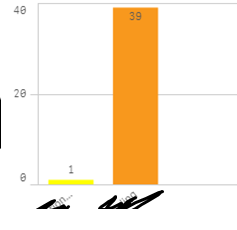
When I click on yellow bar, then it should show only 1 bar of Not Applicable status (Rule- 'y'), but it shows all 3 charts with 1 count which is wrong.
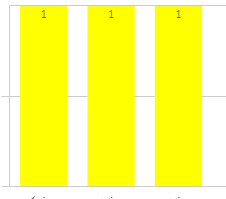
Desired output :

Is it issue with data format?
edit : Master item : 1-Rule1 where status='Not applicable' , 2- Rule2
Regards,
Shubham
 anushree1
- Mark as New
- Bookmark
- Subscribe
- Mute
- Subscribe to RSS Feed
- Permalink
- Report Inappropriate Content
Hi,
I do not see any condition written for showing not applicable status.
Could you please share the sample input and desired output for a better understanding here
Shubham_Deshmuk- Mark as New
- Bookmark
- Subscribe
- Mute
- Subscribe to RSS Feed
- Permalink
- Report Inappropriate Content
Hi,
Sorry, forgot to mention the condition, pls check the edit.
Also I already tried same condition in both master drill down fields.
Shubham_Deshmuk- Mark as New
- Bookmark
- Subscribe
- Mute
- Subscribe to RSS Feed
- Permalink
- Report Inappropriate Content
Hi @anushree1 ,
Sample input is already there and desired output I mentioned in the post.
