Unlock a world of possibilities! Login now and discover the exclusive benefits awaiting you.

- Qlik Community
- :
- Forums
- :
- Analytics & AI
- :
- Products & Topics
- :
- Visualization and Usability
- :
- Re: Excluding a data
- Subscribe to RSS Feed
- Mark Topic as New
- Mark Topic as Read
- Float this Topic for Current User
- Bookmark
- Subscribe
- Mute
- Printer Friendly Page

- Mark as New
- Bookmark
- Subscribe
- Mute
- Subscribe to RSS Feed
- Permalink
- Report Inappropriate Content
Excluding a data
Hi all,
I have a 10 clients name in client_name field.
here i want to load or select only particular 5 clients data.
I have added filter pane in that it must show only name of 5 clients instead of showing 10 clients.
thanks,
Pramod
Accepted Solutions
- Mark as New
- Bookmark
- Subscribe
- Mute
- Subscribe to RSS Feed
- Permalink
- Report Inappropriate Content
hi Carlo beletti,
LOAD
if(Match(client_name,'Bill'),client_name) as [Client Name]
FROM [...YOUR SOURCE...];
It's working fine for one value like 'bill' but i need to add 3 more values to that, will you please explain the syntax for that.
Thanks,
Pramod
- Mark as New
- Bookmark
- Subscribe
- Mute
- Subscribe to RSS Feed
- Permalink
- Report Inappropriate Content
Try with match, mixmatch or wildmatch funtions.
Example:
LOAD
if(Match(client_name,'Bill'),client_name) as [Client Name]
FROM [...YOUR SOURCE...];
- Mark as New
- Bookmark
- Subscribe
- Mute
- Subscribe to RSS Feed
- Permalink
- Report Inappropriate Content
Check this document for more details

 jonathandienst
- Mark as New
- Bookmark
- Subscribe
- Mute
- Subscribe to RSS Feed
- Permalink
- Report Inappropriate Content
I would do this with an inline table to set the clients to load:
Included:
LOAD * Inline
[
Client
AAA
BBB
CCC
];
Data:
LOAD Client,
...
FROM ...
WHERE Exists(Client);
(optionally drop the table "Included" at the end of the script)
I prefer this to hard coding the client names into the LOAD script, because that approach is hard to maintain and update. The table could also come from a text file, spreadsheet or database as well.
HTH
Jonathan
- Mark as New
- Bookmark
- Subscribe
- Mute
- Subscribe to RSS Feed
- Permalink
- Report Inappropriate Content
Hi jonathan dienst,
actually i have 3 sheets, and for 1 sheet i need all clients and one sheet i need only 5 clients.
that too i need filter pane for each sheet. in sheet1 filter pane i need all 10 clients and in second sheet filter pane i need only 5 client names.
Thanks,
Pramod
jonathandienst
- Mark as New
- Bookmark
- Subscribe
- Mute
- Subscribe to RSS Feed
- Permalink
- Report Inappropriate Content
That's not a load issue, but a filtered expression
Sum({<Client = {'AAA','BBB','CCC'}> Sales)
Add however many clients you need to the expressions on each sheet.
jonathandienst
- Mark as New
- Bookmark
- Subscribe
- Mute
- Subscribe to RSS Feed
- Permalink
- Report Inappropriate Content
Of course you could data drive that as well by setting some flag or grouping fields linked to the client
ClientGroups:
LOAD * Inline
[
Client,ClientGroup
AAA, G1
BBB, G1
CCC, G2
];
And then your expression
Sum({<ClientGroup = {'G1'}> Sales)
- Mark as New
- Bookmark
- Subscribe
- Mute
- Subscribe to RSS Feed
- Permalink
- Report Inappropriate Content
hi jonathan dienst,
I have attached the screenshot of sheet from qlik sense. i have a filter pane on right corner it is showing
client_id in that i want to display only 3,8,10 id's.
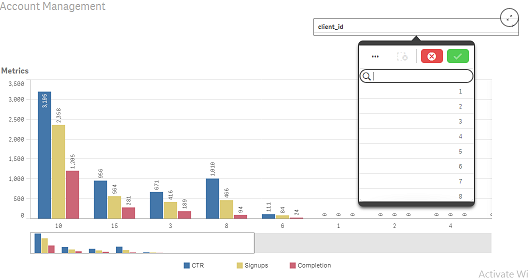
Please check and explain.
Thanks,
Pramod
- Mark as New
- Bookmark
- Subscribe
- Mute
- Subscribe to RSS Feed
- Permalink
- Report Inappropriate Content
hi Carlo beletti,
LOAD
if(Match(client_name,'Bill'),client_name) as [Client Name]
FROM [...YOUR SOURCE...];
It's working fine for one value like 'bill' but i need to add 3 more values to that, will you please explain the syntax for that.
Thanks,
Pramod

 sunilkumarqv
- Mark as New
- Bookmark
- Subscribe
- Mute
- Subscribe to RSS Feed
- Permalink
- Report Inappropriate Content
try this in expression
=Aggr(Only({<ID={'3','8','10'}>}ID),ID)