Unlock a world of possibilities! Login now and discover the exclusive benefits awaiting you.

- Qlik Community
- :
- Forums
- :
- Analytics & AI
- :
- Products & Topics
- :
- Visualization and Usability
- :
- Re: Extracting fields from filename, removing zero...
- Subscribe to RSS Feed
- Mark Topic as New
- Mark Topic as Read
- Float this Topic for Current User
- Bookmark
- Subscribe
- Mute
- Printer Friendly Page

 varmekontrol
- Mark as New
- Bookmark
- Subscribe
- Mute
- Subscribe to RSS Feed
- Permalink
- Report Inappropriate Content
Extracting fields from filename, removing zeroes and converting date/timestamp
I am pretty sure if this question has already been asked in some sort in other topics, but apparently, I have not gotten the information needed to solve my problem, so I am hoping someone in here can help me solve the problem, and save some time.,
I want to import all files from a folder and convert the file into fields that I can use to analyze the amount and content of the files in that folder.
A typical file would look like this -> 0006037356_50548136_valuereport_20170831023203_2105.csv
I then want to extract the information from this file name so I have fields with
- 0006037356 (Unique hardware no)
- 50548136 (Unique meter no)
- 20170831 (Date)
- 023203 (Timestamp)
Right now I am doing the extraction by using this load.
LOAD
    FileName() as Filename,
    Mid(FileName(), 1, 10) as import_elvaco_enhed,
    Mid(FileName(), 12, 😎 as meter_no,
    Mid(FileName(), 33, 😎 as import_date,
    Mid(FileName(), 41, 6) as import_time_stamp

FROM [lib://Mobistyle/*]
(txt, codepage is 28591, embedded labels, delimiter is ';', msq);
QUESTION 1:
I want to do the following.
- 0006037356 (Remove the zeroes in front of the number)
- 50548136 (If there are zeroes in front of the number, they should be removed)
- 20170831 (Convert this to YYYY-MM-DD)
- 023203 (Convert this to HH:MM)
- (Create new field containing the size (KB) of the file)
- (If possible, have a look in the file to see if the file is blank, or with information. Maybe filesize would suit the same need?)
QUESTION 2:
I only want to look at the filename but for some reason when loading the data, I get all the millions of lines included in the files, and even if the data load uses the time, and displays that millions of lines have been imported, I am not able to use any of that information?
(Not that I need it, just think it a waste of time and storage)
Accepted Solutions

 marcus_sommer
- Mark as New
- Bookmark
- Subscribe
- Mute
- Subscribe to RSS Feed
- Permalink
- Report Inappropriate Content
The following should cover most of your needs:
load
*,
filebasename() as F1,
num(subfield(filebasename(), '_', 1)) as F2,
num(subfield(filebasename(), '_', 2)) as F3,
date(floor(timestamp#(subfield(filebasename(), '_', 3), 'YYYYMMDDhhmmss'))) as F4,
time(frac(timestamp#(subfield(filebasename(), '_', 3), 'YYYYMMDDhhmmss'))) as F5,
filesize() as F6
from YourCSV;
If you don't want to load the content of these files else just their meta-data you will need a for each loop over dirlist/filelist. You will find a good example within the help by for each and here: Loops in the Script.
Of course each field which is created will consume some ressources but Qlik stored only the distinct fieldvalues of a field and therefore you don't worry about it.
- Marcus
marcus_sommer
- Mark as New
- Bookmark
- Subscribe
- Mute
- Subscribe to RSS Feed
- Permalink
- Report Inappropriate Content
The following should cover most of your needs:
load
*,
filebasename() as F1,
num(subfield(filebasename(), '_', 1)) as F2,
num(subfield(filebasename(), '_', 2)) as F3,
date(floor(timestamp#(subfield(filebasename(), '_', 3), 'YYYYMMDDhhmmss'))) as F4,
time(frac(timestamp#(subfield(filebasename(), '_', 3), 'YYYYMMDDhhmmss'))) as F5,
filesize() as F6
from YourCSV;
If you don't want to load the content of these files else just their meta-data you will need a for each loop over dirlist/filelist. You will find a good example within the help by for each and here: Loops in the Script.
Of course each field which is created will consume some ressources but Qlik stored only the distinct fieldvalues of a field and therefore you don't worry about it.
- Marcus
varmekontrol
- Mark as New
- Bookmark
- Subscribe
- Mute
- Subscribe to RSS Feed
- Permalink
- Report Inappropriate Content
Buityful work 
It works like a charm, and I now have a bunch of new tools (expressions) to play with.
THANKS!
varmekontrol
- Mark as New
- Bookmark
- Subscribe
- Mute
- Subscribe to RSS Feed
- Permalink
- Report Inappropriate Content
I was to existed before testing the date part of the load 
The date conversion only gave me Null values.
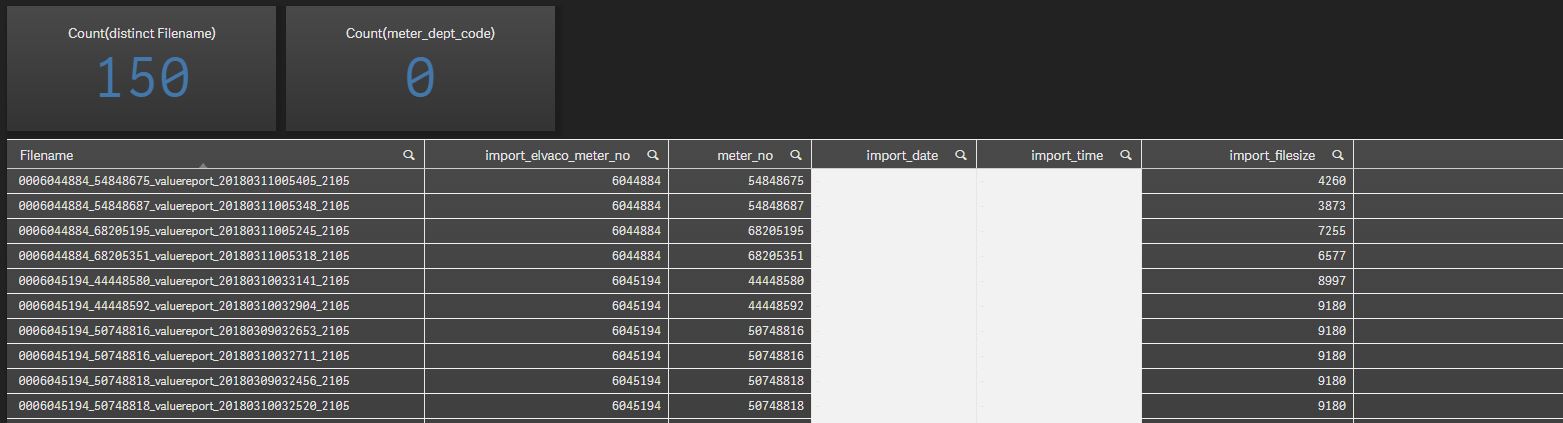
load
     *,

     filebasename() as Filename,
     num(subfield(filebasename(), '_', 1)) as import_elvaco_meter_no,
     num(subfield(filebasename(), '_', 2)) as meter_no,
     date(floor(timestamp#(subfield(filebasename(), '_', 3), 'YYYYMMDDhhmm'))) as import_date,
     time(frac(timestamp#(subfield(filebasename(), '_', 3), 'YYYYMMDDhhmm'))) as import_time,
     filesize() as import_filesize

FROM [lib://Kildeparken/*]
(txt, codepage is 28591, embedded labels, delimiter is ';', msq);
marcus_sommer
- Mark as New
- Bookmark
- Subscribe
- Mute
- Subscribe to RSS Feed
- Permalink
- Report Inappropriate Content
You changed the format-code for timestamp#() which is a converting-function and not a format-function. Therefore try it with:
date(floor(timestamp#(subfield(filebasename(), '_', 3), 'YYYYMMDDhhmmss')), 'DD.MM.YYYY') as F4
time(frac(timestamp#(subfield(filebasename(), '_', 3), 'YYYYMMDDhhmmss'))' 'hh:mm') as F5
- Marcus
varmekontrol
- Mark as New
- Bookmark
- Subscribe
- Mute
- Subscribe to RSS Feed
- Permalink
- Report Inappropriate Content
I figured it out. It works in both ways.
The reason it did not work, was because it was looking at the _valuereport_
1 2 3 4
0006037356_50548136_valuereport_20170831023203_2105.csv
date(floor(timestamp#(subfield(filebasename(), '_', 3), 'YYYYMMDDhhmmss')), 'DD.MM.YYYY') as import_date,
     time(frac(timestamp#(subfield(filebasename(), '_', 3), 'YYYYMMDDhhmmss')), 'hh:mm') as import_time,
Thank you for your help, it NOW works like a charm, and actually did to start with
