Unlock a world of possibilities! Login now and discover the exclusive benefits awaiting you.

- Qlik Community
- :
- Forums
- :
- Analytics & AI
- :
- Products & Topics
- :
- Visualization and Usability
- :
- Re: Format issue
- Subscribe to RSS Feed
- Mark Topic as New
- Mark Topic as Read
- Float this Topic for Current User
- Bookmark
- Subscribe
- Mute
- Printer Friendly Page

 abhaysingh
- Mark as New
- Bookmark
- Subscribe
- Mute
- Subscribe to RSS Feed
- Permalink
- Report Inappropriate Content
Format issue
Hi all,
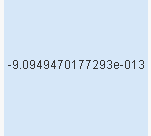
pls find the snapshot, getting value -9.0999987787-09 something I want -9.09
When I m converting it to Num((value),'0.00') it is giving me -0.00.
pls suggest
Regards
Abhay

 jonathandienst
- Mark as New
- Bookmark
- Subscribe
- Mute
- Subscribe to RSS Feed
- Permalink
- Report Inappropriate Content
I assume you mean -9.0999987787E-09. This is 0.000000000909999. Multiply by 1E9 to get what you need.
=Num(value * 1E9, '0.00') - will give -9.10 which is normallt rounded
=Num(Ceil(value * 1E9, 0.01), '0.00') will give -9.09
abhaysingh
- Mark as New
- Bookmark
- Subscribe
- Mute
- Subscribe to RSS Feed
- Permalink
- Report Inappropriate Content
Thanks for revert but its not working

 sasiparupudi1
- Mark as New
- Bookmark
- Subscribe
- Mute
- Subscribe to RSS Feed
- Permalink
- Report Inappropriate Content
if (index(Value,'e')>0, num(ceil(Num#(SubField(Value,'e',1) , '#,##0.#'),0.01),'0.00'),num(ceil(Num#(Value, '#,##0.#'),0.01),'0.00'))
sasiparupudi1
- Mark as New
- Bookmark
- Subscribe
- Mute
- Subscribe to RSS Feed
- Permalink
- Report Inappropriate Content
hi
did you manage to get the expression working?
Sasi
 jagan
jagan
- Mark as New
- Bookmark
- Subscribe
- Mute
- Subscribe to RSS Feed
- Permalink
- Report Inappropriate Content
Hi Abhay,
Try like this
=Num(-9.0999987787E-09, '#,##0.000000000000')
You are getting -0.00, because the actual number is -0.000000000909999, when you round of to two decimals you will 0.00
Hope this helps you.
Regards,
Jagan.
