Unlock a world of possibilities! Login now and discover the exclusive benefits awaiting you.

- Qlik Community
- :
- Forums
- :
- Analytics & AI
- :
- Products & Topics
- :
- Visualization and Usability
- :
- Re: Function Column()
- Subscribe to RSS Feed
- Mark Topic as New
- Mark Topic as Read
- Float this Topic for Current User
- Bookmark
- Subscribe
- Mute
- Printer Friendly Page

 MarioCenteno
- Mark as New
- Bookmark
- Subscribe
- Mute
- Subscribe to RSS Feed
- Permalink
- Report Inappropriate Content
Function Column()
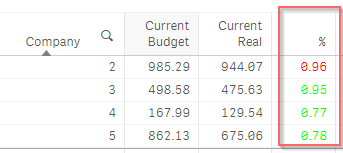
I'm trying to paint a kpi when it's greater than 0.95 that is green otherwise it's red, I'm using the column () function but apparently I'm doing something wrong.
Current expression:
IF (Column(4) >0.95, RGB(0, 255, 0), RGB(255,0,0))
Accepted Solutions

 petter
- Mark as New
- Bookmark
- Subscribe
- Mute
- Subscribe to RSS Feed
- Permalink
- Report Inappropriate Content
Be aware that the column number starts counting at the first measure column - it disregards the dimension columns.
So it looks like it is column number 3 that you should test for:
If( Column(3)>0.95, RGB(0,255,0),RGB(255,0,0))
petter
- Mark as New
- Bookmark
- Subscribe
- Mute
- Subscribe to RSS Feed
- Permalink
- Report Inappropriate Content
Be aware that the column number starts counting at the first measure column - it disregards the dimension columns.
So it looks like it is column number 3 that you should test for:
If( Column(3)>0.95, RGB(0,255,0),RGB(255,0,0))
MarioCenteno
- Mark as New
- Bookmark
- Subscribe
- Mute
- Subscribe to RSS Feed
- Permalink
- Report Inappropriate Content
It worked for me, I had a bad concept of this function but you have helped me to understand it.
Thansk a lot Petter.
petter
- Mark as New
- Bookmark
- Subscribe
- Mute
- Subscribe to RSS Feed
- Permalink
- Report Inappropriate Content
You're welcome 
