Unlock a world of possibilities! Login now and discover the exclusive benefits awaiting you.

- Qlik Community
- :
- Forums
- :
- Analytics & AI
- :
- Products & Topics
- :
- Visualization and Usability
- :
- Get the MinString value based on 2 conditions usin...
- Subscribe to RSS Feed
- Mark Topic as New
- Mark Topic as Read
- Float this Topic for Current User
- Bookmark
- Subscribe
- Mute
- Printer Friendly Page

 EliGohar
- Mark as New
- Bookmark
- Subscribe
- Mute
- Subscribe to RSS Feed
- Permalink
- Report Inappropriate Content
Get the MinString value based on 2 conditions using Set Analysis
Hi Experts,
I'm having this kind of table in my model:
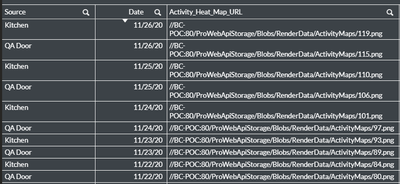
I'm trying to create a KPI that presents the first Source value (according to ABC order) based on 2 conditions:
1. Max Date - in this table above it's 26/11/2020
2. Activity_Heat_Map_URL field should be populated with URL (Not null)
So for the example above I suppose to get the Kitchen source.
I tried the following expression but I get wrong result:
MinString({<[Activity_Heat_Map_URL]-={'-'},Date={"=$(=Date(Max(Date),'DD/MM/YYYY'))"}>}Capitalize(Source))
What am I doing wrong?
Eli.

 tresB
tresB
- Mark as New
- Bookmark
- Subscribe
- Mute
- Subscribe to RSS Feed
- Permalink
- Report Inappropriate Content
It seems your null exclusion is not working here. Try like:
MinString({<[Activity_Heat_Map_URL]={'*'},Date={"=$(=Date(Max(Date),'DD/MM/YYYY'))"}>}Capitalize(Source))
Including '*' means 'all values except nulls'
EliGohar
- Mark as New
- Bookmark
- Subscribe
- Mute
- Subscribe to RSS Feed
- Permalink
- Report Inappropriate Content
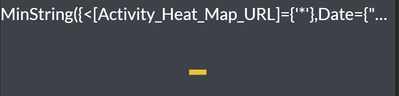 tresB
tresB
- Mark as New
- Bookmark
- Subscribe
- Mute
- Subscribe to RSS Feed
- Permalink
- Report Inappropriate Content
@EliGohar ..Ohh
Try with this small correction in quotes; use double quotes instead, also try removing '=' from date before '$', like:
MinString({<[Activity_Heat_Map_URL]={"*"},Date={"$(=Date(Max(Date),'DD/MM/YYYY'))"}>}Capitalize(Source))
EliGohar
- Mark as New
- Bookmark
- Subscribe
- Mute
- Subscribe to RSS Feed
- Permalink
- Report Inappropriate Content
@tresB I thought your expression worked but then I updated the table to be:
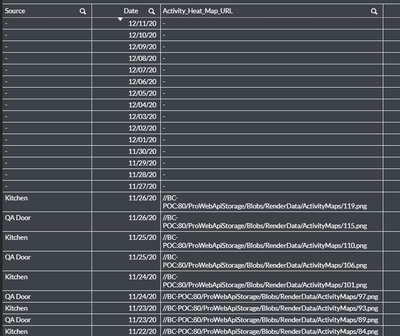
Your expression:
MinString({<[Activity_Heat_Map_URL]={"*"},Date={"$(=Date(Max(Date),'DD/MM/YYYY'))"}>}Capitalize(Source))
Returns Null in the KPI value. I'm expecting to get Kitchen.
BTW to find the max date that has the URL I'm using:
max({<Date={"=$(=Date(Max(Date),'DD/MM/YYYY'))"}, [Activity_Heat_Map_URL]-={"-"}>}date(Date,VDate))
And I get the correct date (26/11/20)
Any idea why?
