Unlock a world of possibilities! Login now and discover the exclusive benefits awaiting you.

- Qlik Community
- :
- Forums
- :
- Analytics & AI
- :
- Products & Topics
- :
- Visualization and Usability
- :
- Re: Get value Date Range picker extension Qlik Sen...
- Subscribe to RSS Feed
- Mark Topic as New
- Mark Topic as Read
- Float this Topic for Current User
- Bookmark
- Subscribe
- Mute
- Printer Friendly Page

 jmialoundama
- Mark as New
- Bookmark
- Subscribe
- Mute
- Subscribe to RSS Feed
- Permalink
- Report Inappropriate Content
Get value Date Range picker extension Qlik Sense
Hi,
I would like to recover the value or values selected by the user in the extenson Date Range Picker.
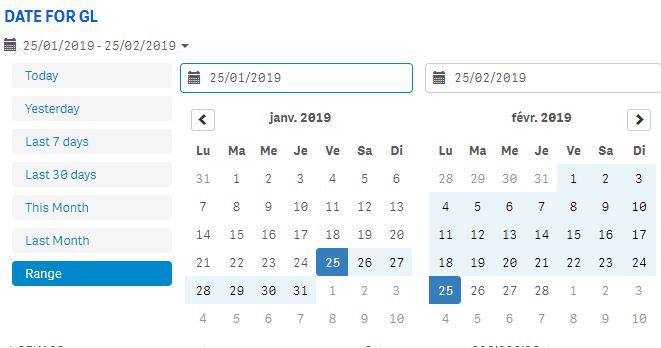
For example if the user selects only a date like 25/01/2020 I would like to retrieve this value in a text object.
If he selects a date range like for example from 25/01/2020 to 25/02/2020, I would like to retrieve the start date and end date in this same text field

 teiswamsler
- Mark as New
- Bookmark
- Subscribe
- Mute
- Subscribe to RSS Feed
- Permalink
- Report Inappropriate Content
Hi Jmialoundama
You can use expressions below, and then edit the text in the text object.
Minimum date:
Date(Min( [Datefield] ))
Maximum date:
Date(Max( [Datefield] ))
In text object
If( count( distinct [Datefield] ) = 1, only( [Datefield] ), Date(Min( [Datefield] )) & ' to ' & Date(Max( [Datefield] )) )
Br.
Teis
jmialoundama
- Mark as New
- Bookmark
- Subscribe
- Mute
- Subscribe to RSS Feed
- Permalink
- Report Inappropriate Content
Thanks for your help.
If the user selects more than one date then the following message is displayed "Date_Min to Date_max", if the user selects no date then the following message is displayed "No date selected".
I put the following condition in a text object but it doesn't work
If( count( distinct [DATE FOR GL] ) > 1,'Du '& Date(Floor(Min( [DATE FOR GL] ))) & ' Au ' & Date(Floor(Max( [DATE FOR GL]))),'No Date for GL selected')
teiswamsler
- Mark as New
- Bookmark
- Subscribe
- Mute
- Subscribe to RSS Feed
- Permalink
- Report Inappropriate Content
hi
Try Changing
count( distinct [DATE FOR GL] ) > 1 to GetSelectedCount( [DATE FOR GL] ) > 1
Br.
Teis
jmialoundama
- Mark as New
- Bookmark
- Subscribe
- Mute
- Subscribe to RSS Feed
- Permalink
- Report Inappropriate Content
I try this :
If( GetSelectedCount([DATE FOR GL]) >0 ,'Du '& Date(Floor(Min( [DATE FOR GL] ))) & ' Au ' & Date(Floor(Max( [DATE FOR GL]))),'No Date for GL selected')
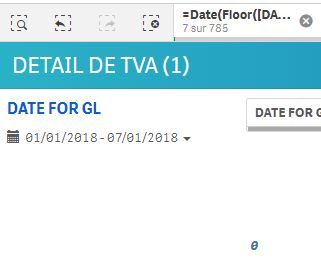
I selected this date range :

But the message which display in my text object it's : NoDate for Gl selected , instead of Du 01/01/2018 Au 07/01/2018
teiswamsler
- Mark as New
- Bookmark
- Subscribe
- Mute
- Subscribe to RSS Feed
- Permalink
- Report Inappropriate Content
Hi
It works at my end, have attached a sample.
Try making a text object with GetSelectedCount([DATE FOR GL]) to see what the calculation returns.
Br.
Teis
jmialoundama
- Mark as New
- Bookmark
- Subscribe
- Mute
- Subscribe to RSS Feed
- Permalink
- Report Inappropriate Content
GetSelectedCount([DATE FOR GL]) return me 0
 teiswamsler
- Mark as New
- Bookmark
- Subscribe
- Mute
- Subscribe to RSS Feed
- Permalink
- Report Inappropriate Content
Hi
Try changing [Date] to your date field name.
Br.
Teis
jmialoundama
- Mark as New
- Bookmark
- Subscribe
- Mute
- Subscribe to RSS Feed
- Permalink
- Report Inappropriate Content
Yes my date filed name it's DATE FOR GL
