Unlock a world of possibilities! Login now and discover the exclusive benefits awaiting you.

- Qlik Community
- :
- Forums
- :
- Analytics & AI
- :
- Products & Topics
- :
- Visualization and Usability
- :
- Re: HUB Connection Lost error message
- Subscribe to RSS Feed
- Mark Topic as New
- Mark Topic as Read
- Float this Topic for Current User
- Bookmark
- Subscribe
- Mute
- Printer Friendly Page

- Mark as New
- Bookmark
- Subscribe
- Mute
- Subscribe to RSS Feed
- Permalink
- Report Inappropriate Content
HUB Connection Lost error message
Hi All,
I have an major error related to the QMC HUB connection while accessing the QMC HUB with external IP. Once want to connect the HUB first page comes but when try to access the application it will not open and shows error connection lost.
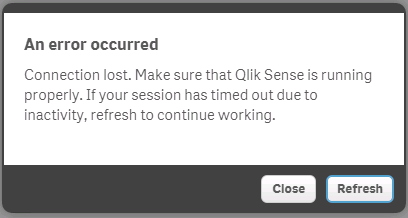
Appreciated in Advance.
Thanks
Bosco
- « Previous Replies
-
- 1
- 2
- Next Replies »
- Mark as New
- Bookmark
- Subscribe
- Mute
- Subscribe to RSS Feed
- Permalink
- Report Inappropriate Content
Not much info to go on, but two things may help:
1: Check the timeout value for the proxy. This value determines how long a user can be idle before the session is closed. It can be found under the property "Session inactivity timeout (minutes)" on this manual-page: http://help.qlik.com/sense/2.0/en-US/online/#../Subsystems/ManagementConsole/Content/virtual-proxies...
2: This is a bit of a stretch, but worth checking. Start the devtools in your browser (firefox is prefered) and refresh the hub page. If the console shows you an error along the lines "cannot establish wss://<server>" then the websocket whitelist in the QMC must be updated. More info on that can be found on the same manual-page as mentioned above.

 wallace_c
- Mark as New
- Bookmark
- Subscribe
- Mute
- Subscribe to RSS Feed
- Permalink
- Report Inappropriate Content
I agree with Magnus said above.
What's your proxy log saying the error?
And also, please confirm if this happened with HTTPs only or HTTP? Check your ports setting:
I am not sure what you mean exactly the first page?
- The splashing page? Or
- The page display applications
If it is the page display applications, means you don't have authentication issue. But might have issue with other ports. You may find a lot of error message or warning message in Proxy logs saying connection error.
If you do have problem with HTTP, You may use fiddler or Wireshark to trace the connections problem.
- Mark as New
- Bookmark
- Subscribe
- Mute
- Subscribe to RSS Feed
- Permalink
- Report Inappropriate Content
Hi All,
I am using the latest Qlik Sense server 2.0.2, i am trying to access the Hub through external ip address on iPad , I am able to login and see the bubbles but yet i am getting the same error as shown above !!
The QMC got restarted just now and the default timeouts are the same and enabled the HTTP checkbox
Please guide me what should i do !!!
- Mark as New
- Bookmark
- Subscribe
- Mute
- Subscribe to RSS Feed
- Permalink
- Report Inappropriate Content
Hi Santosh,
Please check the certificate is it expired or not.
Thanks
Avinash
- Mark as New
- Bookmark
- Subscribe
- Mute
- Subscribe to RSS Feed
- Permalink
- Report Inappropriate Content
Hi Avinash,
Sorry for the delay reply, its the default installation and i have no installed any certificate by myself and so it will self assigned Qlik Sense certificate.
But i dont know how come , it got resolved 
Thanks for your Help and Time !!
- Mark as New
- Bookmark
- Subscribe
- Mute
- Subscribe to RSS Feed
- Permalink
- Report Inappropriate Content
Qlik Dev
Access the CHEMICAL and add the external IP address and the domain in the white list of addresses within the configuration of proxies. It is at the very bottom of the screen.
- « Previous Replies
-
- 1
- 2
- Next Replies »