Unlock a world of possibilities! Login now and discover the exclusive benefits awaiting you.

- Qlik Community
- :
- Forums
- :
- Analytics & AI
- :
- Products & Topics
- :
- Visualization and Usability
- :
- Re: Help on below set expression?
- Subscribe to RSS Feed
- Mark Topic as New
- Mark Topic as Read
- Float this Topic for Current User
- Bookmark
- Subscribe
- Mute
- Printer Friendly Page

 daisy1438
- Mark as New
- Bookmark
- Subscribe
- Mute
- Subscribe to RSS Feed
- Permalink
- Report Inappropriate Content
Help on below set expression?
Hi
I have fields targetdate ,opendate,issue ID and status.
I need set expression for below requirement.
count the issue id when targetdate >= opendate and status is open.
I am writing the below expression but it is not working properly.
Count({<[ Target date]>= [opendate ],Status={'Open'}>}distinct Issue ID)
Thanks.
- « Previous Replies
-
- 1
- 2
- Next Replies »

 petter
- Mark as New
- Bookmark
- Subscribe
- Mute
- Subscribe to RSS Feed
- Permalink
- Report Inappropriate Content
The RowID should be an field that is an id on the lowest level of granularity - which means that every row in the table that contains [Issue ID] has a unique RowID. That is to ensure that the boolean operation in the search will work well without using aggregations.
Count( {<RowID={"=[Target Date]>=[opendate] AND [Status]='open' "}>} DISTINCT [Issue ID] )
If you don't have a field that is a unique ID you can create RowID in the load statement of the table by using RowNo() function like this:
LOAD
.....
RowNo() AS RowID,
.....

 jaumecf23
- Mark as New
- Bookmark
- Subscribe
- Mute
- Subscribe to RSS Feed
- Permalink
- Report Inappropriate Content
Hi,
Try something like this:
Count({<[ Target date]= {">=[opendate]"},Status={'Open'}>}distinct Issue ID)

 MayilVahanan
- Mark as New
- Bookmark
- Subscribe
- Mute
- Subscribe to RSS Feed
- Permalink
- Report Inappropriate Content
Hi
If Target Date and Open Date is occurs in same table, then you can try like below
Load
*,
If([Target Date] > [Open Date],1 ,0) AS Flag
From
DatasourceTableName;
In Chart, Try below expression.
Count({<Flag = {1} ,Status={'Open'}>}distinct Issue ID)
Hope it helps.
Please close the thread by marking correct answer & give likes if you like the post.
 sunny_talwar
- Mark as New
- Bookmark
- Subscribe
- Mute
- Subscribe to RSS Feed
- Permalink
- Report Inappropriate Content
Or may be this if an Issue ID will have a single Target Date and a single Open Date
Count({<[Issue ID] = {"=[Target Date] >= [Open Date]"}, Status = {'Open'}>} DISTINCT [Issue ID])
daisy1438
- Mark as New
- Bookmark
- Subscribe
- Mute
- Subscribe to RSS Feed
- Permalink
- Report Inappropriate Content
Hi Sunny
could you please help on this.
I have one date field and data like below.
Completion Date
10-jun-2017
11-mar-2017
20-apr-2018
9-jan-2017
30-dec-2016
23-nov-2016
10-dec-2018.
The above dates not in order. I need the data in proper order like minimum to maximum dates.
23-nov-2016
30-dec-2016
9-jan-2017
11-mar-2017
10-jun-2017
20-apr-2018
10-dec-2018 like that.
I am using below expression but ii is not given correct output.
Date(Date#([Completion Date],'DD-MMM-YYYY'))
How to sorting the above data. Please help on this.
Thanks
 bwisealiahmad
- Mark as New
- Bookmark
- Subscribe
- Mute
- Subscribe to RSS Feed
- Permalink
- Report Inappropriate Content
Hi,
Did you check the sorting setting for this? Is this a listbox or a field?
Best,
Ali A
daisy1438
- Mark as New
- Bookmark
- Subscribe
- Mute
- Subscribe to RSS Feed
- Permalink
- Report Inappropriate Content
Hi Ali
It is field but I need to display in table box and i am trying the sorting options also.
 dx_anupam
- Mark as New
- Bookmark
- Subscribe
- Mute
- Subscribe to RSS Feed
- Permalink
- Report Inappropriate Content
Hi Daisy,
you can try using formula =Floor([Date]) in sort by expression.
Regards,
Anupam
bwisealiahmad
- Mark as New
- Bookmark
- Subscribe
- Mute
- Subscribe to RSS Feed
- Permalink
- Report Inappropriate Content
Hi,
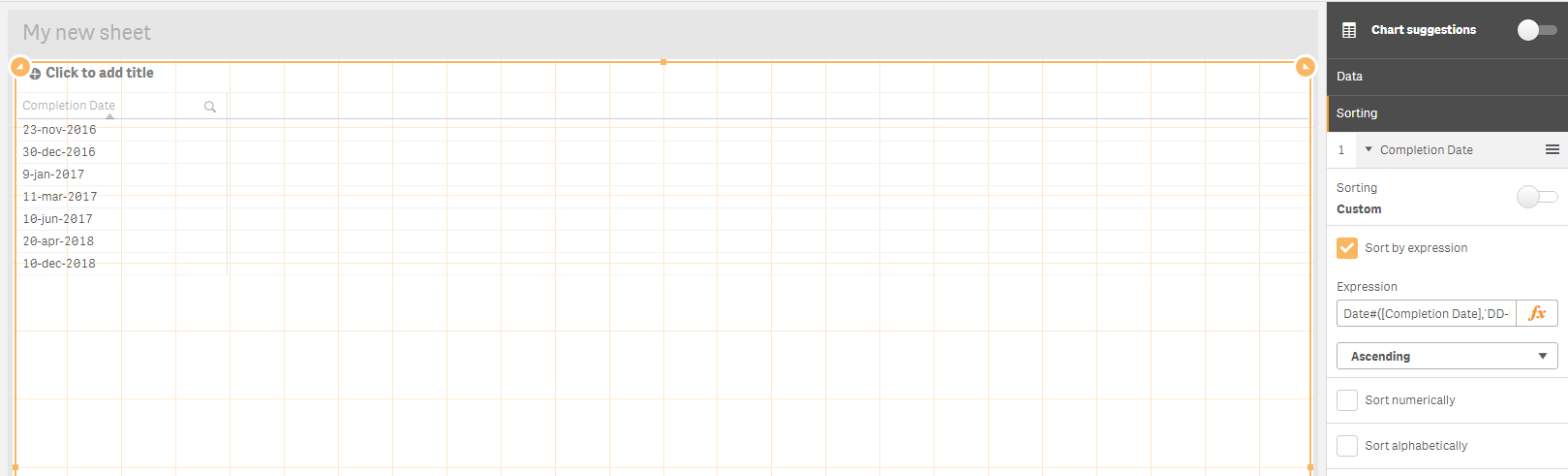
I just tried with an inline table and your values.
Put this:
Date#([Completion Date],'DD-MMM-YYYY')
Under the sorting...I put the sorting to custom and sort by expression. The above expression and unchecked Numerically / Alphabetically.
Loaded this order:
LOAD * Inline [
"Completion Date"
10-jun-2017
11-mar-2017
20-apr-2018
9-jan-2017
30-dec-2016
23-nov-2016
10-dec-2018
];
Works for me?
Best,
Ali A

- « Previous Replies
-
- 1
- 2
- Next Replies »