Unlock a world of possibilities! Login now and discover the exclusive benefits awaiting you.

Announcements
Share your agentic AI experience, learn from others, and earn a new badge: Put Agentic AI to Work
- Qlik Community
- :
- Forums
- :
- Analytics & AI
- :
- Products & Topics
- :
- Visualization and Usability
- :
- Hide column filled only with nulls
Options
- Subscribe to RSS Feed
- Mark Topic as New
- Mark Topic as Read
- Float this Topic for Current User
- Bookmark
- Subscribe
- Mute
- Printer Friendly Page
Turn on suggestions
Auto-suggest helps you quickly narrow down your search results by suggesting possible matches as you type.
Showing results for

 pgonin
Contributor II
2020-04-08
10:33 AM
- Mark as New
- Bookmark
- Subscribe
- Mute
- Subscribe to RSS Feed
- Permalink
- Report Inappropriate Content
Hide column filled only with nulls
Hello dears!
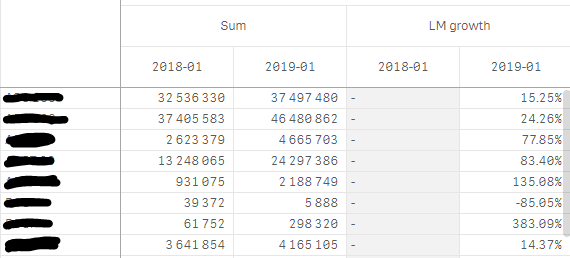
Please tell me how to hide a column in pivot table which has only zeros (nulls) - see example below. I know about unchecking button "include zero values" and "include null values". Normally, if I have only one measure, it works correctly, but I have to add one more measure (which has a lot of null values for prior months).
In this particular case I want to hide month "2018-01" in measure "LM growth"
- Tags:
- pivot table
1,350 Views
1 Reply

 Anna_Klimkova
Employee
2020-04-10
04:32 AM
- Mark as New
- Bookmark
- Subscribe
- Mute
- Subscribe to RSS Feed
- Permalink
- Report Inappropriate Content
You can't hide this month because you have values (not null) for month "2018-01" in the first measure Sum .
1,308 Views
