Unlock a world of possibilities! Login now and discover the exclusive benefits awaiting you.

- Qlik Community
- :
- Forums
- :
- Analytics & AI
- :
- Products & Topics
- :
- Visualization and Usability
- :
- 'Hide' column name in pivot table
- Subscribe to RSS Feed
- Mark Topic as New
- Mark Topic as Read
- Float this Topic for Current User
- Bookmark
- Subscribe
- Mute
- Printer Friendly Page

 kdaniels-obrien
- Mark as New
- Bookmark
- Subscribe
- Mute
- Subscribe to RSS Feed
- Permalink
- Report Inappropriate Content
'Hide' column name in pivot table
Hi,
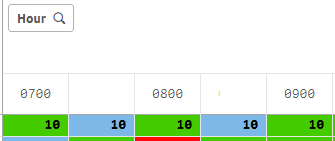
I have a pivot table that shows what product needs to be delivered at certain times. Products need to be delivered every half hour. My pivot table is set up as: Product as row, hour as column, and my measure if quantity. Instead of every column name being displayed across the top, I would like to show every hour and leave the half hour marks as blank. (See pictures for better understanding)
How can I conditionally make the column name blank? I don't want to hide the delivery quantities, just the name of the column. For example, instead of showing 12:00, 12:30, 1:00,1:30... I want to show 12:00 (blank column name) 1:00 (blank column name.