Unlock a world of possibilities! Login now and discover the exclusive benefits awaiting you.

- Qlik Community
- :
- Forums
- :
- Analytics & AI
- :
- Products & Topics
- :
- Visualization and Usability
- :
- Re: Hours excluding weekends(Sat,Sun)48 Hrs
- Subscribe to RSS Feed
- Mark Topic as New
- Mark Topic as Read
- Float this Topic for Current User
- Bookmark
- Subscribe
- Mute
- Printer Friendly Page

 rpavan17
- Mark as New
- Bookmark
- Subscribe
- Mute
- Subscribe to RSS Feed
- Permalink
- Report Inappropriate Content
Hours excluding weekends(Sat,Sun)48 Hrs
Hi,
I am trying to get Network hours between two timestamps.
This formula works in excel.
NETWORKDAYS(min({<Flag_First_Flow={'Yes'}>}Time_stamp_His),min({<Flag_Invoice_Approved={'Yes'}>}Time_stamp_His))-1-
MOD(min({<Flag_First_Flow={'Yes'}>}Time_stamp_His),1)+MOD(min({<Flag_Invoice_Approved={'Yes'}>}Time_stamp_His),1)
also, the below works in qliksense
=NETWORKDAYS(min(INVOICE_DATE),min(SCAN_DATE))-1-MOD(min(INVOICE_DATE),1)+MOD(min(SCAN_DATE),1)
But, when i use "Time_stamp_His" only it wont work.
MOD(min(Time_stamp_His),1) will not give any result, just blank. I have checked the format both INVOICE_DATE,SCAN_DATE and Time_stamp_His format is same.
Kindly help.
Accepted Solutions
 DavidŠtorek
- Mark as New
- Bookmark
- Subscribe
- Mute
- Subscribe to RSS Feed
- Permalink
- Report Inappropriate Content
Hi,
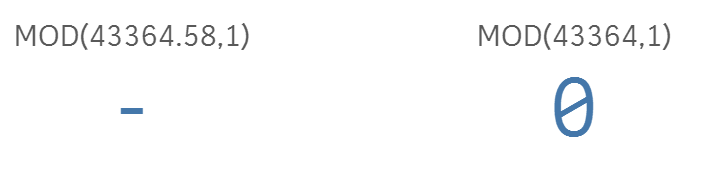
you are absolutely right with MOD function. The reason is that MOD() requires INTEGERS as imputs, which surely timestamp is not.

 Gysbert_Wassena
- Mark as New
- Bookmark
- Subscribe
- Mute
- Subscribe to RSS Feed
- Permalink
- Report Inappropriate Content
Make sure Time_stamp_His contains a real timestamp value and not just text values that only look like timestamps. If necessary use the TimeStamp# function to turn text values into timestamp values.
talk is cheap, supply exceeds demand
rpavan17
- Mark as New
- Bookmark
- Subscribe
- Mute
- Subscribe to RSS Feed
- Permalink
- Report Inappropriate Content
It gives the result for Timestamp for below formula.
NETWORKDAYS(min({<Flag_First_Flow={'Yes'}>}Time_stamp_His),min({<Flag_Invoice_Approved={'Yes'}>}Time_stamp_His)) . Network days result is correct
When i add MOD(min({<Flag_First_Flow={'Yes'}>}Time_stamp_His),1)+MOD(min({<Flag_Invoice_Approved={'Yes'}>}Time_stamp_His),1) It will not give any result.
For me, it looks like there is a issue with MOD and Time_stamp_His
rpavan17
- Mark as New
- Bookmark
- Subscribe
- Mute
- Subscribe to RSS Feed
- Permalink
- Report Inappropriate Content
The below works..
=NETWORKDAYS(min({<Flag_First_Flow={'Yes'}>}Time_stamp_His),min({<Flag_Invoice_Approved={'Yes'}>}Time_stamp_His))
-1-frac(min({<Flag_First_Flow={'Yes'}>}Time_stamp_His))+frac(min({<Flag_Invoice_Approved={'Yes'}>}Time_stamp_His))
DavidŠtorek
- Mark as New
- Bookmark
- Subscribe
- Mute
- Subscribe to RSS Feed
- Permalink
- Report Inappropriate Content
Hi,
you are absolutely right with MOD function. The reason is that MOD() requires INTEGERS as imputs, which surely timestamp is not.
