Unlock a world of possibilities! Login now and discover the exclusive benefits awaiting you.

- Qlik Community
- :
- Forums
- :
- Analytics & AI
- :
- Products & Topics
- :
- Visualization and Usability
- :
- Re: How do i create a matrix or the two-dimensiona...
- Subscribe to RSS Feed
- Mark Topic as New
- Mark Topic as Read
- Float this Topic for Current User
- Bookmark
- Subscribe
- Mute
- Printer Friendly Page

- Mark as New
- Bookmark
- Subscribe
- Mute
- Subscribe to RSS Feed
- Permalink
- Report Inappropriate Content
How do i create a matrix or the two-dimensional table in qlik sense?
I am new here.how do i create a matrix or the two-dimensional table in qlik sense?
Accepted Solutions

 Michael_Tarallo
- Mark as New
- Bookmark
- Subscribe
- Mute
- Subscribe to RSS Feed
- Permalink
- Report Inappropriate Content
Hello Adi,
I assume you might mean like a Pivot Table? Where you have the top row displaying values such as years and the left column displaying values such as country, month- etc. ??
such as:
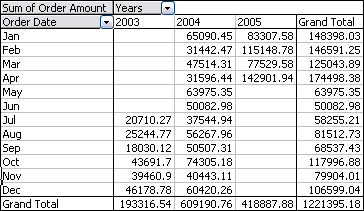
Currently in this release of Qlik Sense 1.0.2 - the default visualization component such as this is not available, however it will be in a very near future version of Qlik Sense. In the mean time - if you are interested, there is an extension object (a customized purpose built components to extend Qlik Sense) - that can be used for this purpose.
You can learn more about extension objects here and how to install them here:
Qlik Sense - Introduction to Extensions (video)
Here is where you can download the extension object:
Qlik Sense - Pivot Table Extension
NOTE: Please mark the appropriate replies as correct / helpful - so our team knows your questions have been answered to your satisfaction.
Also note: being you are new you may want to check out these video to get started: New to Qlik Sense Videos
Regards,
Mike T
Qlik
Mike Tarallo
Qlik
Michael_Tarallo
- Mark as New
- Bookmark
- Subscribe
- Mute
- Subscribe to RSS Feed
- Permalink
- Report Inappropriate Content
Hello Adi,
I assume you might mean like a Pivot Table? Where you have the top row displaying values such as years and the left column displaying values such as country, month- etc. ??
such as:
Currently in this release of Qlik Sense 1.0.2 - the default visualization component such as this is not available, however it will be in a very near future version of Qlik Sense. In the mean time - if you are interested, there is an extension object (a customized purpose built components to extend Qlik Sense) - that can be used for this purpose.
You can learn more about extension objects here and how to install them here:
Qlik Sense - Introduction to Extensions (video)
Here is where you can download the extension object:
Qlik Sense - Pivot Table Extension
NOTE: Please mark the appropriate replies as correct / helpful - so our team knows your questions have been answered to your satisfaction.
Also note: being you are new you may want to check out these video to get started: New to Qlik Sense Videos
Regards,
Mike T
Qlik
Mike Tarallo
Qlik
- Mark as New
- Bookmark
- Subscribe
- Mute
- Subscribe to RSS Feed
- Permalink
- Report Inappropriate Content
Thank you!

 petter
- Mark as New
- Bookmark
- Subscribe
- Mute
- Subscribe to RSS Feed
- Permalink
- Report Inappropriate Content
Actually - there is a technique to create a pivot table in Qlik Sense which can be used with the standard table. It is not interactive but nevertheless a complete well-proven technique for decades. Have a look at the document I made on Qlik Community: How create a PIVOT table in standard Qlik Sense