Unlock a world of possibilities! Login now and discover the exclusive benefits awaiting you.

- Qlik Community
- :
- Forums
- :
- Analytics & AI
- :
- Products & Topics
- :
- Visualization and Usability
- :
- Re: How to change button color based on selection?
- Subscribe to RSS Feed
- Mark Topic as New
- Mark Topic as Read
- Float this Topic for Current User
- Bookmark
- Subscribe
- Mute
- Printer Friendly Page

 Breezy
- Mark as New
- Bookmark
- Subscribe
- Mute
- Subscribe to RSS Feed
- Permalink
- Report Inappropriate Content
How to change button color based on selection?
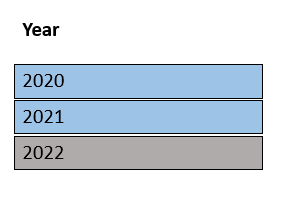
Hello, below I have three buttons. I need it to be so that when I click a button the color will change to demonstrate it is clicked. In the example below I clicked 2022 and the button changed to gray.
- « Previous Replies
-
- 1
- 2
- Next Replies »
 salonicdk28
- Mark as New
- Bookmark
- Subscribe
- Mute
- Subscribe to RSS Feed
- Permalink
- Report Inappropriate Content
Firstly you need to create variables, say for example

For Chart button, you have to set the chart variable vChart action as 1, then under the properties ->appearance ,set the background color by expression and write like this if(vChart=1,'#009845','#DDDDDD') and to change the font color of the text, there also you can set the font styling by expression and write if(vChart=1,RGB(255, 255, 255),'#595959')
Same way you have to set for data button as well assign that button action as 0
Font Styling- if(vChart=0,RGB(255, 255, 255),'#595959')
Background color- if(vChart=0,'#009845','#DDDDDD')
Hope this helps in your case
Thanks,
Saloni
salonicdk28
- Mark as New
- Bookmark
- Subscribe
- Mute
- Subscribe to RSS Feed
- Permalink
- Report Inappropriate Content
Firstly you need to create variables, say for example

For Chart button, you have to set the chart variable vChart action as 1, then under the properties ->appearance ,set the background color by expression and write like this if(vChart=1,'#009845','#DDDDDD') and to change the font color of the text, there also you can set the font styling by expression and write if(vChart=1,RGB(255, 255, 255),'#595959')
Same way you need to set for data button as well-
like background color- if(vChart=0,'#009845','#DDDDDD')
font styling- if(vChart=0,RGB(255, 255, 255),'#595959')
Hope this helps in your case
Thanks,
Saloni
salonicdk28
- Mark as New
- Bookmark
- Subscribe
- Mute
- Subscribe to RSS Feed
- Permalink
- Report Inappropriate Content
Firstly you need to create variables, say for example

For Chart button, you have to set the chart variable vChart action as 1, then under the properties ->appearance ,set the background color by expression and write like this if(vChart=1,'#009845','#DDDDDD') and to change the font color of the text, there also you can set the font styling by expression and write if(vChart=1,RGB(255, 255, 255),'#595959')
Same way set for data button as well where vChart =0 in each of the above expressions
Thanks,
Saloni
Breezy
- Mark as New
- Bookmark
- Subscribe
- Mute
- Subscribe to RSS Feed
- Permalink
- Report Inappropriate Content
Hi,
I used the chart button:
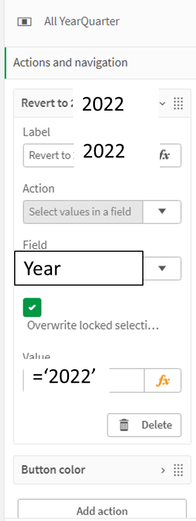
However, I had my action/navigation like this:
I don't understand what you mean by "you have to set the chart variable vChart action as 1." Can you please clarify?
salonicdk28
- Mark as New
- Bookmark
- Subscribe
- Mute
- Subscribe to RSS Feed
- Permalink
- Report Inappropriate Content
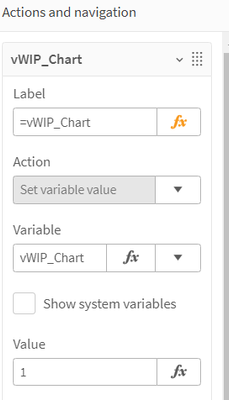
I meant instead of action you have set instead use set variable value and insert variable which is designed for this and in value, write 1 or 0 as per the condition like below-

 Lemac
Lemac
- Mark as New
- Bookmark
- Subscribe
- Mute
- Subscribe to RSS Feed
- Permalink
- Report Inappropriate Content
I would do it like this: In the background property of your button you define:
=if(GetCurrentSelections(Year)='Year: 2022', '#DDDDDD', '#FF0000')
Breezy
- Mark as New
- Bookmark
- Subscribe
- Mute
- Subscribe to RSS Feed
- Permalink
- Report Inappropriate Content
Hi - follow-up question,
Now I'm trying to figure this out if I used, instead of Year, two words, such as 'New Year' . It's giving me an error message though. Am I putting the ' ' in the wrong places?
Lemac recommendation:
=if(GetCurrentSelections(Year)='Year: 2022', '#DDDDDD', '#FF0000')
My recommendation
=if(GetCurrentSelections([New Year])='[New Year]: 2022', '#006580', '#906086')
 neerajthakur
- Mark as New
- Bookmark
- Subscribe
- Mute
- Subscribe to RSS Feed
- Permalink
- Report Inappropriate Content
Change your recommendation to this
=if(GetCurrentSelections([New Year])='New Year: 2022', '#006580', '#906086')
Please Accepts as Solution if it solves your query.
Breezy
- Mark as New
- Bookmark
- Subscribe
- Mute
- Subscribe to RSS Feed
- Permalink
- Report Inappropriate Content
Alas, that does not work either. I also tried the following and it did not work either.
=if(([New Year]=2022), '#006580', '#906086')

- « Previous Replies
-
- 1
- 2
- Next Replies »