Unlock a world of possibilities! Login now and discover the exclusive benefits awaiting you.

- Qlik Community
- :
- Forums
- :
- Analytics & AI
- :
- Products & Topics
- :
- Visualization and Usability
- :
- Re: How to create a pie chart without dimension on...
- Subscribe to RSS Feed
- Mark Topic as New
- Mark Topic as Read
- Float this Topic for Current User
- Bookmark
- Subscribe
- Mute
- Printer Friendly Page

 akpofureenughwu
- Mark as New
- Bookmark
- Subscribe
- Mute
- Subscribe to RSS Feed
- Permalink
- Report Inappropriate Content
How to create a pie chart without dimension on qliksense
Good day sir,
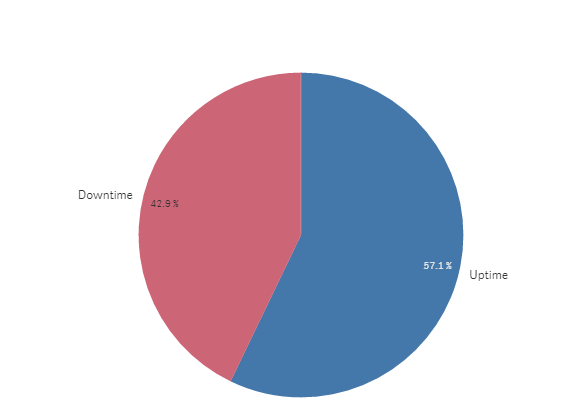
I have a set of data and I wish you develop a pie chart with two measures and no dimension.
Sample data is attached
The pie chart is to solve a relationship between uptime and downtime
I know this is possilbe in qlikview. how about qliksense?
Regards
Accepted Solutions

 OmarBenSalem
- Mark as New
- Bookmark
- Subscribe
- Mute
- Subscribe to RSS Feed
- Permalink
- Report Inappropriate Content
As dimension :
=ValueList('Uptime','Downtime')
as a measure:
if(ValueList('Uptime','Downtime')='Uptime',Count({<Uptime={1}>}Uptime),
if(ValueList('Uptime','Downtime')='Downtime',count({<Downtime={1}>}Downtime)))
result:
OmarBenSalem
- Mark as New
- Bookmark
- Subscribe
- Mute
- Subscribe to RSS Feed
- Permalink
- Report Inappropriate Content
As dimension :
=ValueList('Uptime','Downtime')
as a measure:
if(ValueList('Uptime','Downtime')='Uptime',Count({<Uptime={1}>}Uptime),
if(ValueList('Uptime','Downtime')='Downtime',count({<Downtime={1}>}Downtime)))
result:
akpofureenughwu
- Mark as New
- Bookmark
- Subscribe
- Mute
- Subscribe to RSS Feed
- Permalink
- Report Inappropriate Content
Thank you omarbensalem

 Tyler_Waterfall
- Mark as New
- Bookmark
- Subscribe
- Mute
- Subscribe to RSS Feed
- Permalink
- Report Inappropriate Content
Amazing - I found this first hit to my question and it worked as hoped. Thanks @OmarBenSalem !

 Amit_Kakkad_PD
- Mark as New
- Bookmark
- Subscribe
- Mute
- Subscribe to RSS Feed
- Permalink
- Report Inappropriate Content
Great solution! Thanks @OmarBenSalem
