Unlock a world of possibilities! Login now and discover the exclusive benefits awaiting you.

- Qlik Community
- :
- Forums
- :
- Analytics & AI
- :
- Products & Topics
- :
- Visualization and Usability
- :
- Re: How to define a variable for date?
Options
- Subscribe to RSS Feed
- Mark Topic as New
- Mark Topic as Read
- Float this Topic for Current User
- Bookmark
- Subscribe
- Mute
- Printer Friendly Page
Turn on suggestions
Auto-suggest helps you quickly narrow down your search results by suggesting possible matches as you type.
Showing results for

 jasmina_karcic
Creator III
2018-06-22
09:11 AM
- Mark as New
- Bookmark
- Subscribe
- Mute
- Subscribe to RSS Feed
- Permalink
- Report Inappropriate Content
How to define a variable for date?
Hello,
How can I define variable in Qlik sense app, for date yesterday (today-1)?
I want use this variable for a title of excel report in NPrinting.
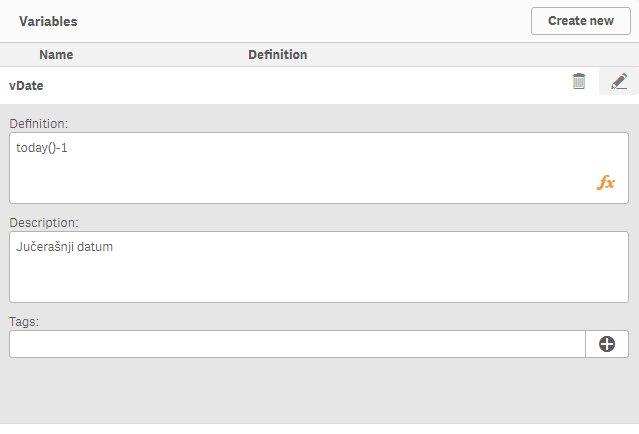
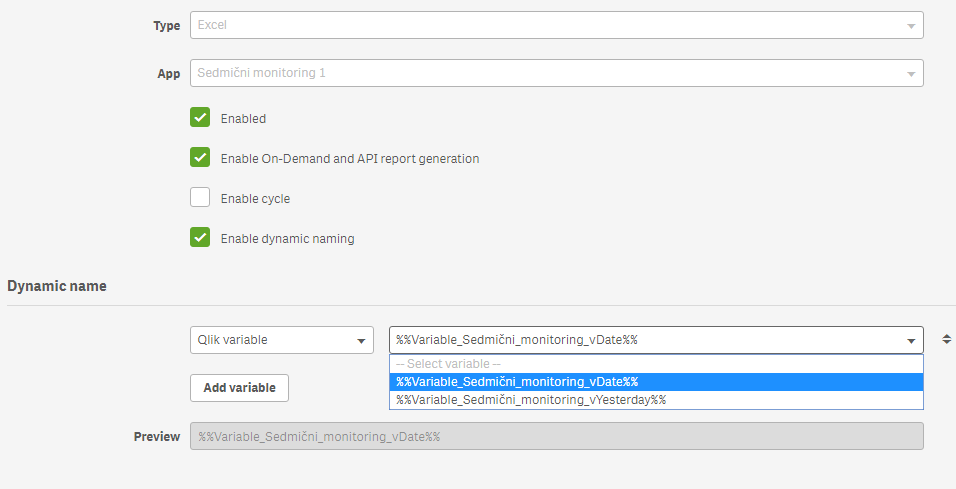
But this doesn't work...
Please help,
Jasmina
5,344 Views
1 Solution
Accepted Solutions

 Gysbert_Wassena
Partner - Champion III
2018-06-22
09:38 AM
- Mark as New
- Bookmark
- Subscribe
- Mute
- Subscribe to RSS Feed
- Permalink
- Report Inappropriate Content
try putting an = character in front of it an use the date function to format the result as a date: =date(today()-1)
talk is cheap, supply exceeds demand
4 Replies
Gysbert_Wassena
Partner - Champion III
2018-06-22
09:38 AM
- Mark as New
- Bookmark
- Subscribe
- Mute
- Subscribe to RSS Feed
- Permalink
- Report Inappropriate Content
try putting an = character in front of it an use the date function to format the result as a date: =date(today()-1)
talk is cheap, supply exceeds demand
jasmina_karcic
Creator III
2018-06-22
09:44 AM
Author
- Mark as New
- Bookmark
- Subscribe
- Mute
- Subscribe to RSS Feed
- Permalink
- Report Inappropriate Content
THANK YOU VERY MUCH!!!!

jasmina_karcic
Creator III
2018-06-22
09:51 AM
Author
- Mark as New
- Bookmark
- Subscribe
- Mute
- Subscribe to RSS Feed
- Permalink
- Report Inappropriate Content
Do you know maybe how can I put this variable in body of email that I am sending by publish task in NPrinting....
Please...
Thanks anyway
5,226 Views
Gysbert_Wassena
Partner - Champion III
2018-06-23
12:03 PM
- Mark as New
- Bookmark
- Subscribe
- Mute
- Subscribe to RSS Feed
- Permalink
- Report Inappropriate Content
Sorry, no idea.
talk is cheap, supply exceeds demand
5,226 Views
