Unlock a world of possibilities! Login now and discover the exclusive benefits awaiting you.

Announcements
Share your agentic AI experience, learn from others, and earn a new badge: Put Agentic AI to Work
- Qlik Community
- :
- Forums
- :
- Analytics & AI
- :
- Products & Topics
- :
- Visualization and Usability
- :
- How to do color coding in qlik sense
Options
- Subscribe to RSS Feed
- Mark Topic as New
- Mark Topic as Read
- Float this Topic for Current User
- Bookmark
- Subscribe
- Mute
- Printer Friendly Page
Turn on suggestions
Auto-suggest helps you quickly narrow down your search results by suggesting possible matches as you type.
Showing results for

 Rajitha1
Contributor III
2022-09-23
06:25 AM
- Mark as New
- Bookmark
- Subscribe
- Mute
- Subscribe to RSS Feed
- Permalink
- Report Inappropriate Content
How to do color coding in qlik sense
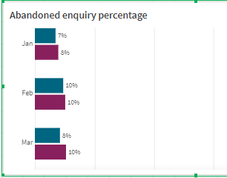
How to do color coding for feb month in gray color
1,476 Views
2 Solutions
Accepted Solutions

 Ray_Strother
Support
2022-09-23
12:11 PM
- Mark as New
- Bookmark
- Subscribe
- Mute
- Subscribe to RSS Feed
- Permalink
- Report Inappropriate Content
Hello,
Perhaps these link will assist you :
1. Color by expression
https://help.qlik.com/en-US/sense/August2022/Subsystems/Hub/Content/Sense_Hub/Colors/color-by-expres...
2. Coloring visualizations using expressions - Qlik Sense
https://www.youtube.com/watch?v=u9Z1_QRTG04
Perhaps these link will assist you :
1. Color by expression
https://help.qlik.com/en-US/sense/August2022/Subsystems/Hub/Content/Sense_Hub/Colors/color-by-expres...
2. Coloring visualizations using expressions - Qlik Sense
https://www.youtube.com/watch?v=u9Z1_QRTG04

 SerhanKaraer
Creator III
2022-09-23
12:25 PM
- Mark as New
- Bookmark
- Subscribe
- Mute
- Subscribe to RSS Feed
- Permalink
- Report Inappropriate Content
Hello Rajitha,
Considering your snapshot as the script below in a simplistic way:
LOAD * INLINE [
Month, Dim, Value
Jan, 1, 0.07
Jan, 2, 0.08
Feb, 1, 0.1
Feb, 2, 0.1
Mar, 1, 0.08
Mar, 2, 0.1
];
You must set color to "By expression".
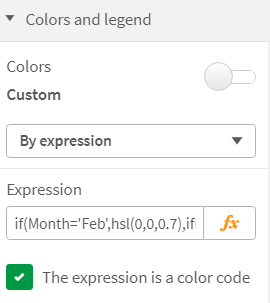
Then set your expression as below:
if(Month='Feb',hsl(0,0,0.7),if(Dim=1,rgb(0,101,128),rgb(135,32,93)))Regards,
2 Replies
Ray_Strother
Support
2022-09-23
12:11 PM
- Mark as New
- Bookmark
- Subscribe
- Mute
- Subscribe to RSS Feed
- Permalink
- Report Inappropriate Content
Hello,
Perhaps these link will assist you :
1. Color by expression
https://help.qlik.com/en-US/sense/August2022/Subsystems/Hub/Content/Sense_Hub/Colors/color-by-expres...
2. Coloring visualizations using expressions - Qlik Sense
https://www.youtube.com/watch?v=u9Z1_QRTG04
Perhaps these link will assist you :
1. Color by expression
https://help.qlik.com/en-US/sense/August2022/Subsystems/Hub/Content/Sense_Hub/Colors/color-by-expres...
2. Coloring visualizations using expressions - Qlik Sense
https://www.youtube.com/watch?v=u9Z1_QRTG04
SerhanKaraer
Creator III
2022-09-23
12:25 PM
- Mark as New
- Bookmark
- Subscribe
- Mute
- Subscribe to RSS Feed
- Permalink
- Report Inappropriate Content
Hello Rajitha,
Considering your snapshot as the script below in a simplistic way:
LOAD * INLINE [
Month, Dim, Value
Jan, 1, 0.07
Jan, 2, 0.08
Feb, 1, 0.1
Feb, 2, 0.1
Mar, 1, 0.08
Mar, 2, 0.1
];
You must set color to "By expression".
Then set your expression as below:
if(Month='Feb',hsl(0,0,0.7),if(Dim=1,rgb(0,101,128),rgb(135,32,93)))Regards,
