Unlock a world of possibilities! Login now and discover the exclusive benefits awaiting you.

- Qlik Community
- :
- Forums
- :
- Analytics & AI
- :
- Products & Topics
- :
- Visualization and Usability
- :
- Re: How to have weighted average work with filter ...
- Subscribe to RSS Feed
- Mark Topic as New
- Mark Topic as Read
- Float this Topic for Current User
- Bookmark
- Subscribe
- Mute
- Printer Friendly Page

 pam1990
- Mark as New
- Bookmark
- Subscribe
- Mute
- Subscribe to RSS Feed
- Permalink
- Report Inappropriate Content
How to have weighted average work with filter selections
Hello,
I have the following measure:
=Sum((Principal/TotalGrossSquareFootage)*Principal)/Sum(Principal)
The (Principal/TotalGrossSquareFootage) portion is the loan per sq ft, which I want to weight.
At the record level, Sum((Principal/TotalGrossSquareFootage)*Principal)/Sum(Principal) works as expected, but the weighting amount at the summary level is incorrect and when I filter the summary is incorrect.
In addition, I do not want to include zeros in my weighting. I did not address that above because I do not have the weighting working correctly.
This is a filter for one loan:
The weighted summary should be 60.19, not 180.57.
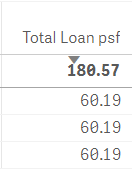
And the one below should be about 106, not 481.41.

I cannot figure out what I am doing wrong.
Accepted Solutions
pam1990
- Mark as New
- Bookmark
- Subscribe
- Mute
- Subscribe to RSS Feed
- Permalink
- Report Inappropriate Content
I solved my issue. I replaced Principal in =Sum((Principal/TotalGrossSquareFootage)*Principal)/Sum(Principal)
With Principal*(LeasedPropertySqFt/
if(Alt(TotalGrossSquareFootage,0)=0,GrossSquareFootage,TotalGrossSquareFootage))
This did the trick.
pam1990
- Mark as New
- Bookmark
- Subscribe
- Mute
- Subscribe to RSS Feed
- Permalink
- Report Inappropriate Content
I solved my issue. I replaced Principal in =Sum((Principal/TotalGrossSquareFootage)*Principal)/Sum(Principal)
With Principal*(LeasedPropertySqFt/
if(Alt(TotalGrossSquareFootage,0)=0,GrossSquareFootage,TotalGrossSquareFootage))
This did the trick.
