Unlock a world of possibilities! Login now and discover the exclusive benefits awaiting you.

- Qlik Community
- :
- Forums
- :
- Analytics & AI
- :
- Products & Topics
- :
- Visualization and Usability
- :
- Re: How to remove 5 from the date field
- Subscribe to RSS Feed
- Mark Topic as New
- Mark Topic as Read
- Float this Topic for Current User
- Bookmark
- Subscribe
- Mute
- Printer Friendly Page

 bhavvibudagam
- Mark as New
- Bookmark
- Subscribe
- Mute
- Subscribe to RSS Feed
- Permalink
- Report Inappropriate Content
How to remove 5 from the date field
Hi Experts,
Can any one please help me on this.
In the below date field I am getting 5,6 from the excel source file load.
Please help me on deleting 5,6 from the filter pane in the front end. I cant delete in the backend.
Thanks in advance.
Accepted Solutions
 jerryyang756
- Mark as New
- Bookmark
- Subscribe
- Mute
- Subscribe to RSS Feed
- Permalink
- Report Inappropriate Content
1) In Script
TabDate:
Load * inline [
Date,
2012-01,
2012-02,
2012-03,
2012-04,
2013-01,
2013-02,
2013-03,
2013-04,
5,
6
];
TabDate2:
NoConcatenate
Load
Date
Resident TabDate where Not IsNum(Date);
Drop Table TabDate;
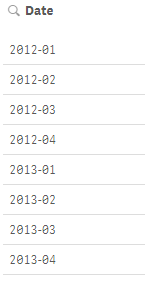
2) In frontend:
=If(Not IsNum(Date),Date) as Calculated Dimension in Filterpane

 petter
- Mark as New
- Bookmark
- Subscribe
- Mute
- Subscribe to RSS Feed
- Permalink
- Report Inappropriate Content
You can filter out the values that should be shown in the filter pane by using an expression.
=If( Date >= MakeDate(2015,1,1) , Date )
jerryyang756
- Mark as New
- Bookmark
- Subscribe
- Mute
- Subscribe to RSS Feed
- Permalink
- Report Inappropriate Content
1) In Script
TabDate:
Load * inline [
Date,
2012-01,
2012-02,
2012-03,
2012-04,
2013-01,
2013-02,
2013-03,
2013-04,
5,
6
];
TabDate2:
NoConcatenate
Load
Date
Resident TabDate where Not IsNum(Date);
Drop Table TabDate;
2) In frontend:
=If(Not IsNum(Date),Date) as Calculated Dimension in Filterpane
