Unlock a world of possibilities! Login now and discover the exclusive benefits awaiting you.

- Qlik Community
- :
- Forums
- :
- Analytics & AI
- :
- Products & Topics
- :
- Visualization and Usability
- :
- Is it possible to disable a Sheet Navigation objec...
Options
- Subscribe to RSS Feed
- Mark Topic as New
- Mark Topic as Read
- Float this Topic for Current User
- Bookmark
- Subscribe
- Mute
- Printer Friendly Page
Turn on suggestions
Auto-suggest helps you quickly narrow down your search results by suggesting possible matches as you type.
Showing results for

 pam1990
Contributor III
2020-08-27
03:16 PM
- Mark as New
- Bookmark
- Subscribe
- Mute
- Subscribe to RSS Feed
- Permalink
- Report Inappropriate Content
Is it possible to disable a Sheet Navigation object while there are no filter pane selections?
I added a Sheet Navigation object to a page in the app. The navigation behavior is to go to the next sheet. I want the user to have that ability after they have done a filter. Is that possible?
- Tags:
- filter
1,679 Views
1 Solution
Accepted Solutions

 jwjackso
Specialist III
2020-08-27
04:12 PM
- Mark as New
- Bookmark
- Subscribe
- Mute
- Subscribe to RSS Feed
- Permalink
- Report Inappropriate Content
In the "Button Layout" turn on the "Enable condition".
In the "Enable condition" expression,
=If(GetSelectedCount(DimName) > 0,1,0)
1,658 Views
2 Replies
jwjackso
Specialist III
2020-08-27
04:12 PM
- Mark as New
- Bookmark
- Subscribe
- Mute
- Subscribe to RSS Feed
- Permalink
- Report Inappropriate Content
In the "Button Layout" turn on the "Enable condition".
In the "Enable condition" expression,
=If(GetSelectedCount(DimName) > 0,1,0)
1,659 Views
pam1990
Contributor III
2020-08-27
04:39 PM
Author
- Mark as New
- Bookmark
- Subscribe
- Mute
- Subscribe to RSS Feed
- Permalink
- Report Inappropriate Content
Thank You
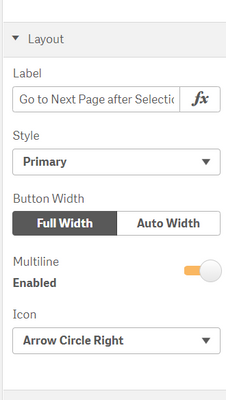
I don't see that option.
1,653 Views
