Unlock a world of possibilities! Login now and discover the exclusive benefits awaiting you.

- Qlik Community
- :
- Forums
- :
- Analytics & AI
- :
- Products & Topics
- :
- Visualization and Usability
- :
- Re: Issue with range calculation in Pivot Table
- Subscribe to RSS Feed
- Mark Topic as New
- Mark Topic as Read
- Float this Topic for Current User
- Bookmark
- Subscribe
- Mute
- Printer Friendly Page

- Mark as New
- Bookmark
- Subscribe
- Mute
- Subscribe to RSS Feed
- Permalink
- Report Inappropriate Content
Issue with range calculation in Pivot Table
Hi Qlik community,
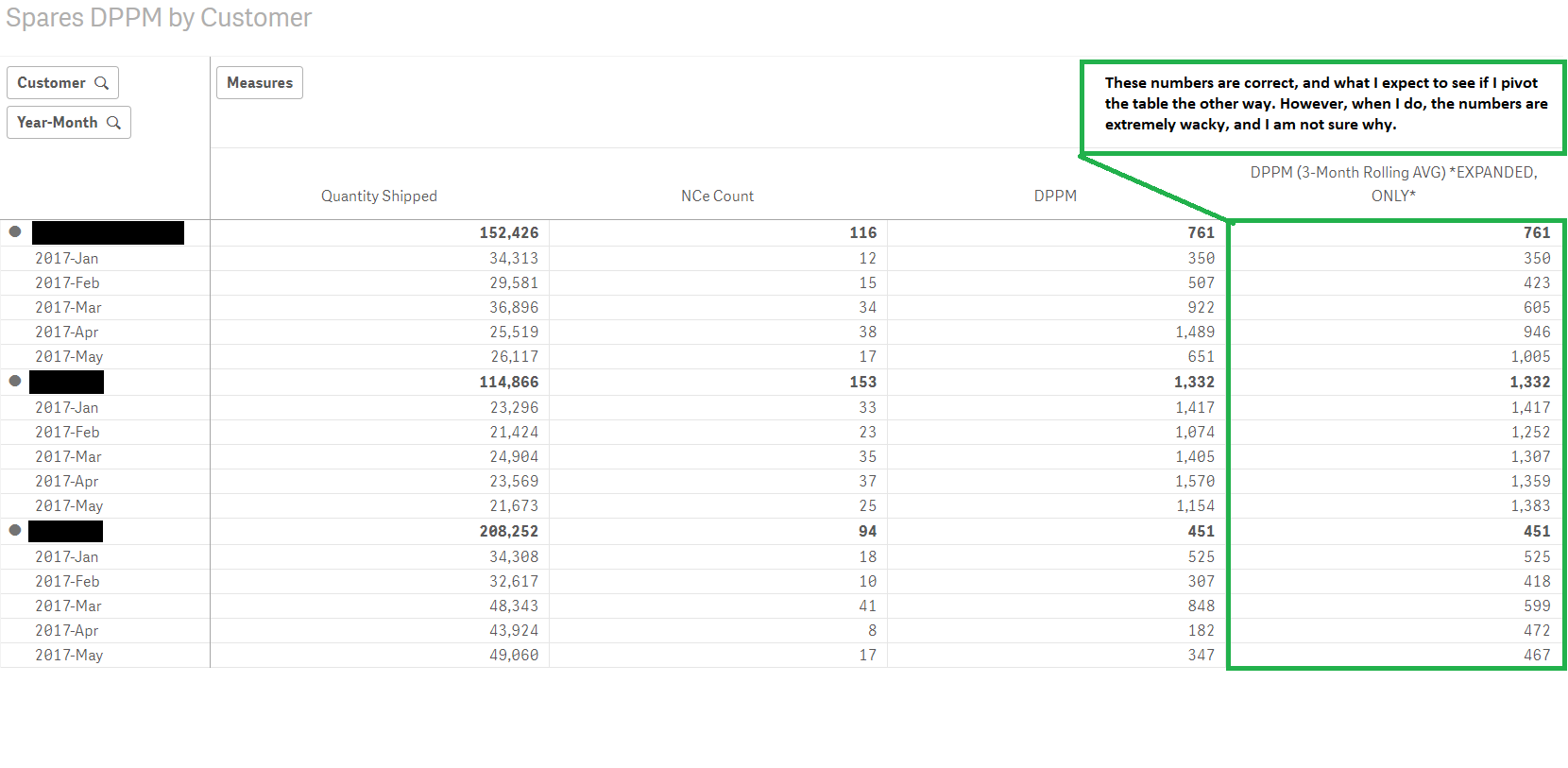
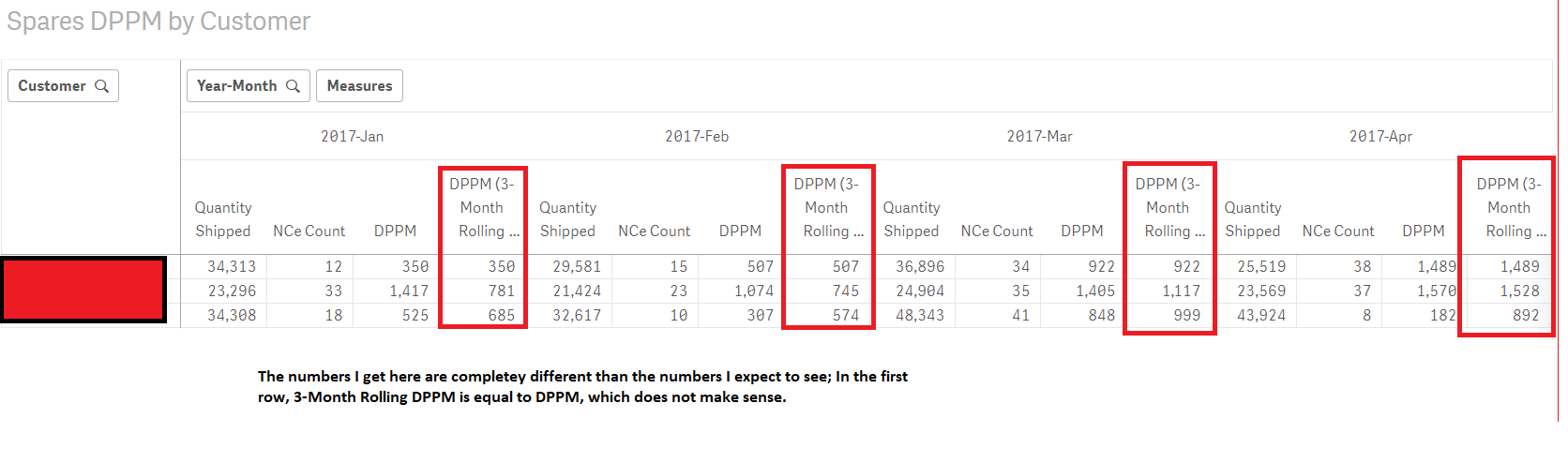
I am having an issue with a range expression that is calculating a three month average. When I have Customer and Year-Month Dimensions as Rows, I get the number I expect to see. However, the business users don't want the default view in this format. They want the Year-Month and the Measures to be in the column, and the customer alone in the Rows. The problem, then, is that the numbers get all wacky when I move the Year-Month dimension to the column.
Attached below are screenshots of both, and here is the calculation that is calculating the 3-Month rolling DPPM:
((RangeAvg(Above(count({<MonthName, Year, Month>}DISTINCT[iQMS_ID]), 0, 3)) * Avg(1))/
(RangeAvg(Above(Sum({<MonthName, Year, Month>}[QTY_SHIPPED]), 0, 3)) * Avg(1)))
*1000000
NOTE: All other dimensions react perfectly fine when Year-Month is moved from row to column!
Any help with this will be much appreciated!
Mohamed
Accepted Solutions

 sunny_talwar
- Mark as New
- Bookmark
- Subscribe
- Mute
- Subscribe to RSS Feed
- Permalink
- Report Inappropriate Content
Try this
((RangeAvg(Before(count({<MonthName, Year, Month>}DISTINCT[iQMS_ID]), 0, 3)) * Avg(1))/
(RangeAvg(Before(Sum({<MonthName, Year, Month>}[QTY_SHIPPED]), 0, 3)) * Avg(1)))
*1000000
sunny_talwar
- Mark as New
- Bookmark
- Subscribe
- Mute
- Subscribe to RSS Feed
- Permalink
- Report Inappropriate Content
Try this
((RangeAvg(Before(count({<MonthName, Year, Month>}DISTINCT[iQMS_ID]), 0, 3)) * Avg(1))/
(RangeAvg(Before(Sum({<MonthName, Year, Month>}[QTY_SHIPPED]), 0, 3)) * Avg(1)))
*1000000
- Mark as New
- Bookmark
- Subscribe
- Mute
- Subscribe to RSS Feed
- Permalink
- Report Inappropriate Content
Thanks Sunny. That worked, but now when I pivot the other way, I get null values. (I prefer this method over the previous, in which incorrect numbers were displayed; the method you've provided is not lying to business users) That said, is there any way to make this dynamic, so that no matter where you pivot, I get the correct numbers?
Regards,
Mohamed
sunny_talwar
- Mark as New
- Bookmark
- Subscribe
- Mute
- Subscribe to RSS Feed
- Permalink
- Report Inappropriate Content
It is your lucky day... try this
Aggr(
((RangeAvg(Above(count({<MonthName, Year, Month>}DISTINCT[iQMS_ID]), 0, 3)) * Avg(1))/
(RangeAvg(Above(Sum({<MonthName, Year, Month>}[QTY_SHIPPED]), 0, 3)) * Avg(1)))
*1000000
, Customer, ([Year-Month], (NUMERIC)))
- Mark as New
- Bookmark
- Subscribe
- Mute
- Subscribe to RSS Feed
- Permalink
- Report Inappropriate Content
Hmm, that didn't seem to work. No worries. Your initial reply will work for first release, and I will try working on making it dynamic before next release.
Thanks!
sunny_talwar
- Mark as New
- Bookmark
- Subscribe
- Mute
- Subscribe to RSS Feed
- Permalink
- Report Inappropriate Content
Oh really? Is Year-Month a date field or text?
- Mark as New
- Bookmark
- Subscribe
- Mute
- Subscribe to RSS Feed
- Permalink
- Report Inappropriate Content
It WAS a text field, but I made it a date field and now it works.
Much appreciated, Sunny!