Unlock a world of possibilities! Login now and discover the exclusive benefits awaiting you.

- Qlik Community
- :
- Forums
- :
- Analytics & AI
- :
- Products & Topics
- :
- Visualization and Usability
- :
- Re: Iterate a table
- Subscribe to RSS Feed
- Mark Topic as New
- Mark Topic as Read
- Float this Topic for Current User
- Bookmark
- Subscribe
- Mute
- Printer Friendly Page

 eduardo_dimperi
- Mark as New
- Bookmark
- Subscribe
- Mute
- Subscribe to RSS Feed
- Permalink
- Report Inappropriate Content
Iterate a table
Hi,
I've a table with 2 fiels, Numero and LatLong. My table has 176 lines and when i do a foreach on this table to retrieve your lines i receive Null starting line 170. I think this is related to fields cause LatLong has 169 distinct lines and Numero 173. I can use a workaround and concatenate two fields, but i want to know if exist another solution.
NoConcatenate
NumeroParaPesquisa:
load
DISTINCT
Numero,
lat&','&lng as LatLong
From
[lib://Dados/Base_location.qvd](qvd)
WHERE NOT IsNull(lat) AND NOT IsNull(lng) AND NOT IsNull(Numero)
;
let vNum = NoOfRows('NumeroParaPesquisa');
ErrorMode=0;
For i_Indice =1 to $(vNum)-1
let vNumero = fieldvalue('Numero','$(i_Indice)');
let vLocation = fieldvalue('LatLong','$(i_Indice)');
Next
Thank you
Accepted Solutions

 rwunderlich
- Mark as New
- Bookmark
- Subscribe
- Mute
- Subscribe to RSS Feed
- Permalink
- Report Inappropriate Content
For i_Indice= 0 to NoOfRows('NumeroParaPesquisa')-1
let vNumero = peek('Numero','$(i_Indice)','NumeroParaPesquisa' );
let vLocation = peek('LatLong','$(i_Indice)','NumeroParaPesquisa' );
Next i_Indice
-Rob
http://masterssummit.com
http://qlikviewcookbook.com
http://www.easyqlik.com
eduardo_dimperi- Mark as New
- Bookmark
- Subscribe
- Mute
- Subscribe to RSS Feed
- Permalink
- Report Inappropriate Content
Just to help someone with the same problem, this workaround dont solve the problem, but works.
NoConcatenate
NumeroParaPesquisa:
load
DISTINCT
Numero &';'& lat&','&lng as Elemento
From
[lib://Dados/Base_location.qvd](qvd)
WHERE NOT IsNull(lat) AND NOT IsNull(lng) AND NOT IsNull(Numero)
;
let vNum = NoOfRows('NumeroParaPesquisa');
ErrorMode=0;

For i_Indice =1 to $(vNum)-1
let vNumero =  SubField(fieldvalue('Elemento','$(i_Indice)'), ';',1);
let vLocation = SubField(fieldvalue('Elemento','$(i_Indice)'), ';',2);

Next
rwunderlich
- Mark as New
- Bookmark
- Subscribe
- Mute
- Subscribe to RSS Feed
- Permalink
- Report Inappropriate Content
For i_Indice= 0 to NoOfRows('NumeroParaPesquisa')-1
let vNumero = peek('Numero','$(i_Indice)','NumeroParaPesquisa' );
let vLocation = peek('LatLong','$(i_Indice)','NumeroParaPesquisa' );
Next i_Indice
-Rob
http://masterssummit.com
http://qlikviewcookbook.com
http://www.easyqlik.com
eduardo_dimperi- Mark as New
- Bookmark
- Subscribe
- Mute
- Subscribe to RSS Feed
- Permalink
- Report Inappropriate Content
Hi Rob, it works!
Could Please explain why this works and my code not? Like, why you use Peek().
Thank you!
rwunderlich
- Mark as New
- Bookmark
- Subscribe
- Mute
- Subscribe to RSS Feed
- Permalink
- Report Inappropriate Content
Hi Eduardo,
The difference between fieldvalue() and peek() is related to how Qlik stores data in memory.
See: https://community.qlik.com/t5/Qlik-Design-Blog/Symbol-Tables-and-Bit-Stuffed-Pointers/ba-p/1475369
Each unique value of a field is stored in a Symbol Table, which is analogous to a filter pane display. One row per value. On each row of the data table columns point to a value in the symbol table. So a table of Names and Country would look like this to Qlik.
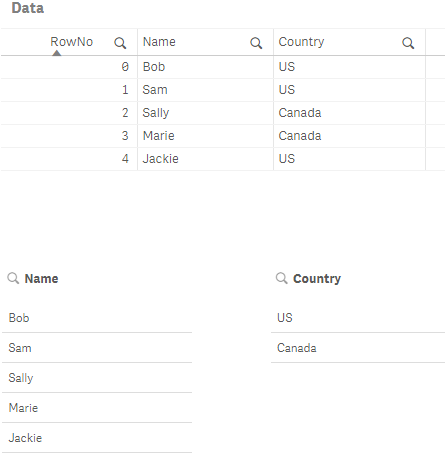
The FieldValues() function iterates over the Symbol table -- the distinct values of a field. For Country there are only 2 values, for Name 5. You cannot associate a Name to a Country by looking at the FieldValues.
Peek('fieldname', rowno, 'tablename') returns a field value from a data table for a specific row (zero based). So:
peek('Name', 1, 'Data') // = Sam
peek('Country, 1, 'Data') // = US
will give us Name and Country correctly associated, that is, from the same row.
-Rob
http://masterssummit.com
http://qlikviewcookbook.com
http://www.easyqlik.com
eduardo_dimperi- Mark as New
- Bookmark
- Subscribe
- Mute
- Subscribe to RSS Feed
- Permalink
- Report Inappropriate Content
Awesome, thank you
