Unlock a world of possibilities! Login now and discover the exclusive benefits awaiting you.

- Qlik Community
- :
- Forums
- :
- Analytics & AI
- :
- Products & Topics
- :
- Visualization and Usability
- :
- Re: KLM Townregions Map Not as expected
- Subscribe to RSS Feed
- Mark Topic as New
- Mark Topic as Read
- Float this Topic for Current User
- Bookmark
- Subscribe
- Mute
- Printer Friendly Page

 Adamo
Adamo
- Mark as New
- Bookmark
- Subscribe
- Mute
- Subscribe to RSS Feed
- Permalink
- Report Inappropriate Content
KLM Townregions Map Not as expected
Hi,
I am using Qlik Sense Business (Qlik Server)
I have a KML file with the Town Regions, that looks like the following
I used this website https://mygeodata.cloud/ to build the Kml file and this is the expected outcome
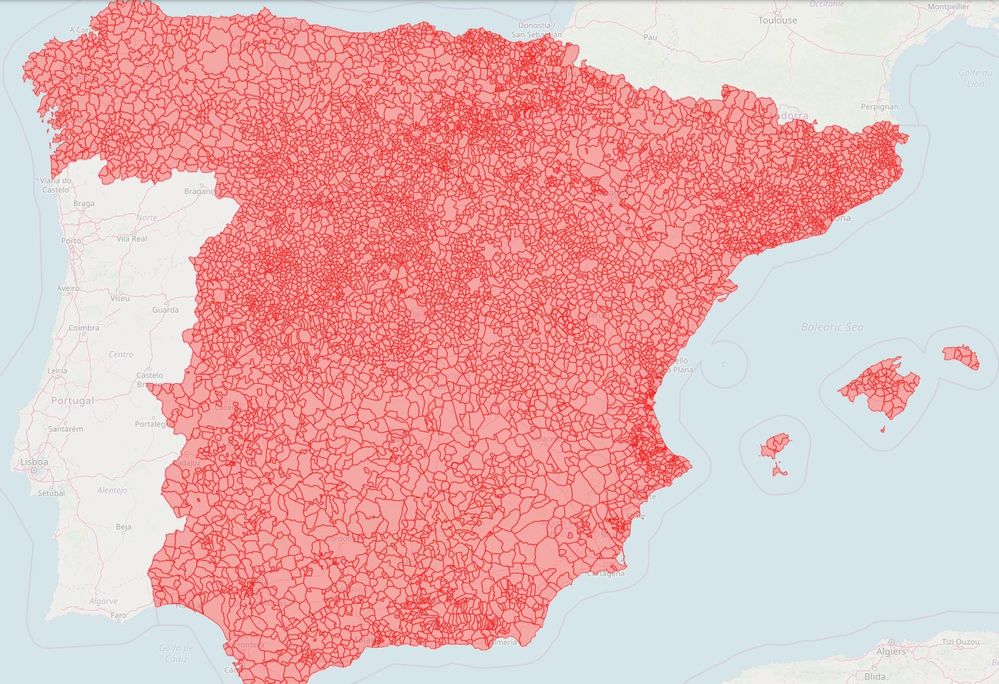
But I don't know what it is wrong because in Qlik Sense the outcome is like this...
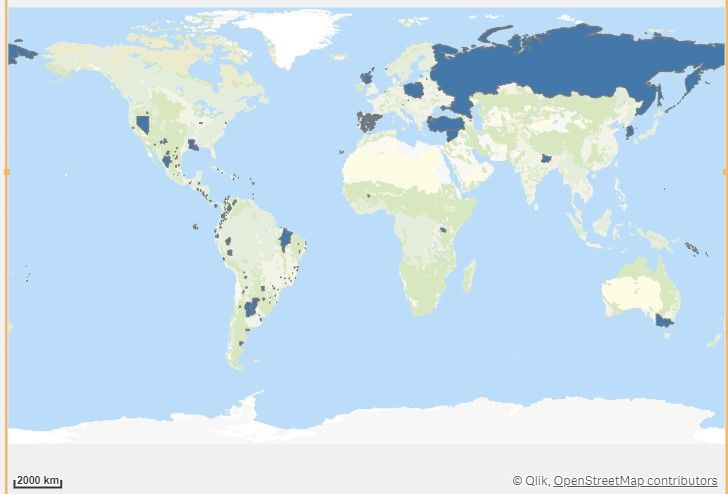
I have attached the KML file I was using for that in the following Wetransfer link :
This is the load script.
MAPA_KLM:

LOAD
    Municipios_name.Name,
    Municipios_name.Point,
    Municipios_name.Area,
    Municipios_name.Line
FROM [lib://DataFiles/Municipios_name.kml]
(kml, Table is [Municipios_name/Municipios_IGN]);
What I am doing?
1) Drag and drop MAP from graphics.
2) Add polygon layer.
3) Set location dimension as [Municipios_name.Name]
4) Set location type as "Automatic"
Anyone can help?? It will be quite appreciated...
Accepted Solutions

 fernando_tonial
- Mark as New
- Bookmark
- Subscribe
- Mute
- Subscribe to RSS Feed
- Permalink
- Report Inappropriate Content
Hello, You can try change location.
4) Set location disable "Automatic" and change like this.
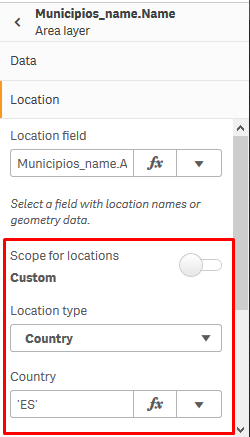
Don't worry, be Qlik.
Tonial
fernando_tonial
- Mark as New
- Bookmark
- Subscribe
- Mute
- Subscribe to RSS Feed
- Permalink
- Report Inappropriate Content
Hello, You can try change location.
4) Set location disable "Automatic" and change like this.
Don't worry, be Qlik.
Tonial
