Unlock a world of possibilities! Login now and discover the exclusive benefits awaiting you.

- Qlik Community
- :
- Forums
- :
- Analytics & AI
- :
- Products & Topics
- :
- Visualization and Usability
- :
- Re: KPI Expression help
- Subscribe to RSS Feed
- Mark Topic as New
- Mark Topic as Read
- Float this Topic for Current User
- Bookmark
- Subscribe
- Mute
- Printer Friendly Page

 mahitham
- Mark as New
- Bookmark
- Subscribe
- Mute
- Subscribe to RSS Feed
- Permalink
- Report Inappropriate Content
KPI Expression help
Hi Experts,
Can any one please help me on below requirement.
In the attached image KPI I have used the below expression
=if(len(GetFieldSelections(EmpTYPE))=0,
Count({<Flag={'Completed'}>}distinct EmpID),
if(GetFieldSelections(EmpTYPE)='New','N/A',
if(GetFieldSelections(EmpTYPE)='Permanents',
Count({<Flag={'Completed'}>}distinct EmpID)
)))
as per this expression when user selects EmpType = New then in the KPI instead of 0 I am passing N/A
Same like when user selects New EmpType related any employee Id then also this KPI has to show N/A instead of 0 value.
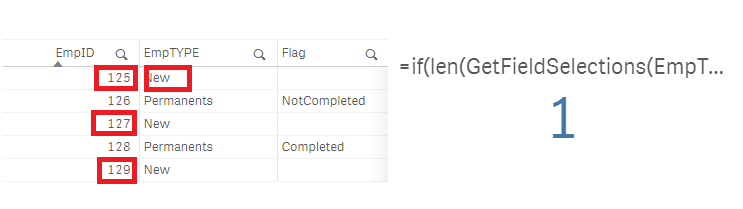
Please help me on this. Please find the below attached app.
Note: I am looking for the solution only in Front end.
Thank in advance
Accepted Solutions

 agigliotti
- Mark as New
- Bookmark
- Subscribe
- Mute
- Subscribe to RSS Feed
- Permalink
- Report Inappropriate Content
maybe this:
=if(len(GetFieldSelections(EmpTYPE))=0 and EmpTYPE<>'New',
Count({<Flag={'Completed'}>}distinct EmpID),
if(GetFieldSelections(EmpTYPE)='New' or EmpTYPE='New','N/A',
if(GetFieldSelections(EmpTYPE)='Permanents',
Count({<Flag={'Completed'}>}distinct EmpID) )
)
)
I hope it helps.
Follow me on my LinkedIn | Know Gamma Informatica at gammainformatica.it
agigliotti
- Mark as New
- Bookmark
- Subscribe
- Mute
- Subscribe to RSS Feed
- Permalink
- Report Inappropriate Content
your KPI expression looks good, what's your expected result?
Follow me on my LinkedIn | Know Gamma Informatica at gammainformatica.it

 andrey_krylov
- Mark as New
- Bookmark
- Subscribe
- Mute
- Subscribe to RSS Feed
- Permalink
- Report Inappropriate Content
Hi Mahitha. Try this
=if(EmpTYPE='New','N/A',
if(len(GetFieldSelections(EmpTYPE))=0,
Count({<Flag={'Completed'}>}distinct EmpID),
if(GetFieldSelections(EmpTYPE)='Permanents',
Count({<Flag={'Completed'}>}distinct EmpID)
)))
mahitham
- Mark as New
- Bookmark
- Subscribe
- Mute
- Subscribe to RSS Feed
- Permalink
- Report Inappropriate Content
Hi agigliotti
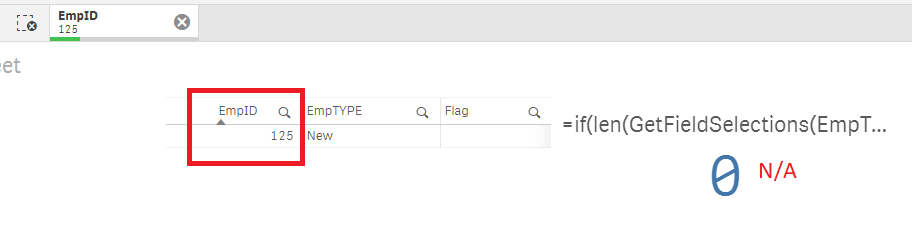
I have mainly two filters Emp Type and Emp Id.
User either selects Emp Type or Emp Id.
Requirement is when user select EmpType = New then need to show N/A in the KPI
if user selects any EmpID related to EmpType = New then also need to show N/A in the KPI
by default need to show actual count.
agigliotti
- Mark as New
- Bookmark
- Subscribe
- Mute
- Subscribe to RSS Feed
- Permalink
- Report Inappropriate Content
maybe this:
=if(len(GetFieldSelections(EmpTYPE))=0 and EmpTYPE<>'New',
Count({<Flag={'Completed'}>}distinct EmpID),
if(GetFieldSelections(EmpTYPE)='New' or EmpTYPE='New','N/A',
if(GetFieldSelections(EmpTYPE)='Permanents',
Count({<Flag={'Completed'}>}distinct EmpID) )
)
)
I hope it helps.
Follow me on my LinkedIn | Know Gamma Informatica at gammainformatica.it
mahitham
- Mark as New
- Bookmark
- Subscribe
- Mute
- Subscribe to RSS Feed
- Permalink
- Report Inappropriate Content
Thank for your help. Its working 
