Unlock a world of possibilities! Login now and discover the exclusive benefits awaiting you.

Announcements
Share your agentic AI experience, learn from others, and earn a new badge: Put Agentic AI to Work
- Qlik Community
- :
- Forums
- :
- Analytics & AI
- :
- Products & Topics
- :
- Visualization and Usability
- :
- KPI number format
Options
- Subscribe to RSS Feed
- Mark Topic as New
- Mark Topic as Read
- Float this Topic for Current User
- Bookmark
- Subscribe
- Mute
- Printer Friendly Page
Turn on suggestions
Auto-suggest helps you quickly narrow down your search results by suggesting possible matches as you type.
Showing results for

Not applicable
2017-01-18
07:56 AM
- Mark as New
- Bookmark
- Subscribe
- Mute
- Subscribe to RSS Feed
- Permalink
- Report Inappropriate Content
KPI number format
Hi
I have a KPI with a number of 2G , but want that to be in decimals like 1.88G.
Exampl: now 1.55G is depicted as 2G, just as 2.49G is.
Can't seem to manage though since adjusting the settings for number format results in the entire number (1.880.246.321,6)
thanks
2,038 Views
5 Replies

 sunny_talwar
MVP
2017-01-18
07:57 AM
- Mark as New
- Bookmark
- Subscribe
- Mute
- Subscribe to RSS Feed
- Permalink
- Report Inappropriate Content
What is the expression you are using right now?
1,911 Views
sunny_talwar
MVP
2017-01-18
07:58 AM
- Mark as New
- Bookmark
- Subscribe
- Mute
- Subscribe to RSS Feed
- Permalink
- Report Inappropriate Content
May be this:
Num(Expression, '##.00G')
1,911 Views
Not applicable
2017-01-18
08:05 AM
Author
- Mark as New
- Bookmark
- Subscribe
- Mute
- Subscribe to RSS Feed
- Permalink
- Report Inappropriate Content
does not work, but thanks!
1,911 Views
sunny_talwar
MVP
2017-01-18
08:10 AM
- Mark as New
- Bookmark
- Subscribe
- Mute
- Subscribe to RSS Feed
- Permalink
- Report Inappropriate Content
What is your current expression?
1,911 Views

 MK9885
Master II
2017-01-18
08:16 AM
- Mark as New
- Bookmark
- Subscribe
- Mute
- Subscribe to RSS Feed
- Permalink
- Report Inappropriate Content
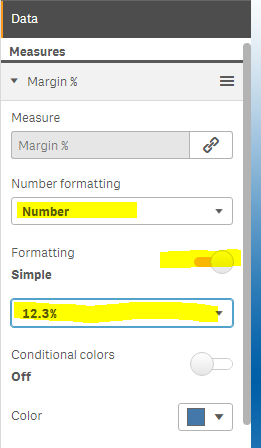
You must have tried this but have you checked the Number formatting>Custom>Number>Change it to a decimal after number.
Like below image
1,911 Views