Unlock a world of possibilities! Login now and discover the exclusive benefits awaiting you.

- Qlik Community
- :
- Forums
- :
- Analytics & AI
- :
- Products & Topics
- :
- Visualization and Usability
- :
- Label
- Subscribe to RSS Feed
- Mark Topic as New
- Mark Topic as Read
- Float this Topic for Current User
- Bookmark
- Subscribe
- Mute
- Printer Friendly Page

 shamitshah
- Mark as New
- Bookmark
- Subscribe
- Mute
- Subscribe to RSS Feed
- Permalink
- Report Inappropriate Content
Label
Hi,
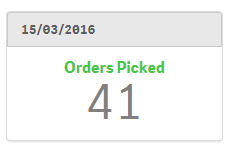
I have the following expression and I want to the label it as Orders with the Max Date
Expression:
count(Distinct{<PickDate={"$(=Max(PickDate))"},LIT_Status={'4'}>}PurchaseOrder)
The Max(PickDate) would be the latest date e.g. 11 June 2016, hence the label should appear as "Orders 11 June 2016"
Any ideas?
Thanks
Shamit
Accepted Solutions

 idogridish2
- Mark as New
- Bookmark
- Subscribe
- Mute
- Subscribe to RSS Feed
- Permalink
- Report Inappropriate Content
hi shamitshah
you can use ValueList(vMaxdate) as dimension with a variable in it
that will hold the max date like:
vMaxdate = max(pickdate).
and in the exprission:
if(ValueList(vMaxdate) = vMaxdate,count(Distinct{<PickDate={"$(=Max(PickDate))"},LIT_Status={'4'}>}PurchaseOrder))
regards
 Gysbert_Wassena
- Mark as New
- Bookmark
- Subscribe
- Mute
- Subscribe to RSS Feed
- Permalink
- Report Inappropriate Content
Afaik it's not possible yet to use expressions as labels in Qlik Sense.
talk is cheap, supply exceeds demand
shamitshah
- Mark as New
- Bookmark
- Subscribe
- Mute
- Subscribe to RSS Feed
- Permalink
- Report Inappropriate Content
Thanks for the info.
Shamit
idogridish2
- Mark as New
- Bookmark
- Subscribe
- Mute
- Subscribe to RSS Feed
- Permalink
- Report Inappropriate Content
hi shamitshah
you can use ValueList(vMaxdate) as dimension with a variable in it
that will hold the max date like:
vMaxdate = max(pickdate).
and in the exprission:
if(ValueList(vMaxdate) = vMaxdate,count(Distinct{<PickDate={"$(=Max(PickDate))"},LIT_Status={'4'}>}PurchaseOrder))
regards
shamitshah
- Mark as New
- Bookmark
- Subscribe
- Mute
- Subscribe to RSS Feed
- Permalink
- Report Inappropriate Content
Thanks Ido,
Works perfectly.
Regards
Shamit
idogridish2
- Mark as New
- Bookmark
- Subscribe
- Mute
- Subscribe to RSS Feed
- Permalink
- Report Inappropriate Content
Great!,
what kind of object is this?
shamitshah
- Mark as New
- Bookmark
- Subscribe
- Mute
- Subscribe to RSS Feed
- Permalink
- Report Inappropriate Content
Just a simple KPI Chart object.
