Unlock a world of possibilities! Login now and discover the exclusive benefits awaiting you.

- Qlik Community
- :
- Forums
- :
- Analytics & AI
- :
- Products & Topics
- :
- Visualization and Usability
- :
- Re: Limit in line chart
- Subscribe to RSS Feed
- Mark Topic as New
- Mark Topic as Read
- Float this Topic for Current User
- Bookmark
- Subscribe
- Mute
- Printer Friendly Page

- Mark as New
- Bookmark
- Subscribe
- Mute
- Subscribe to RSS Feed
- Permalink
- Report Inappropriate Content
Limit in line chart
Hello qlikers 🙂 ,
I had load data from a excel file in a line chart.
Now I want to add a limit. For example the limit should be y = 3.5 . See the red line below.
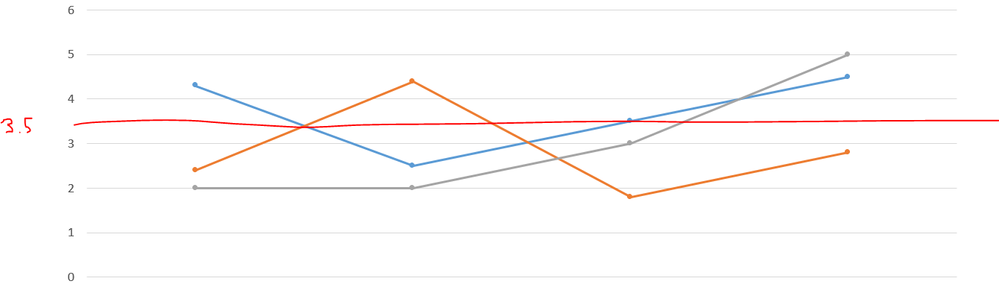
How can I do this?
Thank you in advance! 🙂
- Tags:
- line chart
Accepted Solutions


- Mark as New
- Bookmark
- Subscribe
- Mute
- Subscribe to RSS Feed
- Permalink
- Report Inappropriate Content
May be add reference line for 3.5 and change the color as per needs?

 StarinieriG
- Mark as New
- Bookmark
- Subscribe
- Mute
- Subscribe to RSS Feed
- Permalink
- Report Inappropriate Content
Hi,
what do you mean for "add a limit"? Limit y-axis? In that case, go to: Appearance > Y-axis > Range > Custom
If you want to add a simple line, you could use number 3.5 as expression
- Mark as New
- Bookmark
- Subscribe
- Mute
- Subscribe to RSS Feed
- Permalink
- Report Inappropriate Content
Sorry, for the not clear question. The Limit should be the red line. It is not a limit, it is only a line in the graph.
The second sentences is a good advice, but I actually don't know how can I get this expression over all dates or how I should build this expression.
Thank you in advance! 🙂
StarinieriG
- Mark as New
- Bookmark
- Subscribe
- Mute
- Subscribe to RSS Feed
- Permalink
- Report Inappropriate Content
I mean like in the image (adding a measure), if it is a static number

- Mark as New
- Bookmark
- Subscribe
- Mute
- Subscribe to RSS Feed
- Permalink
- Report Inappropriate Content
I'm really sorry, but I'm confused. 😞
- Mark as New
- Bookmark
- Subscribe
- Mute
- Subscribe to RSS Feed
- Permalink
- Report Inappropriate Content
May be add reference line for 3.5 and change the color as per needs?
- Mark as New
- Bookmark
- Subscribe
- Mute
- Subscribe to RSS Feed
- Permalink
- Report Inappropriate Content
Ahhh! Thank you very much! 🙂
The keyword reference line helped me! I wish you all a nice day! 🙂
- Mark as New
- Bookmark
- Subscribe
- Mute
- Subscribe to RSS Feed
- Permalink
- Report Inappropriate Content
Great, Please mark as proper answer as accepted solution.