Unlock a world of possibilities! Login now and discover the exclusive benefits awaiting you.

- Qlik Community
- :
- Forums
- :
- Analytics & AI
- :
- Products & Topics
- :
- Visualization and Usability
- :
- Linking master calender
- Subscribe to RSS Feed
- Mark Topic as New
- Mark Topic as Read
- Float this Topic for Current User
- Bookmark
- Subscribe
- Mute
- Printer Friendly Page

 raju_salmon
- Mark as New
- Bookmark
- Subscribe
- Mute
- Subscribe to RSS Feed
- Permalink
- Report Inappropriate Content
Linking master calender
Hi,
I am new to databases and qlikview, hence seems like basis question.
I have created master calendar using attached script.
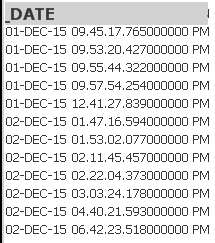
In my Sales Table I have date fields in below format. When i am linking this Date field with Calendar Date i can able to link. Is it because of two different formats? What changed i need to do in ca lender script? Any suggestions whether i can modify below database date field or ??
Accepted Solutions

 sunny_talwar
- Mark as New
- Bookmark
- Subscribe
- Mute
- Subscribe to RSS Feed
- Permalink
- Report Inappropriate Content
I guess the _Date field is read as text rather than TimeStamp here. Try this:
Date(Floor(Date#(Left(_Date, 9), 'DD-MMM-YY'))) as _Date
sunny_talwar
- Mark as New
- Bookmark
- Subscribe
- Mute
- Subscribe to RSS Feed
- Permalink
- Report Inappropriate Content
Your date is actually a timestamp. Either you can change your timestamp to a date -> Date(Floor(_Date)) as Date or you need to create a master Time Table (The Master Time Table) in addition to master calendar.
raju_salmon
- Mark as New
- Bookmark
- Subscribe
- Mute
- Subscribe to RSS Feed
- Permalink
- Report Inappropriate Content
Hi Sunny,
Date(Floor(_Date)) as Date is not giving me the result. _Date field showing zero records.
sunny_talwar
- Mark as New
- Bookmark
- Subscribe
- Mute
- Subscribe to RSS Feed
- Permalink
- Report Inappropriate Content
I guess the _Date field is read as text rather than TimeStamp here. Try this:
Date(Floor(Date#(Left(_Date, 9), 'DD-MMM-YY'))) as _Date
