Unlock a world of possibilities! Login now and discover the exclusive benefits awaiting you.

- Qlik Community
- :
- Forums
- :
- Analytics & AI
- :
- Products & Topics
- :
- Visualization and Usability
- :
- Re: Load Inline
- Subscribe to RSS Feed
- Mark Topic as New
- Mark Topic as Read
- Float this Topic for Current User
- Bookmark
- Subscribe
- Mute
- Printer Friendly Page

 d_ankusha
- Mark as New
- Bookmark
- Subscribe
- Mute
- Subscribe to RSS Feed
- Permalink
- Report Inappropriate Content
Load Inline
Hi,
I have a load statement:
Temp:
Load * Inline [
temp
a
b
ccc
];
I want output:
temp
a
b
c
c
c
This should happen for every next value added in inline.
Can anyone suggest a solution for this. I tried using left() and keepchar() but my logic is not working out.
- « Previous Replies
-
- 1
- 2
- Next Replies »
Accepted Solutions

 ujjwalraja
- Mark as New
- Bookmark
- Subscribe
- Mute
- Subscribe to RSS Feed
- Permalink
- Report Inappropriate Content
Hi,
Try this it is working fine.
new:
Load * ,len(temp) as length Inline [
temp
a
b
cc
xy
def
ghi
];
new1:
Load temp, length as length1
Resident new
where length >1;
//let vRowCount= peek('RowCount',-1,'new1') ;
//trace $(vRowCount)
//for i=0 to $(vRowCount)
let vlength= peek('length1',-1,'new1');
do while vlength>0
P:
Load mid(temp,$(vlength),1) as nee
Resident new1;
let vlength=vlength-1;
TRACE $(vlength);
loop
TTTT:
Load temp
Resident
new where length=1;
Load nee as temp
Resident P
where len(nee)=1
Order by nee ;
Drop Tables new,new1,P;

- Mark as New
- Bookmark
- Subscribe
- Mute
- Subscribe to RSS Feed
- Permalink
- Report Inappropriate Content
Did you try with mid() function?
d_ankusha
- Mark as New
- Bookmark
- Subscribe
- Mute
- Subscribe to RSS Feed
- Permalink
- Report Inappropriate Content
yes, i tried that. but the main problem is that the rest of the value is not coming in next line.

 MindaugasBacius
- Mark as New
- Bookmark
- Subscribe
- Mute
- Subscribe to RSS Feed
- Permalink
- Report Inappropriate Content
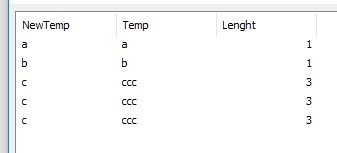
This works perfectly:
Temp:
Load * Inline [
temp
a
b
ccc
];
NoConcatenate
tmp:
LOAD *
,Len(temp) as Lenght
,RowNo() as Row
Resident Temp;
DROP Table Temp;
LET TotalRow = Peek('Row', -1, 'tmp');
FOR i = 1 to $(TotalRow)
NoConcatenate
tmp2:
LOAD *
Resident tmp
Where Row = $(i)
;
vLenght = Peek('Lenght');
vTemp = Peek('temp');
Data:
LOAD Mid('$(vTemp)', '$(vLenght)', 1) as NewTemp
,'$(vTemp)' as Temp
,'$(vLenght)' as Lenght
AutoGenerate $(vLenght);
DROP Table tmp2;
NEXT i
DROP Table tmp;
exit script;
 arvind_patil
- Mark as New
- Bookmark
- Subscribe
- Mute
- Subscribe to RSS Feed
- Permalink
- Report Inappropriate Content
Hi Ankusha,
Is there any seprater in actual value then you can use subfield or else
left and right function.
Thanks,
Arvind Patil
d_ankusha
- Mark as New
- Bookmark
- Subscribe
- Mute
- Subscribe to RSS Feed
- Permalink
- Report Inappropriate Content
no there is no separator in the values so can't use subfield.
Using left and right just gives me single value, i want the rest of the string evaluated as per the logic in next line.
d_ankusha
- Mark as New
- Bookmark
- Subscribe
- Mute
- Subscribe to RSS Feed
- Permalink
- Report Inappropriate Content
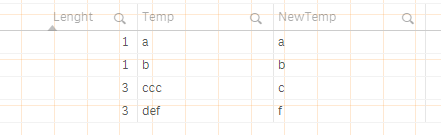
this is not actually working out . if i add new value as 'def' in Temp column . you can see the below output:
ujjwalraja
- Mark as New
- Bookmark
- Subscribe
- Mute
- Subscribe to RSS Feed
- Permalink
- Report Inappropriate Content
Hi,
Try this code
new:
Load * ,len(temp) as length Inline [
temp
a
b
def
ghi
];
new1:
Load temp, length as length1
Resident new
where length >1;
//let vRowCount= peek('RowCount',-1,'new1') ;
//trace $(vRowCount)
//for i=0 to $(vRowCount)
let vlength= peek('length1',-1,'new1');
do while vlength>0
P:
Load mid(temp,$(vlength),1) as nee
Resident new1;
let vlength=vlength-1;
TRACE $(vlength);
loop
TTTT:
Load temp
Resident
new where length=1;
Load nee as temp
Resident P
Order by nee;
Drop Tables new,new1,P;
arvind_patil
- Mark as New
- Bookmark
- Subscribe
- Mute
- Subscribe to RSS Feed
- Permalink
- Report Inappropriate Content
But in some filed have 2 characters then its not work..
Thanks,
Arvind Patil
ujjwalraja
- Mark as New
- Bookmark
- Subscribe
- Mute
- Subscribe to RSS Feed
- Permalink
- Report Inappropriate Content
Hi,
Try this it is working fine.
new:
Load * ,len(temp) as length Inline [
temp
a
b
cc
xy
def
ghi
];
new1:
Load temp, length as length1
Resident new
where length >1;
//let vRowCount= peek('RowCount',-1,'new1') ;
//trace $(vRowCount)
//for i=0 to $(vRowCount)
let vlength= peek('length1',-1,'new1');
do while vlength>0
P:
Load mid(temp,$(vlength),1) as nee
Resident new1;
let vlength=vlength-1;
TRACE $(vlength);
loop
TTTT:
Load temp
Resident
new where length=1;
Load nee as temp
Resident P
where len(nee)=1
Order by nee ;
Drop Tables new,new1,P;
- « Previous Replies
-
- 1
- 2
- Next Replies »