Unlock a world of possibilities! Login now and discover the exclusive benefits awaiting you.

- Qlik Community
- :
- Forums
- :
- Analytics & AI
- :
- Products & Topics
- :
- Visualization and Usability
- :
- Load multiple CSV files into a table
- Subscribe to RSS Feed
- Mark Topic as New
- Mark Topic as Read
- Float this Topic for Current User
- Bookmark
- Subscribe
- Mute
- Printer Friendly Page

- Mark as New
- Bookmark
- Subscribe
- Mute
- Subscribe to RSS Feed
- Permalink
- Report Inappropriate Content
Load multiple CSV files into a table
I have attempted to adapt code from other Qlik community threads but still to no avail. All i want is to put together all the csv files in a folder into one table.
Neither of these scripts work
1) Provides no error message
vPath = 'C:\Dropbox\Trading\Data\'
For each File in FileList('$(vPath)*.csv')
TableName:
Load
Date(Date#([@1], 'DD/MM/YYYY') ) AS [Date],
[@2] AS [Open],
[@3] AS [High],
[@4] AS [Low],
[@5] AS [Close],
[@6] As [Volume],
[@7] As [Open Interest],
LEFT(FileBaseName (), 6) as Code_CSV
From $(File);
NEXT
2) Does not recognise C:
For each vFileName in Filelist ('lib://C:\Dropbox\Trading\Data\*.csv')
Load *,
Date(Date#([@1], 'DD/MM/YYYY') ) AS [Date],
[@2] AS [Open],
[@3] AS [High],
[@4] AS [Low],
[@5] AS [Close],
[@6] As [Volume],
[@7] As [Open Interest],
LEFT(FileBaseName (), 6) as Code_CSV
From [$(vFileName)]
(txt, utf8, embedded labels, delimiter is ',', msq);
Next vFileName

 pradosh_thakur
- Mark as New
- Bookmark
- Subscribe
- Mute
- Subscribe to RSS Feed
- Permalink
- Report Inappropriate Content
hi
I have checked with the following code and its working.You compare your path and make sure \(slash) shall be there in the last in the vPath varibale.
vPath = 'C:\Dropbox\Trading\Data\'
For each File in FileList('$(vPath)'&'*.csv')
TableName:
Load
Date(Date#([@1], 'DD/MM/YYYY') ) AS [Date],
[@2] AS [Open],
[@3] AS [High],
[@4] AS [Low],
[@5] AS [Close],
[@6] As [Volume],
[@7] As [Open Interest],
LEFT(FileBaseName (), 6) as Code_CSV
From '$(File)' (txt, codepage is 1252, no labels, delimiter is ',', msq);;
NEXT
regards
Pradosh
- Mark as New
- Bookmark
- Subscribe
- Mute
- Subscribe to RSS Feed
- Permalink
- Report Inappropriate Content
Thanks, I might check this on my home PC as the work PC drives are pointed to a server. When I initially installed QS desktop at work I had to temporarily alter the registry to allow the program to load onto C: drive before switching it back.

 CELAMBARASAN
- Mark as New
- Bookmark
- Subscribe
- Mute
- Subscribe to RSS Feed
- Permalink
- Report Inappropriate Content
Hi
Have you created connection to the folder in Qlik Sense? Without a connection created for the folder (where your csv files are stored), Qlik script won't have access to the direct folders.
For each vFileName in Filelist ('lib://<FolderConnectionName>\*.csv')
Ref:
- Mark as New
- Bookmark
- Subscribe
- Mute
- Subscribe to RSS Feed
- Permalink
- Report Inappropriate Content
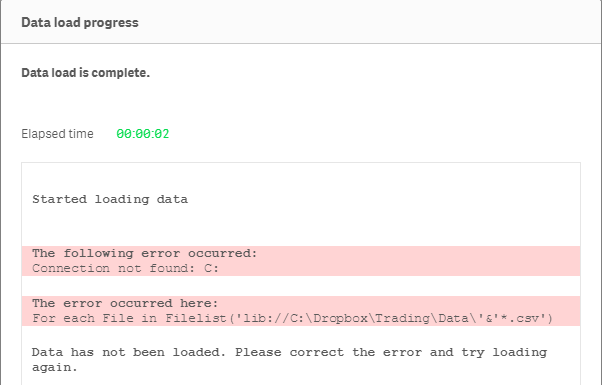
Keeps getting the same error message
vPath = 'lib://C:\Dropbox\Trading\Data\'
For each File in Filelist('$(vPath)'&'*.csv')
Tablename:
Load
Date(Date#([@1], 'DD/MM/YYYY') ) AS [Date],
[@2] AS [Open],
[@3] AS [High],
[@4] AS [Low],
[@5] AS [Close],
[@6] As [Volume],
[@7] As [Open Interest],
LEFT(FileBaseName (), 6) as Code_CSV
From $(File) (txt, utf8, embedded labels, delimiter is ',', msq);
NEXT

 mdmukramali
- Mark as New
- Bookmark
- Subscribe
- Mute
- Subscribe to RSS Feed
- Permalink
- Report Inappropriate Content
Dear Cam,
Use Below working script with your sample files.
Just you have to create a New Connection in Your Application with Name QVD Files which should point to your csv files data.
Set vConcatenate = ;
FileList:
LOAD
'' AS SourceFile
AUTOGENERATE 0;
sub ScanFolder(Root)
for each FileExtension in 'csv'
for each FoundFile in filelist( Root & '\*.' & FileExtension)
Data:
LOAD '$(FoundFile)' as SourceFile,
Date(Date#([@1], 'DD/MM/YYYY') ) AS [Date],
[@2] AS [Open],
[@3] AS [High],
[@4] AS [Low],
[@5] AS [Close],
[@6] As [Volume],
[@7] As [Open Interest],
LEFT(FileBaseName (), 6) as Code_CSV,
FileBaseName() as FileName
from
$(FoundFile)
(txt, utf8, no labels, delimiter is ',', msq);
Set vConcatenate = Concatenate;
next FoundFile
next FileExtension
for each SubDirectory in dirlist( Root & '\*' )
call ScanFolder(SubDirectory)
next SubDirectory
end sub
Call ScanFolder('lib://QVD Files/') ;
find the attached sample application also.
CELAMBARASAN
- Mark as New
- Bookmark
- Subscribe
- Mute
- Subscribe to RSS Feed
- Permalink
- Report Inappropriate Content
Hi Cam
In Qlik Sense, you should create a Folder connection for the folder path where CSV files are stored C:\Dropbox\Trading\Data\
Let say you have created connection in the name of Data for the above mentioned path, then your library path will be lib://Data\
Thanks
Celambarasan
- Mark as New
- Bookmark
- Subscribe
- Mute
- Subscribe to RSS Feed
- Permalink
- Report Inappropriate Content
Apologies but where does this point to C:\Dropbox\Trading\Data\?
- Mark as New
- Bookmark
- Subscribe
- Mute
- Subscribe to RSS Feed
- Permalink
- Report Inappropriate Content
If I choose this option in the Cloud based version I can't select by Folder, it only has webfile. It is available in the desktop version though.
- Mark as New
- Bookmark
- Subscribe
- Mute
- Subscribe to RSS Feed
- Permalink
- Report Inappropriate Content
So i just used the Desktop version and I made a connection to the Folder and it worked. Thanks
- Mark as New
- Bookmark
- Subscribe
- Mute
- Subscribe to RSS Feed
- Permalink
- Report Inappropriate Content
So i just used the Desktop version and I made a connection to the Folder C:\Dropbox\Trading\Data\, replaced the /QVD files/ with /data/ and it worked. Thanks