Unlock a world of possibilities! Login now and discover the exclusive benefits awaiting you.

Announcements
Want to see what's currently in public preview? We've pulled it all together in one place. Check it out here
- Qlik Community
- :
- Forums
- :
- Analytics & AI
- :
- Products & Topics
- :
- Visualization and Usability
- :
- Loading data
Options
- Subscribe to RSS Feed
- Mark Topic as New
- Mark Topic as Read
- Float this Topic for Current User
- Bookmark
- Subscribe
- Mute
- Printer Friendly Page
Turn on suggestions
Auto-suggest helps you quickly narrow down your search results by suggesting possible matches as you type.
Showing results for

 Luis_Gueerero13
Contributor II
2021-09-06
05:51 PM
- Mark as New
- Bookmark
- Subscribe
- Mute
- Subscribe to RSS Feed
- Permalink
- Report Inappropriate Content
Loading data
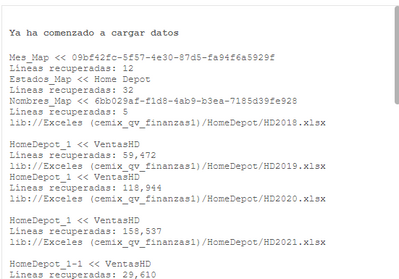
When I load my information I have to store everything in the same table “HomeDepot_1” but I don’t understand why a table loads it to “HomeDepot_1-1” this started to happen without any reason.
1,255 Views
3 Replies

 rwunderlich
MVP
2021-09-06
05:56 PM
- Mark as New
- Bookmark
- Subscribe
- Mute
- Subscribe to RSS Feed
- Permalink
- Report Inappropriate Content
It is likely because you are loading using
LOAD *
And the files have a different number of columns.
-Rob
Luis_Gueerero13
Contributor II
2021-09-06
06:01 PM
Author
- Mark as New
- Bookmark
- Subscribe
- Mute
- Subscribe to RSS Feed
- Permalink
- Report Inappropriate Content
So what can I do to make it not happen?
rwunderlich
MVP
2021-09-06
07:09 PM
- Mark as New
- Bookmark
- Subscribe
- Mute
- Subscribe to RSS Feed
- Permalink
- Report Inappropriate Content
Use the Concatenate prefix to force load into a single table. But first you'll have to create a table to name in the Concatenate().
HomeDepot:
LOAD 0 as DummyField AutoGenerate 0;
Concatenate (HomeDepot)
LOAD *
From lib://Exceles/blah blah/*.xlsx;
Drop Field DummyField;
-Rob
1,217 Views
