Unlock a world of possibilities! Login now and discover the exclusive benefits awaiting you.

- Qlik Community
- :
- Forums
- :
- Analytics & AI
- :
- Products & Topics
- :
- Visualization and Usability
- :
- Max Date with Set Expression - Converting MAXX in ...
- Subscribe to RSS Feed
- Mark Topic as New
- Mark Topic as Read
- Float this Topic for Current User
- Bookmark
- Subscribe
- Mute
- Printer Friendly Page

 rhhlee
- Mark as New
- Bookmark
- Subscribe
- Mute
- Subscribe to RSS Feed
- Permalink
- Report Inappropriate Content
Max Date with Set Expression - Converting MAXX in PowerBI to QlikSense
Hello,
Fairly new to Qlik Sense (Windows). Previously used Power BI in other organisations, but now utilising Qlik Sense in my current one.
I have a field called Saving Type, which can be broken down into Actual, Projected or Baseline. There is an additional field called From Date.
| From Date | Saving Type | Max Date (Ideal) |
| 2021-06-01 | Actual | 2021-07-01 |
| 2021-07-01 | Actual | 2021-07-01 |
| 2021-07-01 | Actual | 2021-07-01 |
| 2021-06-01 | Baseline | 2021-07-01 |
| 2021-07-01 | Baseline | 2021-07-01 |
| 2021-08-01 | Baseline | 2021-07-01 |
| 2021-09-01 | Baseline | 2021-07-01 |
| 2021-06-01 | Projected | 2021-07-01 |
I wanted to grab the Maximum [From Date] for Saving Type "Actual", and apply it as the maximum date for all types of Saving.
In Power BI, ideally I would like it to appear like this (in the below screenshot - the max date is Sept 2021 for Actual, and the max for Baseline/Projected is Jun 2022):
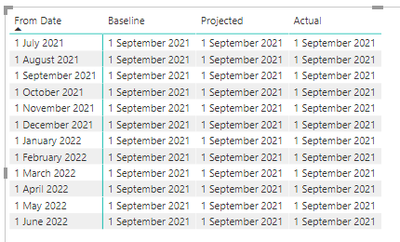
Currently in Qlik Sense, I am seeing this, having applied this Expression as a Measure:
Max({1<[Saving Type-SavingType] = {Actual}>}[Table1.From Date])
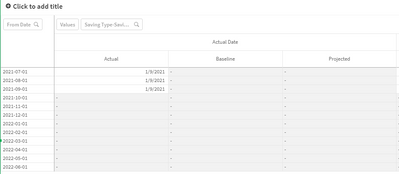
Would appreciate if someone could point me towards how to better adjust the above. For reference, the equivalent in PowerBI would be this expression:
Thanks!
rhhlee
- Mark as New
- Bookmark
- Subscribe
- Mute
- Subscribe to RSS Feed
- Permalink
- Report Inappropriate Content
Bumping this up! Thanks!
rhhlee
- Mark as New
- Bookmark
- Subscribe
- Mute
- Subscribe to RSS Feed
- Permalink
- Report Inappropriate Content
Hello - bumping this up, as I haven't had any replies yet - still seeking some help.
Adding a bit more detail as below:
Currently I have the following result:
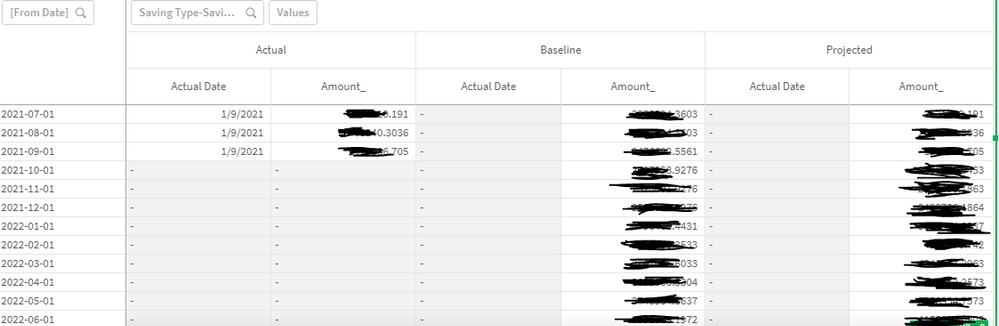
From the above results, the Actual Date is being calculated using:
Actual Date = Max({1<[Saving Type-SavingType] = {Actual}>}[Table1.From Date])
What occurs is that for where Savings Types = Actual, there are only three "From Dates" (Jul - Sept) - hence it returns the correct Maximum date of 1/9/2021.
What I want to achieve is the following:
- Have the Actual Date also apply for Saving Types other than Actual.
- The reason is that when the From Date is equal or less than the Actual Date calculated above - I want the "Projected" Saving Type to use the Amount from the "Actual" Saving Type.
In PowerBI, I have it currently formatted like this:
That way - I can present it like this:

Unfortunately, in QlikSense - it's showing as this:

Any help greatly appreciated!
