Unlock a world of possibilities! Login now and discover the exclusive benefits awaiting you.

- Qlik Community
- :
- Forums
- :
- Analytics & AI
- :
- Products & Topics
- :
- Visualization and Usability
- :
- Re: Maximum among the tables values
- Subscribe to RSS Feed
- Mark Topic as New
- Mark Topic as Read
- Float this Topic for Current User
- Bookmark
- Subscribe
- Mute
- Printer Friendly Page

 deepak_km9886
- Mark as New
- Bookmark
- Subscribe
- Mute
- Subscribe to RSS Feed
- Permalink
- Report Inappropriate Content
Maximum among the tables values
 - Copy.png)
i want to know the maximum of population and get the city value. This i could do easily with the following expression
Only(If(Population=Max(Total (Population)),City))
.png)
But my question is when i have same value of population, then also i should get city ,but it should be break the tie taking GDP into consideration and look for highest gdp between max populatoin.
for eg In the above pic i should get City=C has a value. Since Population of A and C is same , it is tie, then we need to consider gdP into account and Since C has more GDp, output should be City=C. How to get this?
Accepted Solutions

 sunny_talwar
- Mark as New
- Bookmark
- Subscribe
- Mute
- Subscribe to RSS Feed
- Permalink
- Report Inappropriate Content
I think you might have a mistake in your sample where the max population is 23412 for City B... assuming this is a typo... you can try this
FirstSortedValue(City, -(Population + GDP/1E10))
sunny_talwar
- Mark as New
- Bookmark
- Subscribe
- Mute
- Subscribe to RSS Feed
- Permalink
- Report Inappropriate Content
I think you might have a mistake in your sample where the max population is 23412 for City B... assuming this is a typo... you can try this
FirstSortedValue(City, -(Population + GDP/1E10))
sunny_talwar
- Mark as New
- Bookmark
- Subscribe
- Mute
- Subscribe to RSS Feed
- Permalink
- Report Inappropriate Content
Sample image and qvw attached
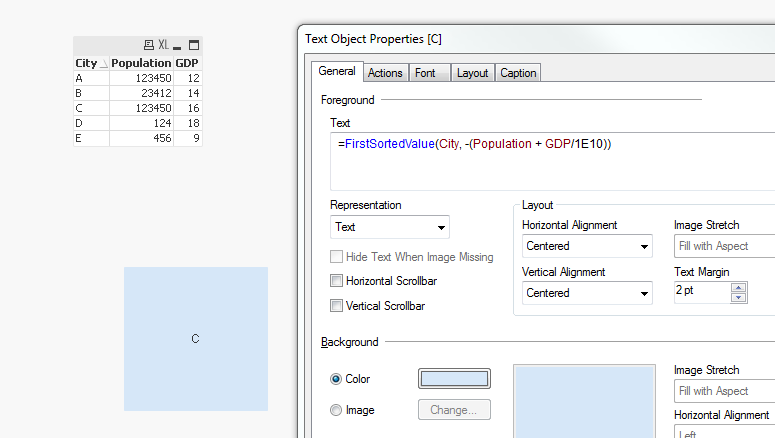
deepak_km9886
- Mark as New
- Bookmark
- Subscribe
- Mute
- Subscribe to RSS Feed
- Permalink
- Report Inappropriate Content
For that B shpuld be returned As the city, since it is having more population. That i can achieve. I'm only concerned about the second image, when i have equal population then the Highest with gdp should be returned.
sunny_talwar
- Mark as New
- Bookmark
- Subscribe
- Mute
- Subscribe to RSS Feed
- Permalink
- Report Inappropriate Content
But if the data remains the same... the highest population is still from City B, right? Are you selecting first based on GDP and then Population?
deepak_km9886
- Mark as New
- Bookmark
- Subscribe
- Mute
- Subscribe to RSS Feed
- Permalink
- Report Inappropriate Content
Also can you explain the expression. Its quite tricky
deepak_km9886
- Mark as New
- Bookmark
- Subscribe
- Mute
- Subscribe to RSS Feed
- Permalink
- Report Inappropriate Content
If there is no any tie between population, then I want B . That is correct.
When i have same value of population, then i want gdp factor. I agree that Even then B is highly populated. But i want C to be the answer .
I want the expression to check if there is no same population, if no then B should be returned without considering GDP.
If there is 2 or more same population, then gdp should break the tie.
sunny_talwar
- Mark as New
- Bookmark
- Subscribe
- Mute
- Subscribe to RSS Feed
- Permalink
- Report Inappropriate Content
Read about FirstSortedValue here
Value Associated with Min/Max Value of Another Field (Front End Solution)
sunny_talwar
- Mark as New
- Bookmark
- Subscribe
- Mute
- Subscribe to RSS Feed
- Permalink
- Report Inappropriate Content
I don't understand how this will expand if you have multiple cities with same populations... but for your current example.. you can try this
=If(Len(Trim(FirstSortedValue({<Population = {"=Count(Population) >= 2"}>}City, -(Population + GDP/1E10)))) > 0, FirstSortedValue({<Population = {"=Count(Population) >= 2"}>}City, -(Population + GDP/1E10)), FirstSortedValue(City, -Population))
