Unlock a world of possibilities! Login now and discover the exclusive benefits awaiting you.

- Qlik Community
- :
- Forums
- :
- Analytics & AI
- :
- Products & Topics
- :
- Visualization and Usability
- :
- Re: Merge fields
- Subscribe to RSS Feed
- Mark Topic as New
- Mark Topic as Read
- Float this Topic for Current User
- Bookmark
- Subscribe
- Mute
- Printer Friendly Page

- Mark as New
- Bookmark
- Subscribe
- Mute
- Subscribe to RSS Feed
- Permalink
- Report Inappropriate Content
Merge fields
Greetings,
I've a table setup like this :
| ID | Definition | Name |
|---|---|---|
| 1 | First Name | Alexander |
| 2 | Last Name | Wise |
| 3 | First Name | Chris |
| 4 | Last Name | Damico |
| 5 | First Name | Frederick |
| 6 | Last Name | Leviathan |
And i'm wondering if there is a way to merge them to have a table like this:
| ID | Name |
|---|---|
| 1 | Alexander Wise |
| 3 | Chris Damico |
| 5 | Frederick Leviathan |
And will i have to create a new table for this ? or is it possible to change the first one ?
Thanks for answer/tips
- Tags:
- merge tables
- « Previous Replies
-
- 1
- 2
- Next Replies »
Accepted Solutions

 undergrinder
- Mark as New
- Bookmark
- Subscribe
- Mute
- Subscribe to RSS Feed
- Permalink
- Report Inappropriate Content
I see, so you have a key to match 
then follow this logic:
table_tmp:
load
registrary_number,
Name as First
from [table]
where Definition='First name';
left join(table_tmp)
Load
registrary_number,
Name as Last
from
undergrinder
- Mark as New
- Bookmark
- Subscribe
- Mute
- Subscribe to RSS Feed
- Permalink
- Report Inappropriate Content
Hi vincent,
Try this inload script:
(so the ID 1 match ID 2):
table1:
Load
ID,
Name
From/Resident Table
Where mod(id,2)=1;
left join(table1)
Load
ID-1 as ID,
Name as Name2
From/Resident Table
Where mod(id,2)=0;
table_final:
Noconcatenate
Load
ID,
Name&' '&Name_2 as Name
resident table1;
drop table table1;
If you mistyped , and the data look like this:
1 First_name Andrew
1 Last_name Smith
then
table1:
Load
ID,
Name as Firstname
From/Resident Table
Where Definition = 'First Name';
Left join(table1)
Load
ID,
Name as Lastname
From/Resident Table
Where Definition = 'Last Name';
Load
ID,
Firstname&' '&Lastname as Name
resident table1;
drop table table1;
Hope this helps.
G.

 gerry_hdm
- Mark as New
- Bookmark
- Subscribe
- Mute
- Subscribe to RSS Feed
- Permalink
- Report Inappropriate Content
hello
using above ()
Is the firstname and Lastname allways correctly sorted
1 firstname 1
2 lastname 1
3 firstname 2
4 lastname 2
etc......
??
- Mark as New
- Bookmark
- Subscribe
- Mute
- Subscribe to RSS Feed
- Permalink
- Report Inappropriate Content
No not always sadly i forgot to mention that!
undergrinder
- Mark as New
- Bookmark
- Subscribe
- Mute
- Subscribe to RSS Feed
- Permalink
- Report Inappropriate Content
but the consecutive ID-s, match right?
1 with 2, 3 with 4?
Because after an ordering Gerold's answer can be good, after filter out the 2-3, 4-5 pairs.
G.
- Mark as New
- Bookmark
- Subscribe
- Mute
- Subscribe to RSS Feed
- Permalink
- Report Inappropriate Content
Either the IDs must match, IDs must be assigned in descending order. For this a solution has already been posted or the sorting has to fit
for correct sorting the script would look like that:
LOAD previous(ID) as ID
previous(Name)&' '&Name as field
Resident tablename
Where Definition='Last Name';
- Mark as New
- Bookmark
- Subscribe
- Mute
- Subscribe to RSS Feed
- Permalink
- Report Inappropriate Content
No they are not sometime it can be like this
1 Firstname Alex
2 Firstname Jean
3 Lastname Leviathan
Some of them didn't put their last name for example
I'm sorting them by a registrary number like this
1 156 Firstname Alex
2 1155 Firstname Jean
3 1155 Lastname Leviathan
So the matching pair would always have the same Registrary number
Maybe something like this would be easier to get ?
1 156 Alex
2 1155 Jean Leviathan
gerry_hdm
- Mark as New
- Bookmark
- Subscribe
- Mute
- Subscribe to RSS Feed
- Permalink
- Report Inappropriate Content
hello Vicent
here is a example you are copy the coding in a New qvw
greetings gerrold
// Example
ReadTable:
load * inline [
ID, Definiton,Name
1, FirstName, Alexander
2, LastName, Wise
3, FirstName, Chris
4, LastName, Damico
5, FirstName, Frederick
6, LastName, Leviathan
];
EndTable:
load *
where not FirstLastName = 'Del'
;
load
if (Definiton = 'LastName' , previous(Name)&','&Name,'Del') as FirstLastName ,
previous(ID) as ID
resident ReadTable;
drop Table ReadTable;
gerry_hdm
- Mark as New
- Bookmark
- Subscribe
- Mute
- Subscribe to RSS Feed
- Permalink
- Report Inappropriate Content
here the expample as qvw
🙂
Gerry

 maxgro
- Mark as New
- Bookmark
- Subscribe
- Mute
- Subscribe to RSS Feed
- Permalink
- Report Inappropriate Content
Try this
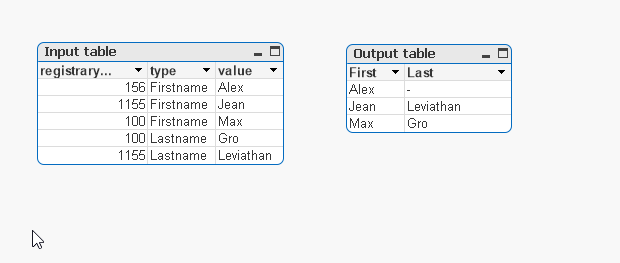
input:
load * inline [
rowno registrarynumber type value
1 156 Firstname Alex
2 1155 Firstname Jean
3 1155 Lastname Leviathan
4 100 Firstname Max
5 100 Lastname Gro
] (delimiter is spaces)
;
output:
load registrarynumber, value as First Resident input where type = 'Firstname';
join (output) load registrarynumber, value as Last Resident input where type = 'Lastname';
- « Previous Replies
-
- 1
- 2
- Next Replies »