Unlock a world of possibilities! Login now and discover the exclusive benefits awaiting you.

- Qlik Community
- :
- Forums
- :
- Analytics & AI
- :
- Products & Topics
- :
- Visualization and Usability
- :
- Re: Missing Field Value
- Subscribe to RSS Feed
- Mark Topic as New
- Mark Topic as Read
- Float this Topic for Current User
- Bookmark
- Subscribe
- Mute
- Printer Friendly Page

- Mark as New
- Bookmark
- Subscribe
- Mute
- Subscribe to RSS Feed
- Permalink
- Report Inappropriate Content
Missing Field Value
Hello Everyone,
I am having a problem, I am trying to alias these fields as you can see here:
.png)
But I get this error:
.png)
Please can someone tell me what the issue is?
Best wishes,
Alison
- « Previous Replies
-
- 1
- 2
- Next Replies »

 Clever_Anjos
- Mark as New
- Bookmark
- Subscribe
- Mute
- Subscribe to RSS Feed
- Permalink
- Report Inappropriate Content
If you want to rename a field use
RENAME <field> to <new name>;

 ahaahaaha
- Mark as New
- Bookmark
- Subscribe
- Mute
- Subscribe to RSS Feed
- Permalink
- Report Inappropriate Content
Hi,
Load
[Payment Date] as Date - absent FROM
- Mark as New
- Bookmark
- Subscribe
- Mute
- Subscribe to RSS Feed
- Permalink
- Report Inappropriate Content
Hello Clever Anjos,
But isn't the case that you can't rename two fields to have the same name? That's what I want to do. I want [Expenditure Date], [Income Date] and [Payment Date] to each be given the field name Date.
- Mark as New
- Bookmark
- Subscribe
- Mute
- Subscribe to RSS Feed
- Permalink
- Report Inappropriate Content
Hello Andrey,
Sorry, what do you mean by that. What do the '-' and 'absent' mean?

 akpofureenughwu
- Mark as New
- Bookmark
- Subscribe
- Mute
- Subscribe to RSS Feed
- Permalink
- Report Inappropriate Content
Hello Cooke,
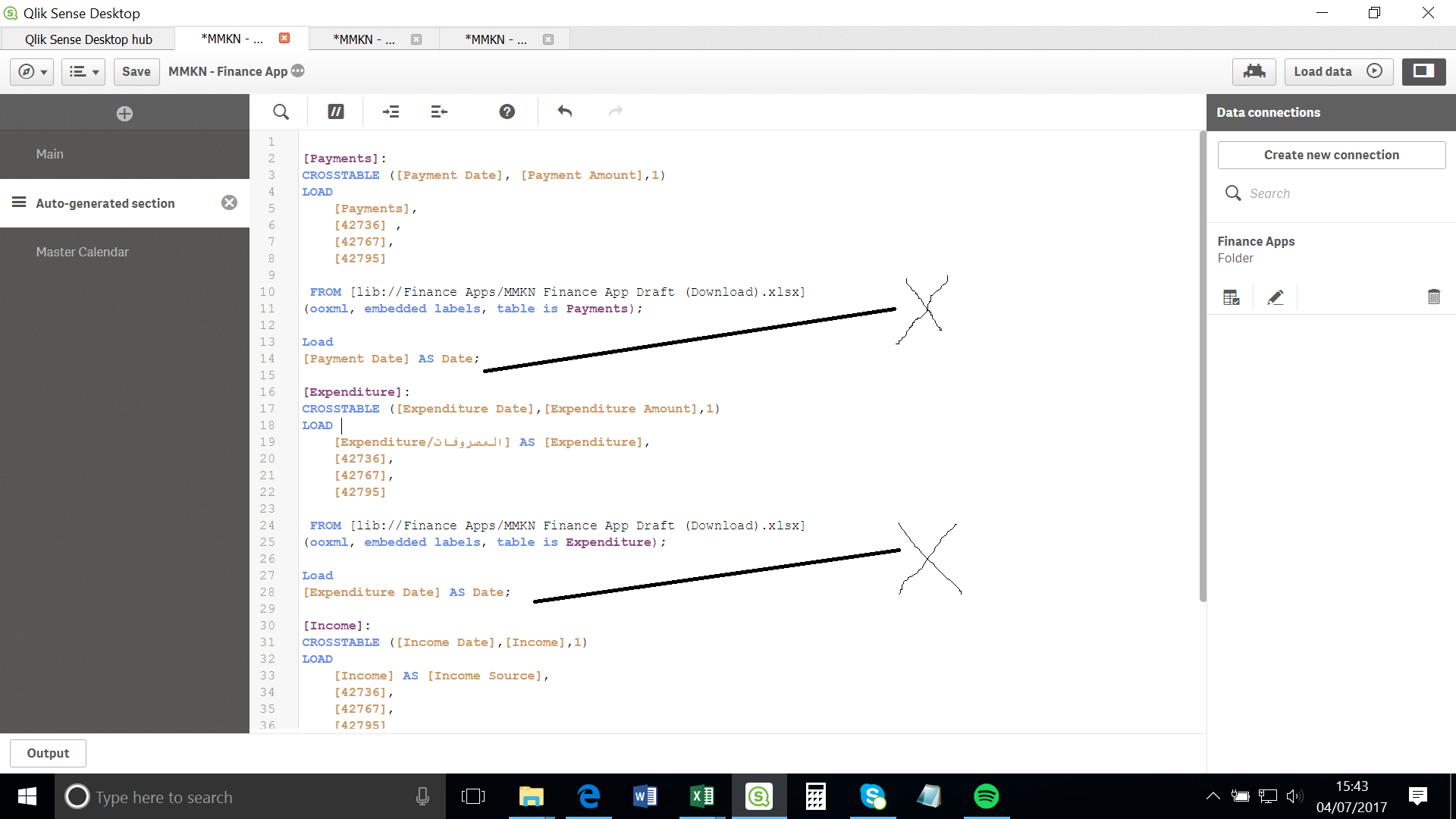
You need to load a data from a defined source...
see my attached image for clarification
if you can send a sample data, it will help this analysis
Regards
- Mark as New
- Bookmark
- Subscribe
- Mute
- Subscribe to RSS Feed
- Permalink
- Report Inappropriate Content
Hello Akpofure Enughwure,
I have now added the data source but I am still have the same problem. Any suggestion?
Thanks in advance.
akpofureenughwu
- Mark as New
- Bookmark
- Subscribe
- Mute
- Subscribe to RSS Feed
- Permalink
- Report Inappropriate Content
Please share a sample data so I can check from my end
- Mark as New
- Bookmark
- Subscribe
- Mute
- Subscribe to RSS Feed
- Permalink
- Report Inappropriate Content
Hi,
Yes of course, here it is.
 arvind_patil
- Mark as New
- Bookmark
- Subscribe
- Mute
- Subscribe to RSS Feed
- Permalink
- Report Inappropriate Content
Hi Alison,
You can try this:
FinalExpenditure :
Load
[Expenditure Amount],
Date([Expenditure Date] as Date
Resident Expenditure;
Drop table Expenditure;
Thanks,
Arvind Patil
- « Previous Replies
-
- 1
- 2
- Next Replies »