Unlock a world of possibilities! Login now and discover the exclusive benefits awaiting you.

Announcements
Share your agentic AI experience, learn from others, and earn a new badge: Put Agentic AI to Work
- Qlik Community
- :
- Forums
- :
- Analytics & AI
- :
- Products & Topics
- :
- Visualization and Usability
- :
- Re: Need Script help
Options
- Subscribe to RSS Feed
- Mark Topic as New
- Mark Topic as Read
- Float this Topic for Current User
- Bookmark
- Subscribe
- Mute
- Printer Friendly Page
Turn on suggestions
Auto-suggest helps you quickly narrow down your search results by suggesting possible matches as you type.
Showing results for

 rajeshqvd
Creator II
2018-11-27
05:26 AM
- Mark as New
- Bookmark
- Subscribe
- Mute
- Subscribe to RSS Feed
- Permalink
- Report Inappropriate Content
Need Script help
Hello,
Need help to get below output in OUT PUT column in qlik script.(creating new column)
| ID | Status | Name | OUT PUT |
| 111 | NO | ||
| 111 | NO | ||
| 111 | NO | jone | jone |
| 111 | NO | jone | |
| 111 | NO | jone | |
| 111 | NO | jone | |
| 111 | NO | jone | |
| 222 | NO | ||
| 222 | NO | ||
| 222 | NO | Lee | Lee |
| 222 | NO | Lee | |
| 222 | NO | Lee |
1,487 Views
1 Solution
Accepted Solutions

 sunny_talwar
MVP
2018-11-27
07:33 AM
- Mark as New
- Bookmark
- Subscribe
- Mute
- Subscribe to RSS Feed
- Permalink
- Report Inappropriate Content
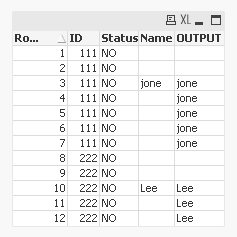
Try this
Table:
LOAD RecNo() as RowNum,
	 *,
	 If(ID = Previous(ID) and Len(Trim(Name)) = 0, Peek('OUTPUT'), Name) as OUTPUT;
LOAD * INLINE [
    ID, Status, Name
    111, NO,
    111, NO,
    111, NO, jone
    111, NO,
    111, NO,
    111, NO,
    111, NO,
    222, NO,
    222, NO,
    222, NO, Lee
    222, NO,
    222, NO,
];
Created the above in QlikView, but will work in Qlik Sense as well.... here is sample image of what I get
1,461 Views
3 Replies
 kaushiknsolanki
MVP
2018-11-27
05:29 AM
- Mark as New
- Bookmark
- Subscribe
- Mute
- Subscribe to RSS Feed
- Permalink
- Report Inappropriate Content
You must tell us what is the logic behind getting those values in output field.
Regards,
Kaushik Solanki
Please remember to hit the 'Like' button and for helpful answers and resolutions, click on the 'Accept As Solution' button. Cheers!
1,482 Views

 ashok_rajm
Contributor III
2018-11-27
05:53 AM
- Mark as New
- Bookmark
- Subscribe
- Mute
- Subscribe to RSS Feed
- Permalink
- Report Inappropriate Content
Please use below syntax to create a new field.
if(Name<>peek(Name),Name) as New_Output

1,477 Views
sunny_talwar
MVP
2018-11-27
07:33 AM
- Mark as New
- Bookmark
- Subscribe
- Mute
- Subscribe to RSS Feed
- Permalink
- Report Inappropriate Content
Try this
Table:
LOAD RecNo() as RowNum,
	 *,
	 If(ID = Previous(ID) and Len(Trim(Name)) = 0, Peek('OUTPUT'), Name) as OUTPUT;
LOAD * INLINE [
    ID, Status, Name
    111, NO,
    111, NO,
    111, NO, jone
    111, NO,
    111, NO,
    111, NO,
    111, NO,
    222, NO,
    222, NO,
    222, NO, Lee
    222, NO,
    222, NO,
];
Created the above in QlikView, but will work in Qlik Sense as well.... here is sample image of what I get
1,462 Views
