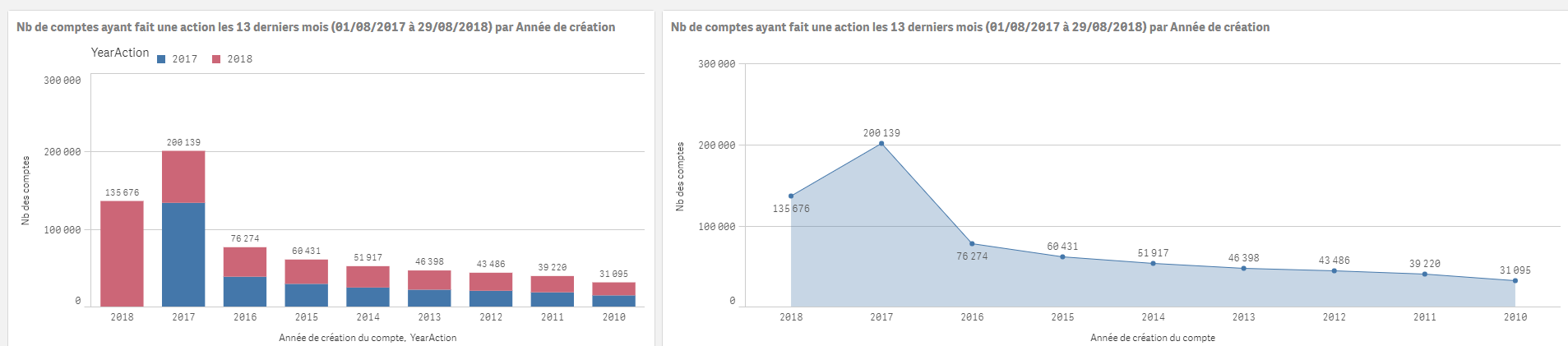
Unlock a world of possibilities! Login now and discover the exclusive benefits awaiting you.

- Qlik Community
- :
- Forums
- :
- Analytics & AI
- :
- Products & Topics
- :
- Visualization and Usability
- :
- Need help
- Subscribe to RSS Feed
- Mark Topic as New
- Mark Topic as Read
- Float this Topic for Current User
- Bookmark
- Subscribe
- Mute
- Printer Friendly Page

 OmarBenSalem
- Mark as New
- Bookmark
- Subscribe
- Mute
- Subscribe to RSS Feed
- Permalink
- Report Inappropriate Content
Need help
Hi all ( stalwar1) ,
I did not know how to explain what I'm aiming for with a title, but here am I elaborating it:
I have
YearCreation : Represents the year of the creation of an account
YearAction : Represents the Year of the action
What I currently have :
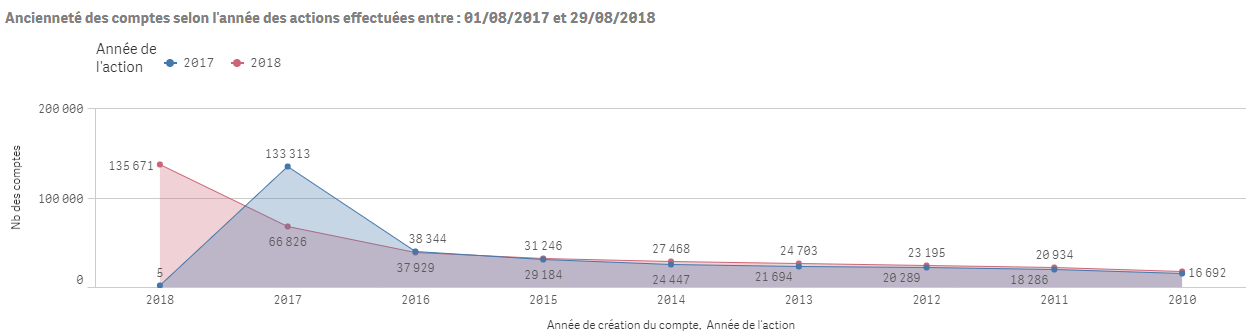
Dim1 : YearCreation
Dim2: YearAction
Measure: count(distinct IdAccount)
=> This to show the year of creation of the accounts % the year of the publication (action)
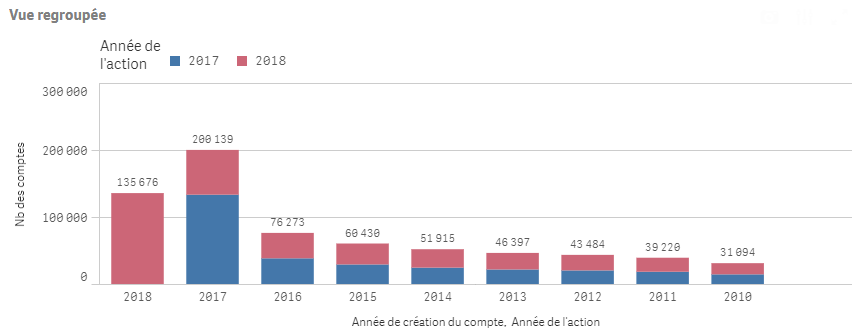
Now, what I want to do is, keep the same thing, but removing the second dimension, and show only ONE LINE.
I mean, having something like this: (these numbers) in one line.
How should I transform my measure?
I tried : Count(distinct{<YearAction=p(YearAction)>} IdAccount)
But this give me "wrong" numbers:

Any hint please?
Accepted Solutions

 sunny_talwar
- Mark as New
- Bookmark
- Subscribe
- Mute
- Subscribe to RSS Feed
- Permalink
- Report Inappropriate Content
Are you sure you used DISTINCT in your expression Omar?
Sum(Aggr(Count(DISTINCT IdAccount), YearCreation, YearAction))
sunny_talwar
- Mark as New
- Bookmark
- Subscribe
- Mute
- Subscribe to RSS Feed
- Permalink
- Report Inappropriate Content
May be you want this
Sum(Aggr(Count(DISTINCT IdAccount), YearCreation, YearAction))
OmarBenSalem
- Mark as New
- Bookmark
- Subscribe
- Mute
- Subscribe to RSS Feed
- Permalink
- Report Inappropriate Content
Still no 

OmarBenSalem
- Mark as New
- Bookmark
- Subscribe
- Mute
- Subscribe to RSS Feed
- Permalink
- Report Inappropriate Content
Wait a second ! Is it true that the new Line Chart should contain the same numbers as in the bar chart?
I mean, if in the YearCreation = 2017, we have 200 139 accounts between actions made in YearAction=2017 and 2018.
Now, if we suppose that there are accounts that intersect those 2 years (made actions in both years)
Wouldn't them be counted one time and thus we'll have lesser accounts?
I mean, would this expression (logically) work?
and if so, maybe the result is true?
Count({<YearAction=p(YearAction)>} ID_COMPTE)

sunny_talwar
- Mark as New
- Bookmark
- Subscribe
- Mute
- Subscribe to RSS Feed
- Permalink
- Report Inappropriate Content
Are you sure you used DISTINCT in your expression Omar?
Sum(Aggr(Count(DISTINCT IdAccount), YearCreation, YearAction))

 vkish16161
- Mark as New
- Bookmark
- Subscribe
- Mute
- Subscribe to RSS Feed
- Permalink
- Report Inappropriate Content
Try
Count({<YearAction=p(YearCreation )>} ID_COMPTE)
P and E functions should ideally be used on tables that don't have linkage between them.
OmarBenSalem
- Mark as New
- Bookmark
- Subscribe
- Mute
- Subscribe to RSS Feed
- Permalink
- Report Inappropriate Content
I was just forgetting sthing really important; stupidest thing ever; i was not including a flag to only count the accounts that have actions -_-
That was STUPID 
Sum(Aggr(Count(DISTINCT {<Flag13MAction={1}>} ID_COMPTE), [AnnéeCreationCompte], YearAction))
Now it works fine !