Unlock a world of possibilities! Login now and discover the exclusive benefits awaiting you.

- Qlik Community
- :
- Forums
- :
- Analytics & AI
- :
- Products & Topics
- :
- Visualization and Usability
- :
- Re: Nested If with getfieldselections not working
- Subscribe to RSS Feed
- Mark Topic as New
- Mark Topic as Read
- Float this Topic for Current User
- Bookmark
- Subscribe
- Mute
- Printer Friendly Page

 csmqlik01
- Mark as New
- Bookmark
- Subscribe
- Mute
- Subscribe to RSS Feed
- Permalink
- Report Inappropriate Content
Nested If with getfieldselections not working
Hi,
I'm trying to use getfieldselections in an expression, to get the user's selection of the company code.
Because I have multiple possibilities, I use a nested if. But it works for only for one nested if, when I add another 'if' I get a error in the expression. is there a restriction in use, because separate the syntax is working.
=if(GetFieldSelections([Company Code])= ' ',Sum({$<[Customer Code]=E({1<[NoFilter]={'Intercompany-4'}>})>}Quantity)
,if(GetFieldSelections([Company Code],'+',2)='BE04','US12',Sum({$<[Customer Code]=E({1<[Filter BE04/US12]={'Intercompany-4'}>})>}Quantity))
,if(GetFieldSelections([Company Code],'+',2)='BE04','US29',Sum({$<[Customer Code]=E({1<[Filter BE04/US29]={'Intercompany-4'}>})>}Quantity))
,if(GetFieldSelections([Company Code],'+',2)='US12','US29',Sum({$<[Customer Code]=E({1<[Filter US12/US29]={'Intercompany-4'}>})>}Quantity)))
or
=if(GetFieldSelections([Company Code],',',2)='BE04','US12',Sum({$<[Filter BE04/US12]=-{'Intercompany-4'}>}Quantity)
,if(GetFieldSelections([Company Code],',',2)='BE04','US29',Sum({$<[Filter BE04/US29]=-{'Intercompany-4'}>}Quantity))
With both I get an error, can anyone say what the problem is
Or is it better to use pick match ..; but how is the syntax to get the same result
Br
- « Previous Replies
-
- 1
- 2
- Next Replies »
csmqlik01
- Mark as New
- Bookmark
- Subscribe
- Mute
- Subscribe to RSS Feed
- Permalink
- Report Inappropriate Content
Hi,
For the two first lines it works , I added one bracket at the end
but now I added a third line and then I get an error
=If(GetFieldSelections([Company Code], ',', 2) = 'BE04, US12', Sum({$<[Filter BE04/US12]=-{'Intercompany-4'}>}Quantity)
, If(GetFieldSelections([Company Code], ',', 2) = 'BE04, US29', Sum({$<[Filter BE04/US29]=-{'Intercompany-4'}>}Quantity))
, If(GetFieldSelections([Company Code], ',', 2) = 'US12, US29', Sum({$<[Filter US12/US29]=-{'Intercompany-4'}>}Quantity)))
csmqlik01
- Mark as New
- Bookmark
- Subscribe
- Mute
- Subscribe to RSS Feed
- Permalink
- Report Inappropriate Content
oeps I mistyped no error anymore
=If(GetFieldSelections([Company Code], ',', 2) = 'BE04, US12', Sum({$<[Filter BE04/US12]=-{'Intercompany-4'}>}Quantity)
, If(GetFieldSelections([Company Code], ',', 2) = 'BE04, US29', Sum({$<[Filter BE04/US29]=-{'Intercompany-4'}>}Quantity)
, If(GetFieldSelections([Company Code], ',', 2) = 'US12, US29', Sum({$<[Filter US12/US29]=-{'Intercompany-4'}>}Quantity))))

 sunny_talwar
- Mark as New
- Bookmark
- Subscribe
- Mute
- Subscribe to RSS Feed
- Permalink
- Report Inappropriate Content
So all working now?
csmqlik01
- Mark as New
- Bookmark
- Subscribe
- Mute
- Subscribe to RSS Feed
- Permalink
- Report Inappropriate Content
Hi,
I have no syntax error but in the chart I get no result with 'BE04, US12' and If I add quotes 'BE04', 'US12' I get no syntax error and have result also for one if, if I add another if I get an error in expression
So it seems to be a problem with multiple selections
sunny_talwar
- Mark as New
- Bookmark
- Subscribe
- Mute
- Subscribe to RSS Feed
- Permalink
- Report Inappropriate Content
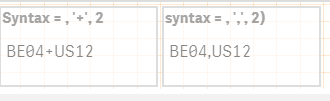
It all boils down to your condition... create a text box object with the following expression -> GetFieldSelections([Company Code], ',', 2) What do you see when you make selection? Do you see BE04, US12 or do you see something else?
csmqlik01
- Mark as New
- Bookmark
- Subscribe
- Mute
- Subscribe to RSS Feed
- Permalink
- Report Inappropriate Content
I tried two textboxes ,
sunny_talwar
- Mark as New
- Bookmark
- Subscribe
- Mute
- Subscribe to RSS Feed
- Permalink
- Report Inappropriate Content
So there is no space after comma... try this
=If(GetFieldSelections([Company Code], ',', 2) = 'BE04,US12', Sum({$<[Filter BE04/US12]=-{'Intercompany-4'}>}Quantity)
, If(GetFieldSelections([Company Code], ',', 2) = 'BE04,US29', Sum({$<[Filter BE04/US29]=-{'Intercompany-4'}>}Quantity)
, If(GetFieldSelections([Company Code], ',', 2) = 'US12,US29', Sum({$<[Filter US12/US29]=-{'Intercompany-4'}>}Quantity))))
csmqlik01
- Mark as New
- Bookmark
- Subscribe
- Mute
- Subscribe to RSS Feed
- Permalink
- Report Inappropriate Content
Thanks Sunny
that's the correct syntax, no error in expression and result as required
If(GetFieldSelections(Field,','2)='Selection1,Selection2', ....
No spaces and between quotes
Thanks again for your help
Best regards
sunny_talwar
- Mark as New
- Bookmark
- Subscribe
- Mute
- Subscribe to RSS Feed
- Permalink
- Report Inappropriate Content
Super... Please close this thread by marking correct and helpful responses
Qlik Community Tip: Marking Replies as Correct or Helpful
Best,
Sunny

- « Previous Replies
-
- 1
- 2
- Next Replies »