Unlock a world of possibilities! Login now and discover the exclusive benefits awaiting you.

- Qlik Community
- :
- Forums
- :
- Analytics & AI
- :
- Products & Topics
- :
- Visualization and Usability
- :
- Re: Not able to browse Qliksense dashboard from Pu...
- Subscribe to RSS Feed
- Mark Topic as New
- Mark Topic as Read
- Float this Topic for Current User
- Bookmark
- Subscribe
- Mute
- Printer Friendly Page

 nikhilgarg
- Mark as New
- Bookmark
- Subscribe
- Mute
- Subscribe to RSS Feed
- Permalink
- Report Inappropriate Content
Not able to browse Qliksense dashboard from Public IP
Hello ALL,
I ahve a server, where i had once installed Qlikview. Now i have uninstalled qlikview and running Qliksense. But i can access sense dashboard via Private IP but not via Public IP. I am not able to access sense dashboard via Public IP. Can anyone help me in this?
- « Previous Replies
-
- 1
- 2
- Next Replies »
nikhilgarg
- Mark as New
- Bookmark
- Subscribe
- Mute
- Subscribe to RSS Feed
- Permalink
- Report Inappropriate Content
It is giving me telnet is unrecognised as an Internal or external command.
I typed:
telnet 123.45.678.90 443
On Thu 5 Apr, 2018, 4:13 PM Andrea Gigliotti, <qcwebmaster@qlikview.com>

 p_verkooijen
- Mark as New
- Bookmark
- Subscribe
- Mute
- Subscribe to RSS Feed
- Permalink
- Report Inappropriate Content
Telnet has to be installed through Windows Features first.
Have ports 443 and 4242 been added to the Firewalls (Router NAT and Windows)?
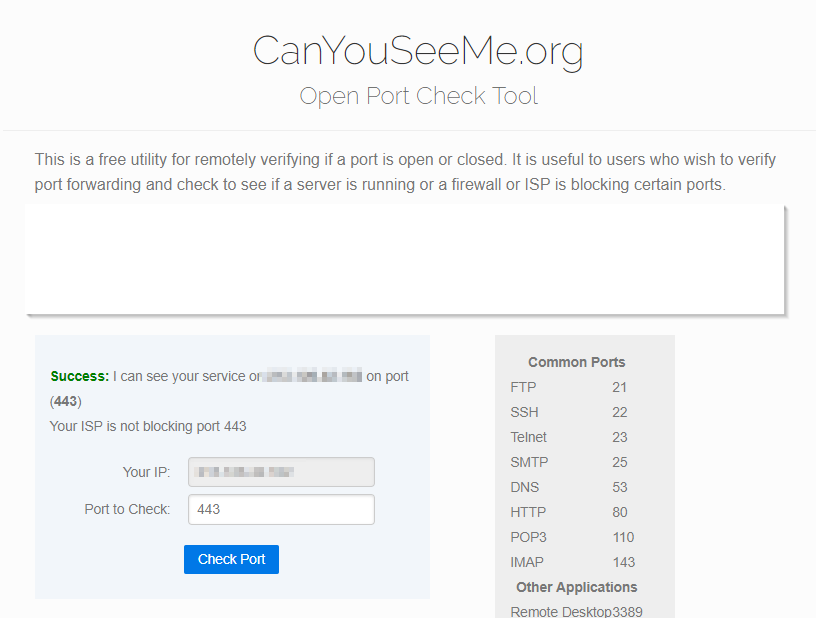
Test external acces using the site canyouseeme.org
- Check port 443
- Check port 4242 (QS Proxy)
nikhilgarg
- Mark as New
- Bookmark
- Subscribe
- Mute
- Subscribe to RSS Feed
- Permalink
- Report Inappropriate Content
Hey,
When i opened Canyouseeme.org, it is not allowing me to change the IP to my server IP.

 agigliotti
- Mark as New
- Bookmark
- Subscribe
- Mute
- Subscribe to RSS Feed
- Permalink
- Report Inappropriate Content
ok so as p.verkooijen said you have to install it first, going to control panel->Programs and Features.
Follow me on my LinkedIn | Know Gamma Informatica at gammainformatica.it
p_verkooijen
- Mark as New
- Bookmark
- Subscribe
- Mute
- Subscribe to RSS Feed
- Permalink
- Report Inappropriate Content
You should use canyouseeme.org when logged on to the Qlik machine itself.
There are several other test tools.
for instance networkappers.com
or Google for "Open port check"
nikhilgarg
- Mark as New
- Bookmark
- Subscribe
- Mute
- Subscribe to RSS Feed
- Permalink
- Report Inappropriate Content
Hey Paul,
Thanks but i have asked IT team to open the ports 4244, 4248, 443 for public IP. Lets see if this works.
nikhilgarg
- Mark as New
- Bookmark
- Subscribe
- Mute
- Subscribe to RSS Feed
- Permalink
- Report Inappropriate Content
Hey Andrea,
Thanks but i have asked IT team to open the ports 4244, 4248, 443 for public IP. Lets see if this works.
p_verkooijen
- Mark as New
- Bookmark
- Subscribe
- Mute
- Subscribe to RSS Feed
- Permalink
- Report Inappropriate Content
Port 4248 is not needed, this is a HTTP authentication port, not HTTPS like 443 and 4244
nikhilgarg
- Mark as New
- Bookmark
- Subscribe
- Mute
- Subscribe to RSS Feed
- Permalink
- Report Inappropriate Content
Ok, but I guess this wouldn't make any problem as well
On Fri 6 Apr, 2018, 3:24 PM Paul Verkooijen, <qcwebmaster@qlikview.com>

- « Previous Replies
-
- 1
- 2
- Next Replies »