Unlock a world of possibilities! Login now and discover the exclusive benefits awaiting you.

- Qlik Community
- :
- Forums
- :
- Analytics & AI
- :
- Products & Topics
- :
- Visualization and Usability
- :
- Re: Number format in Qliksense
- Subscribe to RSS Feed
- Mark Topic as New
- Mark Topic as Read
- Float this Topic for Current User
- Bookmark
- Subscribe
- Mute
- Printer Friendly Page

 VVJ
VVJ
- Mark as New
- Bookmark
- Subscribe
- Mute
- Subscribe to RSS Feed
- Permalink
- Report Inappropriate Content
Number format in Qliksense
Hi All,
I've prepared a table and one of my column contains value as 100.00
I want to display the same as 100,0 instead of 100.00.
Suggestions to change it at table level or data loading is much appreciated. Thanks.
Accepted Solutions
 R_Kaymakchiev
- Mark as New
- Bookmark
- Subscribe
- Mute
- Subscribe to RSS Feed
- Permalink
- Report Inappropriate Content
Hi,
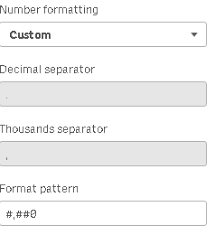
you can simply change the appearance of the Measure number formating.
There are predefined and custom formats.
This custom format -> #.##0,0 will allow you see the number like 100,0
Example:
VVJ
- Mark as New
- Bookmark
- Subscribe
- Mute
- Subscribe to RSS Feed
- Permalink
- Report Inappropriate Content
Hi,
Thanks for your help. It worked if added the column as a Measure.
But as I did not add the column as a measure, I used following expression which fixed the issue
=num(height,'###,0',',','.')
R_Kaymakchiev
- Mark as New
- Bookmark
- Subscribe
- Mute
- Subscribe to RSS Feed
- Permalink
- Report Inappropriate Content
Hi,
you can simply change the appearance of the Measure number formating.
There are predefined and custom formats.
This custom format -> #.##0,0 will allow you see the number like 100,0
Example:
VVJ
- Mark as New
- Bookmark
- Subscribe
- Mute
- Subscribe to RSS Feed
- Permalink
- Report Inappropriate Content
Hi,
Thanks for your help. It worked if added the column as a Measure.
But as I did not add the column as a measure, I used following expression which fixed the issue
=num(height,'###,0',',','.')
