Unlock a world of possibilities! Login now and discover the exclusive benefits awaiting you.

- Qlik Community
- :
- Forums
- :
- Analytics & AI
- :
- Products & Topics
- :
- Visualization and Usability
- :
- Re: Out of calculation memory
- Subscribe to RSS Feed
- Mark Topic as New
- Mark Topic as Read
- Float this Topic for Current User
- Bookmark
- Subscribe
- Mute
- Printer Friendly Page

- Mark as New
- Bookmark
- Subscribe
- Mute
- Subscribe to RSS Feed
- Permalink
- Report Inappropriate Content
Out of calculation memory
I am trying to bring in the salesforce data to Qliksense desktop and the data is in two or more objects in salesforce.
Q1) Should I link the objects based on a common field or will the Qlik salesforce connector automatically do it for me?
Q2) Sometimes it gives me "Out of Calculation memory" How do i resolve this? I have about 200,000 records in one object and 17,000 records in another.

 rbecher
- Mark as New
- Bookmark
- Subscribe
- Mute
- Subscribe to RSS Feed
- Permalink
- Report Inappropriate Content
Can you tell a little bit more about the data model. I guess there are many overlapping fields (fields with same name in both tables) leading into a big synthetic key. Tables should be linked by one field only. So you need to create a composite key to link the tables.
- Ralf
- Mark as New
- Bookmark
- Subscribe
- Mute
- Subscribe to RSS Feed
- Permalink
- Report Inappropriate Content
Do i need to actively link the tables or does qlik sense does it automatically? I have never linked them before but they were able to somehow link themselves.
What more information can i provide?
rbecher
- Mark as New
- Bookmark
- Subscribe
- Mute
- Subscribe to RSS Feed
- Permalink
- Report Inappropriate Content
Tables are linked automatically by field with same name. But if you have multiple fields with same name it creates a synthetical key which is kind of a table inbetween the both tables containing all combinations of values of all matching fields. This calculation can lead into a memory issue (my guessing here). Best practice is to have only a single field to link tables..
- Mark as New
- Bookmark
- Subscribe
- Mute
- Subscribe to RSS Feed
- Permalink
- Report Inappropriate Content
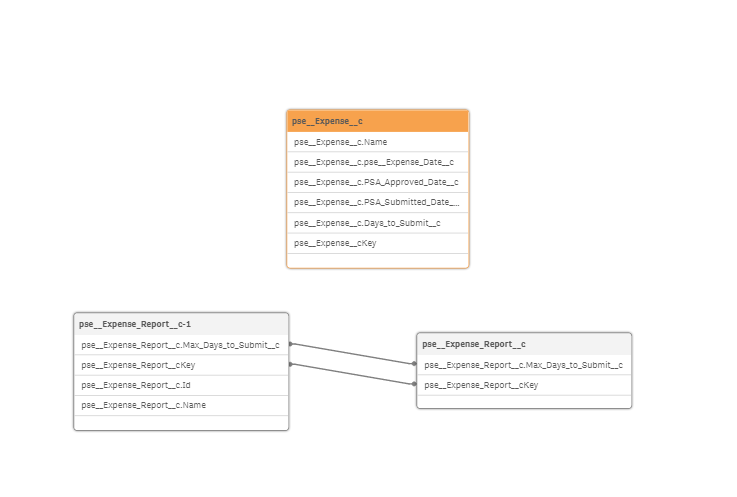
Looks like I have more than one field joined. How do i get rid of the extra one? Also why did it create an extra block down below? Thanks

 arnould_it
- Mark as New
- Bookmark
- Subscribe
- Mute
- Subscribe to RSS Feed
- Permalink
- Report Inappropriate Content
Hi,
the same problem appears also with a correct "star schema" data model (without synthetical keys) with a normal volume of data (tens of thousand records).
I'm using a "table" object including 8 dimensions and 4 columns, set analysis and normal calculation.
Very strange. I work with QlikView from several years and Qlik Sense from 2 years, it's the first time that I encounter this issue with Sense.
Maybe it's something desired by the company, to limit the indiscriminate use of calculations.
In fact, Sense is not a "reporting BI tool".
- Mark as New
- Bookmark
- Subscribe
- Mute
- Subscribe to RSS Feed
- Permalink
- Report Inappropriate Content
There is no synthetical key in my data model. However, Out of calculation memory happens to a table and a map in the Qlik app.
Any suggestion?
Thanks!