Unlock a world of possibilities! Login now and discover the exclusive benefits awaiting you.

- Qlik Community
- :
- Forums
- :
- Analytics & AI
- :
- Products & Topics
- :
- Visualization and Usability
- :
- Pie Chart Problem
Options
- Subscribe to RSS Feed
- Mark Topic as New
- Mark Topic as Read
- Float this Topic for Current User
- Bookmark
- Subscribe
- Mute
- Printer Friendly Page
Turn on suggestions
Auto-suggest helps you quickly narrow down your search results by suggesting possible matches as you type.
Showing results for

 Brownie
Contributor III
2022-11-02
05:18 AM
- Mark as New
- Bookmark
- Subscribe
- Mute
- Subscribe to RSS Feed
- Permalink
- Report Inappropriate Content
Pie Chart Problem

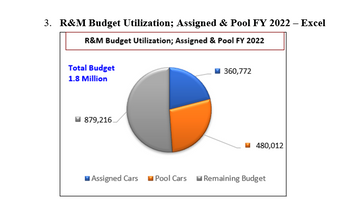
Hey,
I have 3 different fields i.e
Order = Pool Cars
Amount in Local Currency = Budget
Assignment = Assigned Cars
And i have to show all these like this in a pie chart.
can anyone show me how would that be possible.
Labels (8)
Labels
- Subscribe by Topic:
-
Chart
-
Data Load Editor
-
Developers
-
dimension
-
expression
-
General Question
-
Script
-
Visualization
765 Views
1 Reply

 rubenmarin
MVP
2022-11-02
06:26 AM
- Mark as New
- Bookmark
- Subscribe
- Mute
- Subscribe to RSS Feed
- Permalink
- Report Inappropriate Content
Hi, you can create a calculated dimensions as =ValueList('Order','Amount','Budget')
And an expression like:
Pick(Match(ValueList('Order','Amount','Budget')
    ,'Order','Amount','Budget')
  ,[ExpressionForOrder]
  ,[ExpressionForAmount]
  ,[ExpressionForBudget]
)
