Unlock a world of possibilities! Login now and discover the exclusive benefits awaiting you.

- Qlik Community
- :
- Forums
- :
- Analytics & AI
- :
- Products & Topics
- :
- Visualization and Usability
- :
- Re: Pivot table sorting with the text as Measure
- Subscribe to RSS Feed
- Mark Topic as New
- Mark Topic as Read
- Float this Topic for Current User
- Bookmark
- Subscribe
- Mute
- Printer Friendly Page

 imrasyed
- Mark as New
- Bookmark
- Subscribe
- Mute
- Subscribe to RSS Feed
- Permalink
- Report Inappropriate Content
Pivot table sorting with the text as Measure
Hi Experts,
I have a pivot table with one Dimension in row and other dimension as column.
1 Dim -- resources as Row
2 Dim -- Agents as Column
3. Measure -- Status(its a Dim which has the active or inactive state of Resource)--I have added as a Measure by using expression only(status)
I need to sort the table based on Status i.e the Inactive once should be always at the top.
| Agent1 | Agent2 | Agent3 | Agent4 | |
| Resource | ||||
| X | Active | Inactive | Active | Active |
| Y | Inactive | Inactive | Inactive | Active |
| Z | Active | Active | Active | Active |
I should always show Inactive ones at the top.(even if one of them is Inactive).
I tried all the possibilities like using dual,aggr but with no luck.Can you please help me out?
Accepted Solutions

 sunny_talwar
- Mark as New
- Bookmark
- Subscribe
- Mute
- Subscribe to RSS Feed
- Permalink
- Report Inappropriate Content
 sunny_talwar
- Mark as New
- Bookmark
- Subscribe
- Mute
- Subscribe to RSS Feed
- Permalink
- Report Inappropriate Content
Would you be able to share a sample qvf to see the issue and help you with it
imrasyed
- Mark as New
- Bookmark
- Subscribe
- Mute
- Subscribe to RSS Feed
- Permalink
- Report Inappropriate Content
Sorry for late reply.
Please find attached sample qvf.
sunny_talwar
- Mark as New
- Bookmark
- Subscribe
- Mute
- Subscribe to RSS Feed
- Permalink
- Report Inappropriate Content
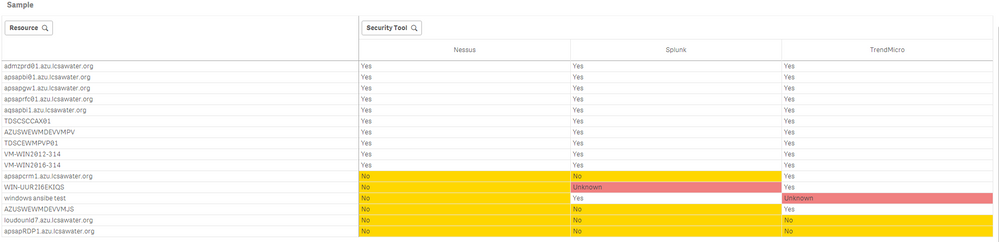
Something like this?
imrasyed
- Mark as New
- Bookmark
- Subscribe
- Mute
- Subscribe to RSS Feed
- Permalink
- Report Inappropriate Content
Hi Sunny.
Thanks a lot for the help.
can you please remove the qvf attachment.
sunny_talwar
- Mark as New
- Bookmark
- Subscribe
- Mute
- Subscribe to RSS Feed
- Permalink
- Report Inappropriate Content
Done
imrasyed
- Mark as New
- Bookmark
- Subscribe
- Mute
- Subscribe to RSS Feed
- Permalink
- Report Inappropriate Content
Thanks a lot Sunny.
 didierodayo
- Mark as New
- Bookmark
- Subscribe
- Mute
- Subscribe to RSS Feed
- Permalink
- Report Inappropriate Content
HI Sunny,
I am curious how this was resolved but the attachment has been removed.
cheers
