Unlock a world of possibilities! Login now and discover the exclusive benefits awaiting you.

- Qlik Community
- :
- Forums
- :
- Analytics & AI
- :
- Products & Topics
- :
- Visualization and Usability
- :
- Pivot table
- Subscribe to RSS Feed
- Mark Topic as New
- Mark Topic as Read
- Float this Topic for Current User
- Bookmark
- Subscribe
- Mute
- Printer Friendly Page

- Mark as New
- Bookmark
- Subscribe
- Mute
- Subscribe to RSS Feed
- Permalink
- Report Inappropriate Content
Pivot table
I have the Pivot table in Qlik Sense. I see the totals at the top. How do i make them to show up at the bottom?
- « Previous Replies
-
- 1
- 2
- Next Replies »

 sunny_talwar
- Mark as New
- Bookmark
- Subscribe
- Mute
- Subscribe to RSS Feed
- Permalink
- Report Inappropriate Content
Check this link: QS pivot table : How to get totals at the bottom?
- Mark as New
- Bookmark
- Subscribe
- Mute
- Subscribe to RSS Feed
- Permalink
- Report Inappropriate Content
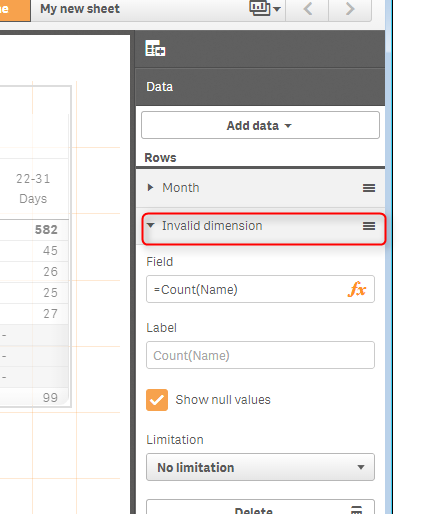
When I do it. It says invalid dimension
- Mark as New
- Bookmark
- Subscribe
- Mute
- Subscribe to RSS Feed
- Permalink
- Report Inappropriate Content
Hi,
You can add Total as a dimension from your script. Then in the Pivot table, use ContryTotal as dimension
Test:
LOAD * INLINE [
Country, Value
A, 50
B, 60
C, 70
];
TotalTest:
Load
Country as Country,
Country as CountryTotal
resident Test;
concatenate (TotalTest)
Load
Country as Country,
'Total' as CountryTotal
resident Test;
- Mark as New
- Bookmark
- Subscribe
- Mute
- Subscribe to RSS Feed
- Permalink
- Report Inappropriate Content
Not sure how to adapt to my issue. This is what i have in the script. How do you suggest i change it?
LIB CONNECT TO 'Salesforce_BULK';
[pse__Expense__c]:
LOAD pse__Expense_Date__c,
PSA_Approved_Date__c,
PSA_Submitted_Date__c,
pse__Expense_Report__c,
pse__Amount__c,
pse__exchange_rate_Incurred_currency__c;
SELECT pse__Expense_Date__c,
PSA_Approved_Date__c,
PSA_Submitted_Date__c,
pse__Expense_Report__c,
pse__Amount__c,
pse__exchange_rate_Incurred_currency__c
FROM pse__Expense__c;
- Mark as New
- Bookmark
- Subscribe
- Mute
- Subscribe to RSS Feed
- Permalink
- Report Inappropriate Content
Can you please let me know which field to use as a dimension? then create a new table using that field like i did (in my case is a country field). Also you need to consider sorting order so the Total can stay at the bottom. You might need to add a new column for sorting.
- Mark as New
- Bookmark
- Subscribe
- Mute
- Subscribe to RSS Feed
- Permalink
- Report Inappropriate Content
The count of this field "pse__Expense_Report__c", is used for calculating totals
- Mark as New
- Bookmark
- Subscribe
- Mute
- Subscribe to RSS Feed
- Permalink
- Report Inappropriate Content
Note: this is for Dimension, not the measure.
So basically you add a Total dimension to the existing dimension
ExpenseReportTotal:
Load
pse__Expense_Report__c as pse__Expense_Report__c,
pse__Expense_Report__c as pse_Expense_Report_Total
resident pse__Expense__c;
concatenate (ExpenseReportTotal)
Load
pse__Expense_Report__c as pse__Expense_Report__c,
'Total' as pse_Expense_Report_Total
resident pse__Expense__c;
- Mark as New
- Bookmark
- Subscribe
- Mute
- Subscribe to RSS Feed
- Permalink
- Report Inappropriate Content
Thanks. I will try it
- Mark as New
- Bookmark
- Subscribe
- Mute
- Subscribe to RSS Feed
- Permalink
- Report Inappropriate Content
Hi,
I have the same issue but with months as a dimension. In my case it doesn't make sense to add a total as a dimension because it will always show me the total for all the months I have in DB.
Do you know of any possible solution for my case?
Thanks!
- « Previous Replies
-
- 1
- 2
- Next Replies »