Unlock a world of possibilities! Login now and discover the exclusive benefits awaiting you.

- Qlik Community
- :
- Forums
- :
- Analytics & AI
- :
- Products & Topics
- :
- Visualization and Usability
- :
- Re: Pivot with expression column
- Subscribe to RSS Feed
- Mark Topic as New
- Mark Topic as Read
- Float this Topic for Current User
- Bookmark
- Subscribe
- Mute
- Printer Friendly Page

 mvs01
mvs01
- Mark as New
- Bookmark
- Subscribe
- Mute
- Subscribe to RSS Feed
- Permalink
- Report Inappropriate Content
Pivot with expression column
I would like to have a pivot with a column with a certain expression.
Here's my data:
Load * Inline [
Nr., Category, Amount, Period
1, Sales, 10000, 202001
2, Cost of Sales, 7500, 202001
3, Gross Margin, 2500, 202001
1, Sales, 15000, 202002
2, Cost of Sales, 7500, 202002
3, Gross Margin, 7500, 202002
]
I would like to have the amount of sales on every row, per period.
The result of the expression 'Sum(Total{<Nr.={1}>}Amount)' as measure is:
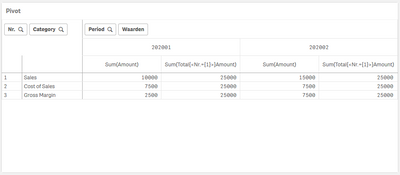
So I'm getting the total sales on every row, but not per period.
I would like to have the amount of sales on every row, per period. In this case, for column period 202001: 10000 and for column period 202002: 15000.
Is this possible and how can I achieve his?
Accepted Solutions

 GaryGiles
- Mark as New
- Bookmark
- Subscribe
- Mute
- Subscribe to RSS Feed
- Permalink
- Report Inappropriate Content
GaryGiles
- Mark as New
- Bookmark
- Subscribe
- Mute
- Subscribe to RSS Feed
- Permalink
- Report Inappropriate Content
Try this:
sum({$<[Nr.]={1}>} Total <Period> Amount)
mvs01
- Mark as New
- Bookmark
- Subscribe
- Mute
- Subscribe to RSS Feed
- Permalink
- Report Inappropriate Content
Thanks @GaryGiles
This is working!
