Unlock a world of possibilities! Login now and discover the exclusive benefits awaiting you.

- Qlik Community
- :
- Forums
- :
- Analytics & AI
- :
- Products & Topics
- :
- Visualization and Usability
- :
- Re: Problems with date
- Subscribe to RSS Feed
- Mark Topic as New
- Mark Topic as Read
- Float this Topic for Current User
- Bookmark
- Subscribe
- Mute
- Printer Friendly Page

- Mark as New
- Bookmark
- Subscribe
- Mute
- Subscribe to RSS Feed
- Permalink
- Report Inappropriate Content
Problems with date
Hi,
i have only one table and there is only one column "monDatum" with the same date 30.11.2016.
I use a script ("testKalender") to generate more date fields like Month etc. like "monMonat"
This is the result:
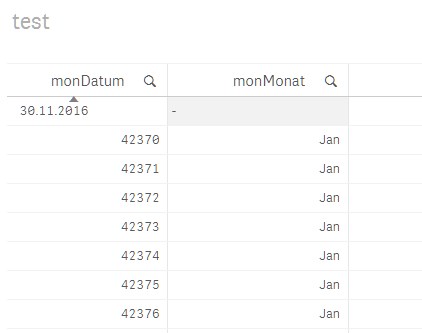
Why "monMonat" doesn´t show "Nov" at the 1st row?
I don´t know where the numbers (42370) are came from AND here it shows a month.
What´s wrong?
regards,
sam
Accepted Solutions
- Mark as New
- Bookmark
- Subscribe
- Mute
- Subscribe to RSS Feed
- Permalink
- Report Inappropriate Content
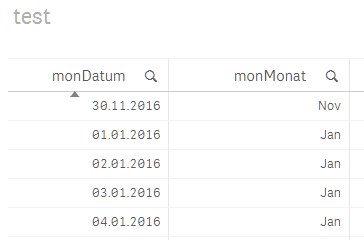
I have found the problem. In the excel file the date fields were formatted as "standard". Now I have the cells formatted as date and it works.
Thanks
sam

 sunny_talwar
- Mark as New
- Bookmark
- Subscribe
- Mute
- Subscribe to RSS Feed
- Permalink
- Report Inappropriate Content
Try with this script:
LOAD
Date(monDatum) as monDatum
FROM [lib://Lib1/nur-ein-datum.xlsx]
(ooxml, embedded labels, table is Tabelle1);
- Mark as New
- Bookmark
- Subscribe
- Mute
- Subscribe to RSS Feed
- Permalink
- Report Inappropriate Content
Thanks, but i want like to know why this happend.
regards,
sam
sunny_talwar
- Mark as New
- Bookmark
- Subscribe
- Mute
- Subscribe to RSS Feed
- Permalink
- Report Inappropriate Content
No idea, Qlik Sense should have picked this up as date without any help, but for some reason it did not. I am not sure why it did not 
- Mark as New
- Bookmark
- Subscribe
- Mute
- Subscribe to RSS Feed
- Permalink
- Report Inappropriate Content
I have found the problem. In the excel file the date fields were formatted as "standard". Now I have the cells formatted as date and it works.
Thanks
sam