Unlock a world of possibilities! Login now and discover the exclusive benefits awaiting you.

- Qlik Community
- :
- Forums
- :
- Analytics & AI
- :
- Products & Topics
- :
- Visualization and Usability
- :
- Qlik Sense Server
- Subscribe to RSS Feed
- Mark Topic as New
- Mark Topic as Read
- Float this Topic for Current User
- Bookmark
- Subscribe
- Mute
- Printer Friendly Page

- Mark as New
- Bookmark
- Subscribe
- Mute
- Subscribe to RSS Feed
- Permalink
- Report Inappropriate Content
Qlik Sense Server
Hello,
I need confirmation on a line statement StandardReload, that used to be mentioned on Settings.ini for Qlik Sense Server.
If this line is not mentioned, does it mean by default it is StandardReload=1. I am asking since I did not find this line statement on my client Qlik Server.
My requirement is to run couple of Execute statement and it fails when I try to run. I think, I need to change the settings from StandardReload=1 to 0 and this I tested on my Qlik Sense desktop edition and ran fine.
My client server edition is 2.0.3+: Build: 81.origin/release/ms12
The error that I get while executing
EXECUTE statement not available in this script mode
Please confirm me what it should be ASAP
Thanks in advance
- Deb

 swuehl
- Mark as New
- Bookmark
- Subscribe
- Mute
- Subscribe to RSS Feed
- Permalink
- Report Inappropriate Content
Yes, I believe default is StandardReload=1
Hence you need to set QS to legacy mode, and in addition I think you need to override script security:
StandardReload=0
OverrideScriptSecurity=1
Please note the explicite warnings when you enable legacy mode and override script security.

 reddy-s
- Mark as New
- Bookmark
- Subscribe
- Mute
- Subscribe to RSS Feed
- Permalink
- Report Inappropriate Content
Hi Debabrata,
Here is what you are looking for:
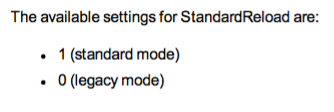
Thanks,
Sangram Reddy.
- Mark as New
- Bookmark
- Subscribe
- Mute
- Subscribe to RSS Feed
- Permalink
- Report Inappropriate Content
Hello all,
I have included StandardReload=0 on Settings.ini file. But I am getting an error
"EXECUTE statement requies Override Security as well as LegacyMode". Does it mean I need to include also OverrideScriptSecurity=1?
Can anyone send me the content of Settings.ini. I am looking for an order that I should include those lines.
Thanks Deb
swuehl
- Mark as New
- Bookmark
- Subscribe
- Mute
- Subscribe to RSS Feed
- Permalink
- Report Inappropriate Content
Yes, please check the links into HELP I've posted above. You'll need to override security.
reddy-s
- Mark as New
- Bookmark
- Subscribe
- Mute
- Subscribe to RSS Feed
- Permalink
- Report Inappropriate Content
Hi Debabrata,
May you have done this but just in case you haven't , make sure you restart Qliksense desktop once you have changed the settings.
Thanks,
Sangram.
- Mark as New
- Bookmark
- Subscribe
- Mute
- Subscribe to RSS Feed
- Permalink
- Report Inappropriate Content
Thanks Sangram & swuehl,
I changed it and restarted, it worked 
But one problem that I am facing now is - after changing the parameters, my qlik screen navigation icons got changed
Note : On QMC under Configuration > Engine, standard in unchecked and entries on Settings.ini file is:
[Settings 7]
OverrideScriptSecurity=1
StandardReload=0
DocumentDirectory=D:\Qlik Data\Apps
Let me know, if I need to check any other files or configuration.
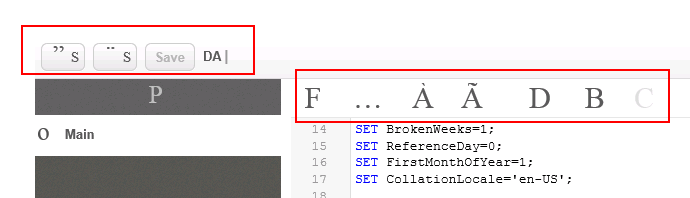
reddy-s
- Mark as New
- Bookmark
- Subscribe
- Mute
- Subscribe to RSS Feed
- Permalink
- Report Inappropriate Content
Hi,
Did you restart the repository database services once you changed the settings?
- Mark as New
- Bookmark
- Subscribe
- Mute
- Subscribe to RSS Feed
- Permalink
- Report Inappropriate Content
yes Sangram