Unlock a world of possibilities! Login now and discover the exclusive benefits awaiting you.

- Qlik Community
- :
- Forums
- :
- Analytics & AI
- :
- Products & Topics
- :
- Visualization and Usability
- :
- Question on Pivot Table % Calculation
- Subscribe to RSS Feed
- Mark Topic as New
- Mark Topic as Read
- Float this Topic for Current User
- Bookmark
- Subscribe
- Mute
- Printer Friendly Page

 gopikrishnach
- Mark as New
- Bookmark
- Subscribe
- Mute
- Subscribe to RSS Feed
- Permalink
- Report Inappropriate Content
Question on Pivot Table % Calculation
I want to create a Dashboard with Monthly % calculation by task, By monthwise and Yearwise based on Task Completion Time. I Created a Piovt Table with my data, but the % values are not coming correctly.
Here iam attaching the datewise date, based upon data we need to calculate the Monthwise reload completion % and yearwise reload completion % Value.
Please help me how to calculate the % calculation by Monthly and yearly for each task.
- « Previous Replies
- Next Replies »
Accepted Solutions

 sunny_talwar
- Mark as New
- Bookmark
- Subscribe
- Mute
- Subscribe to RSS Feed
- Permalink
- Report Inappropriate Content
Here you are
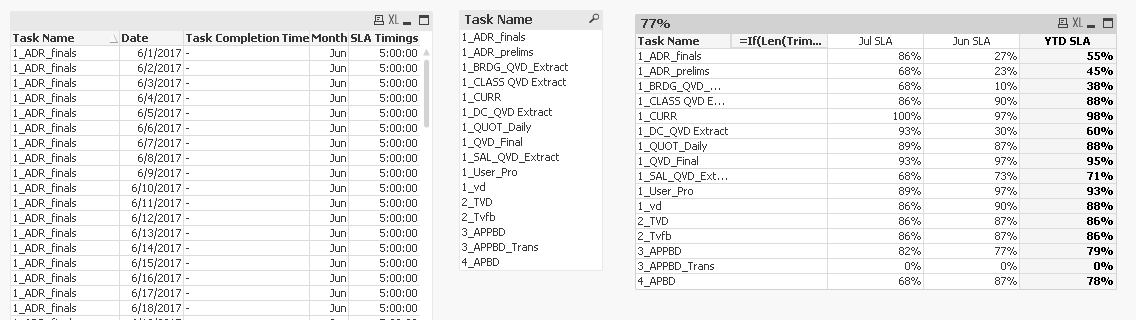
You provided the SLA Timings for only 2 months, that's why I removed all other data to show you how this will work for 2 months. But this can be expanded to more than 2 months.....
Table:
LOAD [Task Name],
Date(Num#(Date)) as Date,
[Task Completion Time],
Month(Num#(Date)) as Month
FROM
(ooxml, embedded labels, table is Sheet2);
[SLA Time]:
CrossTable(Month, [SLA Timings])
LOAD * INLINE [
Task Name, Jun, Jul
1_vd, 5:00:00, 5:00:00
1_CURR, 5:00:00, 5:00:00
1_ADR_finals, 5:00:00, 5:00:00
1_ADR_prelims, 6:30:00, 5:00:00
1_DC_QVD Extract, 5:00:00, 5:00:00
1_CLASS QVD Extract, 5:00:00, 5:00:00
1_BRDG_QVD_Extract, 5:00:00, 5:00:00
1_SAL_QVD_Extract, 5:30:00, 5:00:00
1_QVD_Final, 5:00:00, 5:00:00
1_QUOT_Daily, 5:00:00, 5:00:00
1_User_Pro, 5:00:00, 5:00:00
2_TVD, 5:00:00, 5:00:00
2_Tvfb, 5:00:00, 5:00:00
3_APPBD, 6:08:00, 6:08:00
3_APPBD_Trans, 6:30:00, 5:15:00
4_APBD, 8:30:00, 5:30:00
];
[Final SLA Time]:
Right Keep (Table)
LOAD [Task Name],
Month(Date#(Month, 'MMM')) as Month,
[SLA Timings]
Resident [SLA Time];
DROP Table [SLA Time];
Once you have SLA Timings for all Months, you can remove the Right Keep in Red color above.....
I request that if you requirement is met now, please close this thread by marking correct and helpful responses.
Qlik Community Tip: Marking Replies as Correct or Helpful
Best,
Sunny
sunny_talwar
- Mark as New
- Bookmark
- Subscribe
- Mute
- Subscribe to RSS Feed
- Permalink
- Report Inappropriate Content
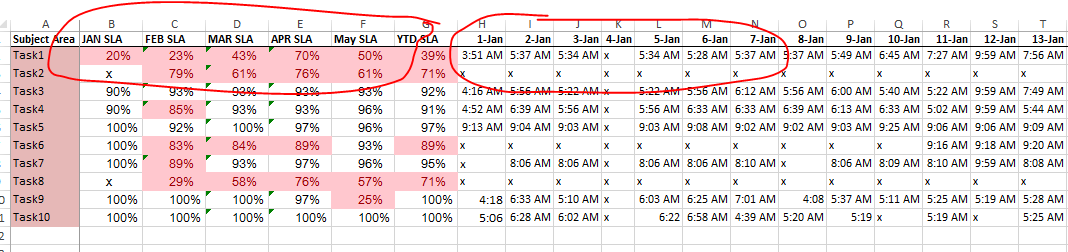
You need both these outputs in your final table? Monthly and YTD SLA and day wise data?
gopikrishnach
- Mark as New
- Bookmark
- Subscribe
- Mute
- Subscribe to RSS Feed
- Permalink
- Report Inappropriate Content
I created the date wise table, but I want monthly and yearly % in one table.
sunny_talwar
- Mark as New
- Bookmark
- Subscribe
- Mute
- Subscribe to RSS Feed
- Permalink
- Report Inappropriate Content
So all you need is the Monthly and YTD FLag table? You are not looking to show everything in one table?
gopikrishnach
- Mark as New
- Bookmark
- Subscribe
- Mute
- Subscribe to RSS Feed
- Permalink
- Report Inappropriate Content
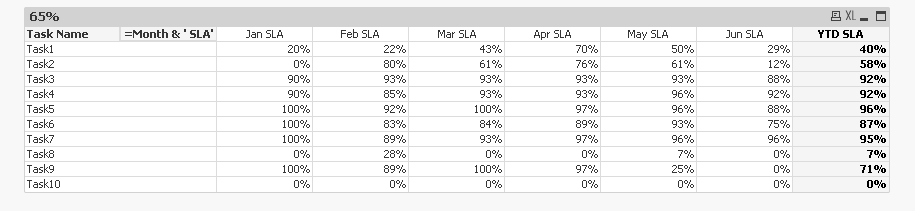
Yes, I need the monthly and YTD FLAG table.
Is it possible to show the information in one table.
gopikrishnach
- Mark as New
- Bookmark
- Subscribe
- Mute
- Subscribe to RSS Feed
- Permalink
- Report Inappropriate Content
If yes, please provide the both tables.
Table1: Date,Month and Year.
Table2: Only Month and Year.
sunny_talwar
- Mark as New
- Bookmark
- Subscribe
- Mute
- Subscribe to RSS Feed
- Permalink
- Report Inappropriate Content
Is it possible to show the information in one table.
I think it is possible, but will take some doing...
gopikrishnach
- Mark as New
- Bookmark
- Subscribe
- Mute
- Subscribe to RSS Feed
- Permalink
- Report Inappropriate Content
Okay. Presently I want monthly and YTD FLAG.
sunny_talwar
- Mark as New
- Bookmark
- Subscribe
- Mute
- Subscribe to RSS Feed
- Permalink
- Report Inappropriate Content
Check this out
gopikrishnach
- Mark as New
- Bookmark
- Subscribe
- Mute
- Subscribe to RSS Feed
- Permalink
- Report Inappropriate Content
In my actual data, I have different type of task name like Task_1 , Task_1_Extract and Task 1. I used purge char and keep char but it is showing separate SLA % Values. I want to display those information in one row.can you please help me.

- « Previous Replies
- Next Replies »