Unlock a world of possibilities! Login now and discover the exclusive benefits awaiting you.

- Qlik Community
- :
- Forums
- :
- Analytics & AI
- :
- Products & Topics
- :
- Visualization and Usability
- :
- Recuperer la ligne vide
- Subscribe to RSS Feed
- Mark Topic as New
- Mark Topic as Read
- Float this Topic for Current User
- Bookmark
- Subscribe
- Mute
- Printer Friendly Page

 eprehu
- Mark as New
- Bookmark
- Subscribe
- Mute
- Subscribe to RSS Feed
- Permalink
- Report Inappropriate Content
Recuperer la ligne vide

Comment puis je recuperer la ligne vide qui contient le 18006 ?
MErci
Accepted Solutions

 Andrei_Cusnir
- Mark as New
- Bookmark
- Subscribe
- Mute
- Subscribe to RSS Feed
- Permalink
- Report Inappropriate Content
Hello,
If my understanding is correct, then you want to get the count of "Customers" where the "Customer Age" is not provided. Here is an example of how you can achieve that and you can get the logic behind it to modify it based on your needs:
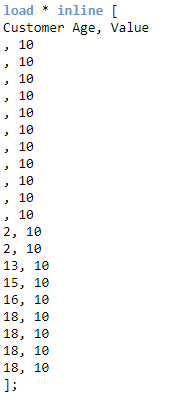
1. I have loaded fake data:
2. On my side, this is the outcome:
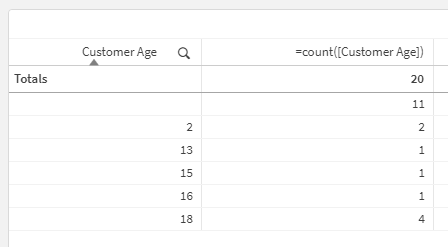
3. So I need to get the value "11", which is the equivalent of your 18006.
4. I have used the measure in Text & image object: count({<[Customer Age]={""}>}[Customer Age])
5. The outcome is:
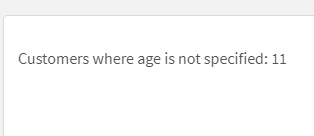
As you can see it gave me the desired count.
I hope that this information was helpful. In case I have misunderstood the use case scenario, please elaborate in details by providing additional information. However, if it has helped you resolve the issue, addressed your concerns or at least pointed you in the right direction, please mark it as Accepted Solution to give further visibility to other community members.
Andrei_Cusnir
- Mark as New
- Bookmark
- Subscribe
- Mute
- Subscribe to RSS Feed
- Permalink
- Report Inappropriate Content
Hello,
It probably has to do with your specific dataset. I can see that the first column is your dimension and some values appear to be small numbers that could possibly represent age and there are larger values that possibly represent years. So it is a little bit confusing as to how exactly this dataset is represented.
Can you please try the specified expression in a KPI object or an Text & image measure? Please share the result that you are getting. If it is counting more than 18006, it could mean that the dataset might have some values that are not parsed properly.
Andrei_Cusnir
- Mark as New
- Bookmark
- Subscribe
- Mute
- Subscribe to RSS Feed
- Permalink
- Report Inappropriate Content
Hello,
If my understanding is correct, then you want to get the count of "Customers" where the "Customer Age" is not provided. Here is an example of how you can achieve that and you can get the logic behind it to modify it based on your needs:
1. I have loaded fake data:
2. On my side, this is the outcome:
3. So I need to get the value "11", which is the equivalent of your 18006.
4. I have used the measure in Text & image object: count({<[Customer Age]={""}>}[Customer Age])
5. The outcome is:
As you can see it gave me the desired count.
I hope that this information was helpful. In case I have misunderstood the use case scenario, please elaborate in details by providing additional information. However, if it has helped you resolve the issue, addressed your concerns or at least pointed you in the right direction, please mark it as Accepted Solution to give further visibility to other community members.
eprehu
- Mark as New
- Bookmark
- Subscribe
- Mute
- Subscribe to RSS Feed
- Permalink
- Report Inappropriate Content
Thanks a lot !
But the expression count also other customer age and i don't know why :

Andrei_Cusnir
- Mark as New
- Bookmark
- Subscribe
- Mute
- Subscribe to RSS Feed
- Permalink
- Report Inappropriate Content
Hello,
It probably has to do with your specific dataset. I can see that the first column is your dimension and some values appear to be small numbers that could possibly represent age and there are larger values that possibly represent years. So it is a little bit confusing as to how exactly this dataset is represented.
Can you please try the specified expression in a KPI object or an Text & image measure? Please share the result that you are getting. If it is counting more than 18006, it could mean that the dataset might have some values that are not parsed properly.
