Unlock a world of possibilities! Login now and discover the exclusive benefits awaiting you.

- Qlik Community
- :
- Forums
- :
- Analytics & AI
- :
- Products & Topics
- :
- Visualization and Usability
- :
- Restrict the values to two decimals
- Subscribe to RSS Feed
- Mark Topic as New
- Mark Topic as Read
- Float this Topic for Current User
- Bookmark
- Subscribe
- Mute
- Printer Friendly Page

 ajsjoshua
- Mark as New
- Bookmark
- Subscribe
- Mute
- Subscribe to RSS Feed
- Permalink
- Report Inappropriate Content
Restrict the values to two decimals
Dear all,
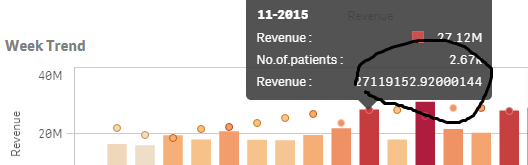
When I hover a chart the values should be integer or fixed to 2 number.
In my expression i formatted the number as auto and checked the value on data points and it displays the values in millions but when i hover it shows all decimals.
PFA for screenshot.
Regards,
Joshua.

 prma7799
- Mark as New
- Bookmark
- Subscribe
- Mute
- Subscribe to RSS Feed
- Permalink
- Report Inappropriate Content
Have you tried this with your expression
Num(Sum(Sale), '##.##')
Or please share sample app
ajsjoshua
- Mark as New
- Bookmark
- Subscribe
- Mute
- Subscribe to RSS Feed
- Permalink
- Report Inappropriate Content
Hi PM,
When we use this Num(Sum(Sales), '##.##') and hover the chart it shows sales value 3 times
like sales:276.2 M
sales:276358049.82
sales:276358049.8199878
prma7799
- Mark as New
- Bookmark
- Subscribe
- Mute
- Subscribe to RSS Feed
- Permalink
- Report Inappropriate Content
Please share sample app.

 francescoreggia
- Mark as New
- Bookmark
- Subscribe
- Mute
- Subscribe to RSS Feed
- Permalink
- Report Inappropriate Content
try
round(Sum(Sales),0.01)
 OmarBenSalem
- Mark as New
- Bookmark
- Subscribe
- Mute
- Subscribe to RSS Feed
- Permalink
- Report Inappropriate Content
U have expressions; maybe the revenue one is mis formatted
format it as a number
ajsjoshua
- Mark as New
- Bookmark
- Subscribe
- Mute
- Subscribe to RSS Feed
- Permalink
- Report Inappropriate Content
Hi PM
PFA for sample app.
when we hover it should show only one sales.Here in this sample it will show two sales.
OmarBenSalem
- Mark as New
- Bookmark
- Subscribe
- Mute
- Subscribe to RSS Feed
- Permalink
- Report Inappropriate Content
Name the label of your color by measure EXACTLY like the label of ur measure.
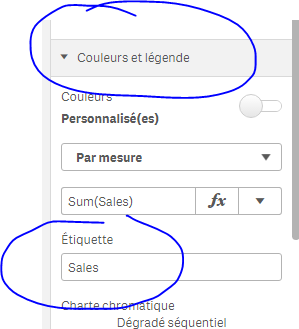
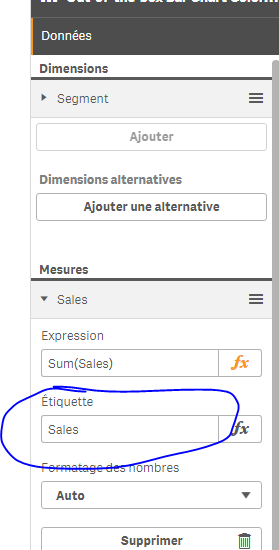
result:
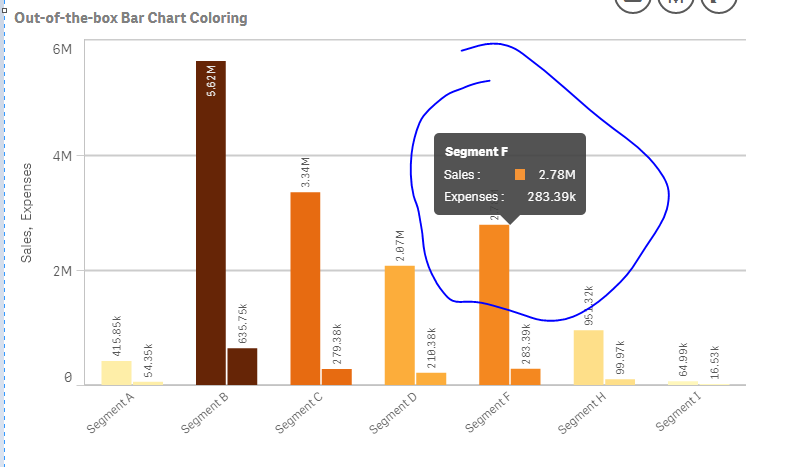
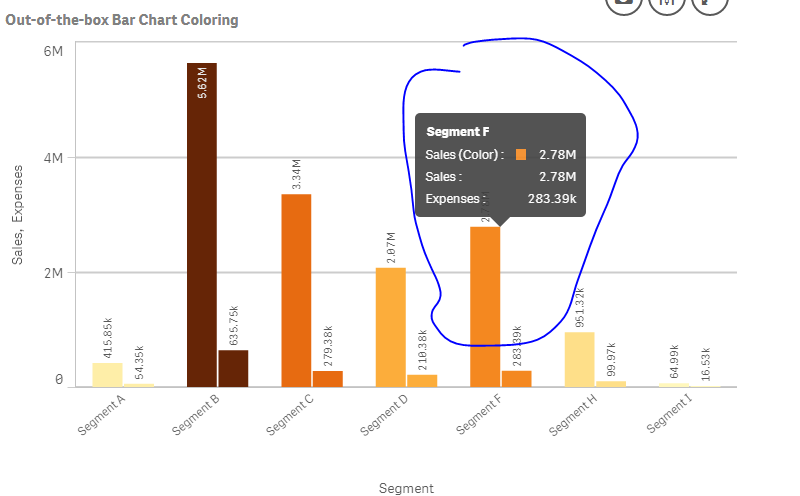
If they're not named exactly identical:
example:
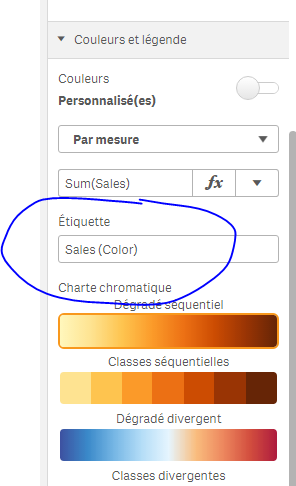
It will show it 2 times even if it's the same measure u're using in both measure and color by measure (sum(Sales)):
ajsjoshua
- Mark as New
- Bookmark
- Subscribe
- Mute
- Subscribe to RSS Feed
- Permalink
- Report Inappropriate Content
Hi Omar,
Thanks for ur reply.
Even if i name same label to both expression still it shows sales two times.
